

For years, software sellers have been told to refund a legitimate complaint before it turns into a chargeback.
That’s still usually the better outcome. But under a new Mastercard rule, a high refund-and-chargeback rate can flag some newer merchants for scam monitoring.
If you run your own SaaS or software billing, the chargeback vs refund decision now has more consequences to weigh.
- A refund can contribute to the combined rate that Mastercard’s Scam Merchant Monitoring Program (SMMP) tracks for qualifying newer merchants, and potentially trigger an investigation.
- A chargeback can add to that signal and raise the dispute levels card networks track. If problems continue, your Mastercard or Maestro processing is at risk.
Add failed payments into the mix, and there’s a third problem to manage: revenue never arrives, and poor recovery can turn a temporary payment failure into churn.
Each one puts something different at risk: revenue, the customer relationship, or your ability to keep processing payments.
This guide shows what each outcome can cost, how those risks differ, and what to do when a refund, chargeback, or failed payment hits your business.
TL;DR: Chargeback vs refund vs failed payments for software sellers
- Refunds, chargebacks, and failed payments cost you in different ways. A refund returns revenue you already collected, and you may still lose the original processing fee. A chargeback can add a dispute fee and response work. A failed payment puts recurring revenue at risk if recovery fails.
- Refunding a legitimate complaint before it becomes a chargeback is still usually the simpler option. You keep control of the resolution and can avoid the extra work and possible fees of a formal dispute.
- Mastercard added an exception in July 2026. Under SMMP, qualifying newer merchants can trigger an investigation by their acquirer (the bank that processes their card payments) or payment facilitator when their combined refund-and-chargeback rate exceeds the threshold. If scam activity is confirmed, Mastercard or Maestro processing can be terminated.
- Don’t fight every chargeback automatically. Whether it is worth contesting depends on the customer’s claim, the amount at stake, the evidence you already have, and the work required to respond. For software sellers, useful evidence can include access logs, license activations, subscription records, and support correspondence.
- A failed payment is a recovery problem, not a dispute. Account updating can prevent some failed renewals. Retries, recovery emails, and dunning can recover revenue from customers who may still intend to renew.
- A merchant of record (MoR) changes who runs these payment workflows. With Freemius, sellers still decide when to refund. Freemius processes refunds, manages the provider- and network-facing chargeback workflow, and runs failed-payment recovery automatically.
What is the difference between a refund, chargeback, and failed payment?
A refund is a payment you choose to return to the customer. A chargeback is a payment the customer disputes through their bank. A failed payment never goes through, but the sale isn’t necessarily lost.
| Refund | Chargeback | Failed payment | |
| What control do you have? | You decide whether to refund, and how much | You can accept or contest it, but you don’t control the final outcome | You control the recovery process and when to stop retrying |
| What can it cost? | Amount refunded + processing costs you may not recover | Disputed amount + possible dispute fee + time spent responding | Recurring revenue if recovery fails + time spent on recovery |
| What should you do first? | Check the request and your refund policy before approving it | Check the reason, deadline, evidence, and amount at stake | Identify the failure, retry where appropriate, and prompt the customer to update payment details |
| What can prevent it? | Clear billing, renewal, cancellation, and refund terms | Recognizable charges, renewal notices, accessible support, and good transaction records | Account updating, retries, recovery emails, and easy payment updates |
| How do card networks treat it? | Excluded from Visa’s VAMP; a high combined refund-and-chargeback rate can form an SMMP signal for qualifying newer Mastercard merchants | Can count under Visa and Mastercard dispute-monitoring programs | Not treated as a dispute |
The final row shows the key difference: Visa and Mastercard do not treat refunds the same way in their monitoring programs. Mastercard can now consider refunds alongside chargebacks for some newer merchants. You can’t assume every refund stays outside card-network monitoring.
When do refunds count toward card-network chargeback thresholds?
Usually, they don’t. That’s one reason refunding a legitimate complaint has traditionally been safer than waiting for a chargeback. You control the refund, avoid a formal dispute, and generally keep the transaction outside the ratios used to identify excessive disputes.
Refunds remain outside Visa’s VAMP and Mastercard’s Excessive Chargeback Program (ECP).
On April 1, 2026, Visa changed the excessive-merchant threshold for VAMP:
- Threshold: lowered from 2.2% to 1.5%
- Regions: US, Canada, Europe, and Asia-Pacific
- Minimum volume: 1,500 fraud and dispute events per month
For smaller software sellers, the 1,500-event minimum can matter more than the percentage. Even if your rate exceeds 1.5%, you won’t enter VAMP unless you also reach 1,500 fraud and dispute events in a month.
In practice, that gives many smaller software businesses some breathing room before VAMP becomes a real operational problem. If you do cross the threshold, you’re expected to bring fraud and dispute levels back down.
Mastercard’s SMMP gives newer merchants less of that breathing room.
What should software sellers know about Mastercard’s SMMP rule?
From July 24, 2026, Mastercard’s Scam Merchant Monitoring Program (SMMP) uses a combined refund-and-chargeback rate as a signal for qualifying newer merchants. It applies when all three conditions are met:
- The merchant has been accepting Mastercard payments for six months or less
- Refunds plus chargebacks exceed 5% of purchase transactions over a rolling 30-day period
- The merchant processed at least 500 Mastercard purchase transactions
Meeting all three conditions can trigger an investigation by the merchant’s acquirer or payment facilitator. It does not mean an automatic penalty, but if the investigation confirms scam activity, Mastercard or Maestro processing can be terminated.
The 5% is not a chargeback limit on its own. Mastercard calculates it by combining refunds and chargebacks, then dividing that total by Mastercard purchase transactions over the rolling 30-day period.
For example, if you process 500 Mastercard purchases and record 20 refunds and six chargebacks, your combined rate is 5.2%: 26 ÷ 500 × 100.

If you’ve also been accepting Mastercard for six months or less, you meet all three SMMP conditions.
For software sellers, that makes the rule most relevant to newer businesses that have already reached meaningful Mastercard transaction volume. Established sellers and smaller software businesses generally fall outside those conditions.
Is refunding still safer than waiting for a chargeback?
Usually, yes, when the customer has a legitimate reason for a refund. SMMP doesn’t overturn the conventional refund-first approach for software sales. Handling legitimate refund requests directly keeps the resolution between you and the customer instead of pushing it into the formal chargeback process.
Responding to customer concerns quickly preserves positive customer relationships and avoids:
- Preparing and submitting a chargeback response
- An applicable dispute fee
- Another formal dispute
You may still lose some of the original processing cost, so a refund isn’t free. But for most legitimate complaints, it can still be cheaper and simpler than letting the issue become a chargeback.
If SMMP applies to you, factor that combined rate into the decision. Then ask whether resolving the complaint now is still the better outcome.
Once a chargeback is filed, though, that choice is gone. From that point, you can only accept the dispute or fight it.
How do you handle a chargeback for software or SaaS?
When a software or SaaS chargeback arrives, check the dispute reason, response deadline, and your evidence before deciding whether to contest it. Don’t fight every chargeback automatically.
A chargeback disputes money you’ve already collected. Depending on your payment setup, your provider may hold or withdraw the disputed amount until the case is resolved.
How does the chargeback process work?
The chargeback process starts when a customer disputes a card payment with their bank or credit card issuer. The bank then sends the disputed transaction through the card network to the seller’s payment provider or acquiring bank.
The process usually looks like this:
- The customer files the dispute: Their issuing bank records the customer’s complaint and assigns a reason for the chargeback.
- You receive a chargeback notice: Your payment provider tells you which transaction is being disputed, why, and when you need to respond.
- You accept or contest it: If you contest the chargeback, you submit evidence through your provider. This is the representment stage.
- The customer’s bank reviews the response: The issuing bank considers the customer’s claim and the evidence supplied for the transaction.
- The dispute is resolved: The issuing bank decides whether the payment stands or the customer keeps the reversal.
Depending on your payment setup, the disputed amount may be withdrawn from or held against your merchant account while the dispute resolution process is underway. Additional chargeback fees may also apply.
What does the chargeback reason code tell you?
A chargeback reason code tells you what the customer is claiming and what your evidence needs to address.
A customer might claim:
- They didn’t authorize the payment
- They didn’t receive the software or service
- They were charged twice because of duplicate billing
- They cancelled the subscription
- The renewal shouldn’t have happened
Some chargebacks happen because of genuine customer concerns or unauthorized transactions. Others may involve chargeback fraud, where a customer disputes a legitimate payment through their bank to recover the money.
The reason code alone won’t tell you whether the claim is valid or fraudulent, so start with the customer’s claim and your own records rather than assuming intent.
If you decide to contest the chargeback, you do that through representment: submitting evidence that directly answers the claim. The evidence section below shows what to submit for each type of claim.
Check the dispute deadline immediately. Response windows vary by network, dispute type, provider, and region, and some can be short. Treat the deadline shown on the dispute as authoritative.
When is a chargeback worth disputing?
A chargeback is worth contesting when the amount and strength of your evidence justify the time needed to respond. Ask four questions:
- What is the customer claiming?
- Can I directly answer that claim?
- How much could I recover?
- How much work will the response take?
Pavankumar Kamat, co-founder and CEO of Panto AI, turned those questions into a repeatable internal rule. In one year, Panto contested 10 chargebacks, won six, and recovered about $9,000 net after process costs.
“We declined to contest low-value or ambiguous cases and accepted the loss to save time and avoid longer disputes.”
Panto’s own threshold also considers whether timestamped evidence already exists and whether the likely recovery outweighs the operational cost of responding. That threshold will be different for every software business, but the principle is useful: winning isn’t the only measure of whether a dispute was worth fighting.

What evidence helps dispute a software chargeback?
Useful chargeback evidence directly answers the customer’s claim:
| Customer’s claim | Evidence to gather |
| Didn’t receive the product | Download, login history, product access, or license activation records |
| Cancelled before renewal | Cancellation timestamp, subscription status, renewal notices, and account history |
| Unauthorized payment | Relevant account activity, device or IP data, and authorization records |
| Incorrect amount | Receipt, invoice, plan changes, and transaction records |
| Terms were unclear | Accepted terms, subscription details, and relevant support correspondence |
Pavankumar has seen almost identical evidence lead to very different lessons.
In one “unauthorized charge” case, the team tied authorization records, IP and device data, order emails, and API usage back to the customer account. The issuer accepted the representment and reversed the chargeback within about 30 days.
The cancellation dispute was different. Pavankumar had timestamps, support history, activity logs, and screenshots of the cancellation flow, but still lost part of the case.
“The bank sided with the cardholder because the cancellation UX left ambiguity. We issued a partial refund and treated it as an operational mistake.”
Sometimes the records support your case; other times the dispute exposes a billing or cancellation experience that needs fixing.
In any case, it’s a good idea to keep records before you need them. Reconstructing subscription consent, support history, or product usage after a dispute arrives makes responding much harder.
How can software sellers prevent chargebacks?
Good chargeback prevention starts by reducing billing surprises, making legitimate card payments easy to recognize, and giving customers a straightforward way to raise an issue with you before they go to their bank. Check four areas:
- Billing descriptor: Will customers recognize the name on their statement?
- Renewal notices: Do they know when they’ll be charged and how much?
- Receipt emails: Can they quickly identify the product and payment?
- Cancellation and support: Can they resolve a problem without going to their bank?
Liran Blumenberg, founder of MultiGroupPoster, saw how easily a cancellation can still leave a customer unsure about what happens next.
One customer bought a monthly plan for a month of access. Liran stopped the renewal, but the customer kept asking whether anything else needed to be cancelled. Liran had explained what he’d changed in the payment system but hadn’t made the outcome clear from the customer’s side.
“Confirm that automatic renewal is off, give the verified date their paid access ends, and make clear whether any money has been refunded. Those are separate facts.
Someone asking to stop the next payment should not have to work out whether you’ve also ended their current access or refunded their purchase.”
The point is to remove ambiguity before it turns into customer dissatisfaction, a billing complaint, or a dispute. Clear renewal details and responsive support also give customers somewhere to take billing questions before their bank becomes the first point of contact.
Clear billing and support won’t prevent every dispute, though. If a customer still challenges the payment, some cases can be resolved before they become formal chargebacks. Visa’s Rapid Dispute Resolution (RDR), for example, can automatically resolve qualifying pre-disputes under merchant-set rules.
Can a chargeback happen after a refund?
Yes. A chargeback can still arrive after you’ve issued a refund, especially if the customer opened the dispute before the refund was processed or before the credit appeared on their account.
That creates the risk of double refund chargebacks: you return the money once through your own refund process, then lose the same transaction again through the chargeback.
Keep the refund amount, date, and transaction reference so you can show that the payment has already been returned. If a dispute still arrives, don’t refund the transaction again automatically. Use the refund record as evidence in your response to avoid paying the customer twice.
Refunds and chargebacks both send back money that was collected. A failed payment is separate: the revenue was never collected in the first place.
What is a failed payment and how do you recover it?
A failed payment is an unsuccessful payment attempt, not a dispute and usually not evidence of fraud. For subscription software, recovery means finding the cause, retrying where appropriate, and asking the customer to update their payment method before access changes.
A payment or renewal can fail because of:
- Insufficient funds
- An expired or replaced card
- An issuer decline
- Fraud controls
- A technical problem
How can software makers prevent failed payments?
Some failed renewals can be prevented before they happen. If your payment provider supports a card account updater, enable it to refresh stored details when participating issuers replace or update a customer’s card.
This can keep annual and long-term subscriptions renewing without asking customers to re-enter their details.
It won’t prevent every failure, though. Insufficient funds, issuer declines, fraud controls, and technical errors can still stop a payment.
Dunning handles the failures account updating can’t prevent.
What is dunning for SaaS and subscription payments?
Dunning is the process of recovering a failed subscription payment before you change or end the customer’s access. It combines automated retries, recovery emails, and payment updates.
A dunning flow needs to answer four questions:
- When do you retry?
- When do you contact the customer?
- How do they update their payment method?
- When do you stop retrying and change their access?
Tim Molter, co-founder and CTO of AI Receptionist, discovered what can happen when that final state isn’t configured properly. A September 2026 audit found 21 subscriptions still sitting in past-due status, including one that had been there for 320 days. Seven had never completed their first payment.
Customers had stopped receiving service, but each account retained a phone number that AI Receptionist paid to provision every month. Three customers had also bought replacement subscriptions while the original subscriptions kept generating invoices and retry cycles.
“Five retries had recovered nothing on these 21. For a $14 product, the recovery email matters far less than making sure a failed first charge can’t leave a zombie behind.”
The lesson is that retries need a hard cutoff. Once recovery has failed, the subscription, access, and any resources tied to the account need to move into a clear next state.
Freemius builds that cutoff into its subscription and failed-payment recovery flow:
- 1 day later: first retry
- 3 days later: second retry
- 5 days later: final retry
- If the final retry fails: Freemius cancels the subscription and associated license
That means the recovery sequence has a defined stopping point rather than leaving failed subscriptions sitting open indefinitely.
Whether the money is being returned, disputed, or recovered, the underlying question is the same: who owns the workflow? If your business does, it also runs the retries, communicates with customers, gathers evidence, decides on access changes, and absorbs the consequences when something goes wrong.
A merchant of record can take on much of that work.
How does a merchant of record handle refunds, chargebacks, and failed payments?
For the card payments it processes, a merchant of record handles the transactional workflow for all three:
- Refunds: processes the refund and updates the related payment and tax records.
- Chargebacks: manages the dispute with the payment provider and card network and submits the response.
- Failed payments: runs retries, recovery emails, and payment-method updates to try to recover the subscription.
Freemius acts as the merchant of record for the transactions it processes and holds the acquiring relationship behind those sales, so sellers don’t need to run those payment-processing workflows through their own merchant account.
How does Freemius handle refunds?
With Freemius, you still decide whether to refund the customer. Freemius handles the payment and applicable tax adjustments once you issue the refund.
For eligible refunds, Freemius refunds its percentage-based fee proportionally but retains the fixed $0.50 fee per transaction. Payment-processor fees also aren’t refunded.
If you issue a refund 30 days or more after the transaction, you’re responsible for the full refund amount, and Freemius may deduct the original platform fee from future payouts under its Vendor Terms.
Card refunds can take 5–10 business days to reach the customer’s account.
How does Freemius handle chargebacks?
Freemius manages the provider-facing dispute process and gives you the first chance to resolve the issue with the customer. The current dispute workflow is:
- Freemius temporarily holds the disputed amount
- You get a chance to resolve the issue with the customer
- If that doesn’t work, Freemius steps in and handles the dispute
- If you win, the held amount is returned to you; if the customer wins, it is refunded to them
- For bank disputes via Stripe, a $15 chargeback fee is deducted from your balance
One of the biggest differences Florian Daugalies noticed after moving to Freemius was no longer having to manage chargebacks directly with Stripe and PayPal. Before the switch, his team spent time gathering information, taking screenshots, and responding to disputes themselves.
“Freemius handles all of that for us. As a store owner, that’s a massive time-saver and stress reducer. It lets us stay focused on growing the business instead of wasting hours fighting chargebacks.”
How does Freemius recover failed subscription payments?
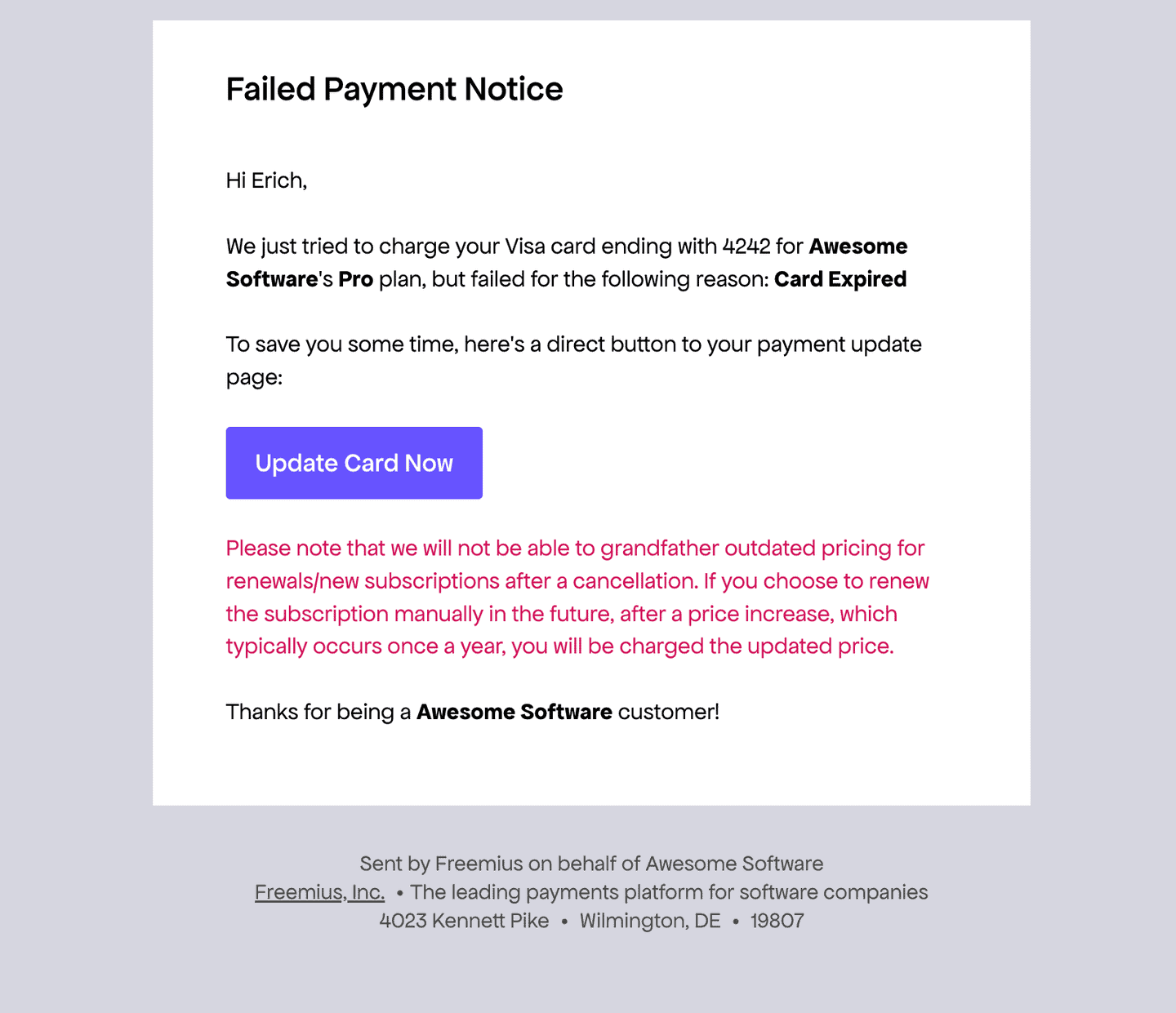
Freemius provides zero-setup dunning for failed subscription renewals:
- Automatic retries: Freemius retries failed renewals on a set schedule without you having to configure the sequence.
- Recovery emails: Customers are prompted to fix the payment problem before access changes.
- Payment updates: Customers can update their payment method during the recovery window.
- Access changes: If recovery ultimately fails, Freemius cancels the subscription and associated license.
An MoR doesn’t make refunds, chargebacks, or failed payments disappear. You still lose revenue when customers refund or dispute payments, and high rates can point to billing or customer-experience problems worth fixing.
What changes is who manages the payment infrastructure and keeps up with the card-network rules behind it.
SMMP is a good example. With your own payment stack, your team needs to know when new monitoring rules apply and adapt how it manages refunds and disputes. With an MoR, that network-facing responsibility sits with the provider.
What should you check in your payment setup now?
Check your refund and chargeback rates, billing descriptor, dunning setup, chargeback policy, and the date of the network thresholds you’re relying on.
- Pull your refund and chargeback rates: Look at them together if your business falls within Mastercard’s SMMP conditions.
- Check your billing descriptor: Would a customer immediately connect the name on their statement to your software?
- Confirm your dunning is running: Know when retries happen, what customers receive, and when access changes or ends.
- Set your chargeback policy: Decide in advance when the amount, reason, evidence, and work involved make a dispute worth contesting.
- Record when you checked your VAMP and SMMP figures: Note when you last checked the thresholds so you know when they need verifying again.
Making these decisions in advance means you won’t have to improvise when the next refund, dispute, or failed payment arrives.
What do refunds, chargebacks, and failed payments really cost a software business?
The obvious cost is the money itself. Refunds send revenue back to the customer, chargebacks can remove revenue and add fees, and failed payments interrupt cash flow.
The less obvious cost is the work around them.
Someone still has to answer customers, gather evidence, watch deadlines, and keep the payment setup working as expected.
That workload can shift as the rules do. Even a familiar decision like refunding a customer can come with a new consideration. Future card-network changes can create the same kind of knock-on work across disputes, recovery, and payment operations.
That may be easy enough to absorb when volumes are low. As your business grows, so does the number of refunds, disputes, and failed renewals someone has to handle.
Freemius’s merchant of record service processes refunds, manages the chargeback workflow with payment providers and card networks, and runs failed-payment recovery for you.
To simplify your payment operations and keep your focus on building your product, book a call with Freemius CEO Vova Feldman.
Frequently asked questions about chargebacks vs refunds vs failed payments
What is a chargeback?
A chargeback is a reversal of a completed card payment after a customer disputes the transaction through their bank or card issuer. The seller can accept the dispute or contest it through representment by submitting evidence that addresses the customer’s claim. For software businesses, that evidence may include access logs, license activations, subscription records, and support correspondence.
Is a refund always better than a chargeback?
No. A refund is usually simpler when you agree that the customer should get their money back, because it can avoid the extra work and possible fees of a formal dispute. However, qualifying newer Mastercard merchants should also consider their combined refund-and-chargeback rate under SMMP before assuming refunds are always invisible to card-network monitoring.
Do refunds count against your chargeback ratio?
Refunds do not count toward Visa’s VAMP fraud-and-dispute ratio, but Mastercard can use a combined refund-and-chargeback rate as an SMMP signal for qualifying newer merchants. Under SMMP, the combined rate must exceed 5% over 30 days, the merchant must process at least 500 Mastercard purchases, and its Mastercard acceptance history must be six months or less. So a quoted percentage threshold does not automatically apply to every software seller.
How long do you have to respond to a chargeback?
There is no single chargeback response deadline that applies to every merchant or dispute. Response windows vary by network and payment provider and can be short, so treat the deadline on the dispute as authoritative.
Is it worth fighting a chargeback?
A chargeback is worth contesting when the amount at stake, strength of your evidence, and work required to respond justify the effort. A dispute with clear records that directly answer the customer’s claim may be worth fighting. A low-value chargeback with weak or difficult-to-reconstruct evidence may not be. Industry-wide win rates cannot tell you whether a specific dispute is worth your time.
What causes a failed payment?
Common causes of failed payments include insufficient funds, outdated or replaced card details, issuer declines, fraud controls, or technical problems. Account-updater services can prevent some failures by refreshing stored card details, while retries and dunning can recover payments that still fail. Unlike a chargeback, a failed payment usually means the revenue was never collected in the first place.