

Showing a Dedicated UI for Changing the Billing Cycle
The billing selector UI is a feature that provides buyers with more flexibility to select their preferred billing cycle at the time of purchase.
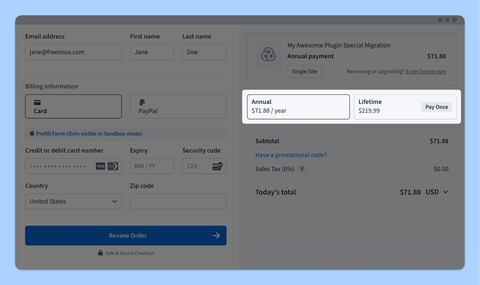
This feature is particularly useful for makers using Freemius Checkout directly, without a dedicated pricing page.
Activation
The billing selector UI is not enabled by default. To activate it, add the following URL parameter to your Checkout URL:
?billing_cycle_selector=responsive_list
Alternatively, if you’re using the Checkout JS SDK, you can enable it with the following configuration:
const handler = new Checkout({
  billing_cycle_selector: 'responsive_list',
});
Configuration Options
The billing_cycle_selector parameter accepts the following values:
responsive_listwhich displays billing cycles in a smart list that adapts to available space.listwhich works similar asresponsive_listabove will display the options vertically.dropdownwhich shows a dropdown UI, allowing buyers to select their preferred billing cycle.
Rendering a Responsive List
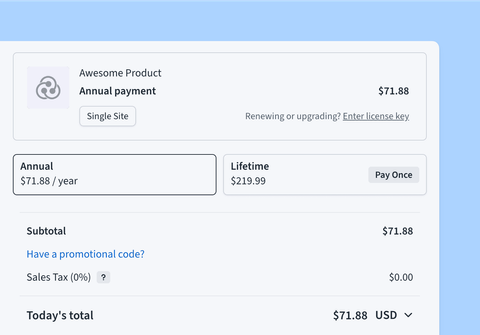
Use the responsive_list option to display all available billing cycles upfront. If only two billing cycles are available, they will appear in a horizontal layout to save space.
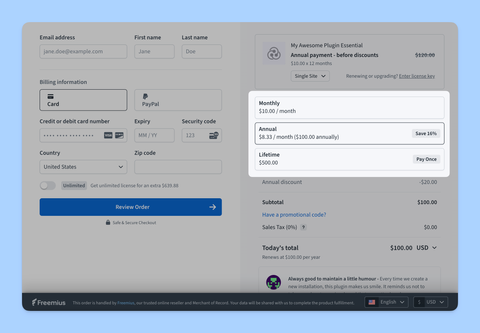
If you prefer a vertical list, you can use list instead of responsive_list.
Rendering a Dropdown UI
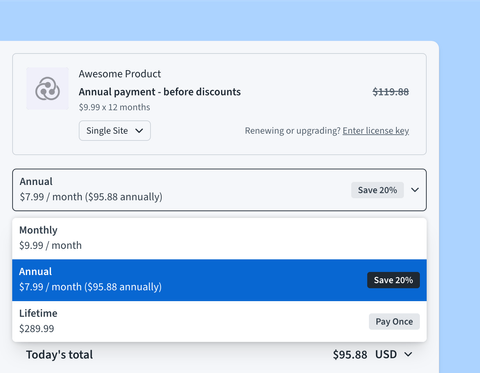
If you want to minimize vertical space usage, set the parameter to dropdown. This will render a single item that buyers can click to open a dropdown menu for selection.
Our recommendation is to use the responsive_list option. You can do so by setting the parameter value to responsive_list or simply true.