# Using the Freemius Checkout JS SDK to Embed the Overlay Checkout
This guide covers basic and advanced usage of the Freemius Checkout JavaScript SDK.
## Basic Usage[](#basic-usage "Direct link to Basic Usage")
First, ensure that you've already [installed the SDK](https://freemius.com/help/help/documentation/saas-sdk/checkout-js-sdk/installation/.md) and have the `checkout` instance ready.
Quick refresher on how to create the instance
* CDN
* NPM
```
```
```
import { Checkout } from '@freemius/checkout';
const checkout = new Checkout({
product_id: '1234',
});
```
Here is an example where we open the checkout popup when a user clicks a button.
Starting with a simple HTML button:
```
```
Add the JavaScript code to handle the button click and open the checkout popup:
```
function getSelectedLicenses() {
return document.querySelector('#licenses').value;
}
document.querySelector('#purchase').addEventListener('click', (e) => {
e.preventDefault();
checkout.open({
name: 'My Awesome Product',
licenses: getSelectedLicenses(),
purchaseCompleted: (response) => {
console.log('Purchase completed:', response);
},
success: (response) => {
console.log('Checkout closed after successful purchase:', response);
},
});
});
```
This will open the Freemius Checkout popup when the user clicks the "Buy Button", using the selected number of licenses.
[](/help/videos/freemius-checkout-advanced-simple-pricing-page.mp4)
The exact code can be found under the [Advanced Examples](#advanced-examples) section below.
## API[](#api "Direct link to API")
Both the constructor and the `open` method accept the official [set of options](https://freemius.com/help/help/documentation/checkout/integration/freemius-checkout-buy-button/.md) supported by Freemius. You can also pass [additional options](#additional-options) as needed.
### The `open` method[](#the-open-method "Direct link to the-open-method")
To display the checkout popup, use `checkout.open();`.
```
checkout.open({
// plan
plan_id: 9999,
// number of sites
licenses: 1,
// billing cycles
billing_cycle: 'annual',
});
```
The `open()` method returns a `Promise` that resolves when the popup actually opens.
In most use cases, this is immediate, but if you call `open()` when `document.body` is not yet available (for example, directly from a script in the head), it will wait for the DOM to be ready before opening the popup.
tip
If you need to perform an action immediately after the popup opens, you can `await` the promise:
```
async function main() {
await checkout.open({
plan_id: 9999,
licenses: 1,
billing_cycle: 'annual',
});
console.log('Checkout popup is now open');
}
```
### The `close` method[](#the-close-method "Direct link to the-close-method")
To close the checkout popup programmatically, use `checkout.close();`.
Here's an example of closing the popup when navigating away in a single-page application (SPA) using some router:
```
$router.on('beforeRouteLeave', (to, from, next) => {
checkout.close();
next();
});
```
For backward compatibility, we also have a `destroy` method that behaves the same as `close`.
### Additional options[](#additional-options "Direct link to Additional options")
In addition to the [standard options](https://freemius.com/help/help/documentation/checkout/integration/freemius-checkout-buy-button/.md#arguments), which are performed on the side of Freemius, the SDK also supports additional options that affect the behavior of the SDK itself.
`afterOpen`[](#afterOpen "Direct link to afterOpen")
() => void
Optional callback to execute when the iFrame opens.
`afterClose`[](#afterClose "Direct link to afterClose")
() => void
An optional callback to execute when the iFrame closes.
`onExitIntent`[](#onExitIntent "Direct link to onExitIntent")
() => void
Optional callback to trigger on exit intent. This is called only when the checkout iFrame is shown, not on global exit intent.
`loadingImageUrl`[](#loadingImageUrl "Direct link to loadingImageUrl")
string
The URL of the image to display while the checkout is loading. By default a loading indicator from Freemius will be used.
`loadingImageAlt`[](#loadingImageAlt "Direct link to loadingImageAlt")
string
The alt text for the loading image. By default 'Loading Freemius Checkout' will be used.
## Sandbox Testing[](#sandbox-testing "Direct link to Sandbox Testing")
To test the Freemius Checkout JavaScript SDK in the sandbox development environment, you need to generate a [`sandbox`](https://freemius.com/help/help/documentation/checkout/integration/freemius-checkout-buy-button/.md#sandbox) object. These values authenticate your requests in the sandbox environment.
To generate the required values:
1. Go to the [Freemius Developer Dashboard](https://dashboard.freemius.com/).
2. Under ***Plans***, click the "Get Checkout" button.
3. Choose the "Overlay code" option.
4. Open the **Sandbox** tab.
5. Copy the code to generate the `sandbox` object and output them for the JavaScript to use.
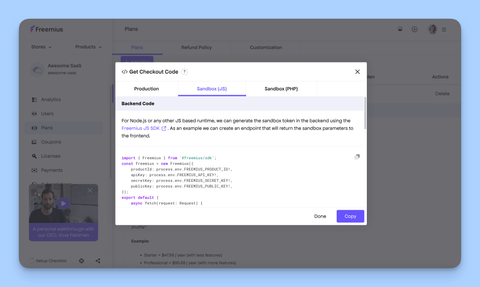
Now you can use the generated `sandbox` object when creating the `Checkout` instance or calling the `open` method.
```
import { Checkout } from '@freemius/checkout';
const sandbox = await fetchSandboxObjectSomehow();
const checkout = new Checkout({
product_id: '0001',
sandbox, // <-- pass the sandbox object here
});
```
note
Use this only during development, and never publish the token and context in production. You can use an `.env` file to store sandbox data.
Using the [JS SDK](https://freemius.com/help/help/documentation/saas-sdk/js-sdk/.md)?
You can use the [`generateSandboxParams`](https://freemius.com/help/help/documentation/saas-sdk/js-sdk/checkout/.md#retrieving-sandbox-parameters) method to generate the sandbox object easily.
## Payment Update Flow (Dunning)[](#payment-update-flow-dunning "Direct link to Payment Update Flow (Dunning)")
If you have enabled [custom URL for the Payment Recovery Flow](https://freemius.com/help/help/documentation/marketing-automation/dunning-failed-payments/.md) from the Developer Dashboard, call the `restoreDunningIfPresent()` function to restore the dunning flow if it was previously initiated.
```
import { restoreDunningIfPresent } from '@freemius/checkout';
restoreDunningIfPresent();
```
tip
Call `restoreDunningIfPresent()` as early as possible, typically on page load, to ensure the dunning flow is restored when needed.
The method returns a Promise that resolves to the `Checkout` instance if the dunning flow was restored, or `null` if there was no dunning flow to restore.
note
If you are using the hosted CDN version, the dunning flow is automatically restored for you, so you do not need to call this function manually.
### Listening for payment method update events[](#listening-for-payment-method-update-events "Direct link to Listening for payment method update events")
The `restoreDunningIfPresent` function accepts an optional object with event handlers:
```
import { restoreDunningIfPresent } from '@freemius/checkout';
restoreDunningIfPresent({
track(event, data) {
console.log('Payment Method Update Event:', data, event);
},
success(data) {
console.log('Payment Method Update Success:', data);
},
});
```
If you are using the hosted CDN version, you can use the `paymentMethodUpdateEvents` property on the `FS` global object, for example:
```
window.FS.paymentMethodUpdateEvents = {
track(event, data) {
console.log('Payment Method Update Event:', data, event);
},
success(data) {
console.log('Payment Method Update Success', data);
},
};
```
All the events from the [CheckoutPopupEvents](https://github.com/Freemius/freemius-checkout-js/blob/main/src/lib/contracts/CheckoutPopupOptions.ts) are supported.
note
Set this property before including the CDN script.
```
```
## Example usage with React[](#example-usage-with-react "Direct link to Example usage with React")
You can use our official [React Starter Kit](https://freemius.com/help/help/documentation/saas-sdk/react-starter/components/.md#checkout-provider) to integrate the Checkout JS SDK into your React applications.
Alternatively, you can manually integrate the SDK into your React app as follows:
Start by creating a small React hook, assuming the `product_id` is available in [some environment variable](https://vite.dev/guide/env-and-mode).
checkout.ts
```
import { Checkout, CheckoutOptions } from '@freemius/checkout';
import { useState, useEffect } from 'react';
export const checkoutConfig: CheckoutOptions = {
product_id: import.meta.env.VITE_FS_PLUGIN_ID as string,
};
export function useCheckout() {
// create a Checkout instance once
const [checkout] = useState(() => new Checkout(checkoutConfig));
useEffect(() => {
// close and destroy the DOM related stuff on unmount
return () => {
checkout.destroy();
};
}, [checkout]);
return checkout;
}
```
Now, use it in your component.
App.tsx
```
import React from 'react';
import { useCheckout } from './checkout.ts';
export default function App() {
const checkout = useCheckout();
return (
);
}
```
## Advanced Examples[](#advanced-examples "Direct link to Advanced Examples")
Here are some advanced usage examples:
Buy Button Code for a Multi-Plans Pricing Table
[](/help/videos/freemius-checkout-advanced-simple-pricing-page.mp4)
* HTML
* JavaScript
* CSS
```