

- Using Freemius Hooks
- Filters Hooks
- default_currency
- connect_url
- trial_promotion_message
- show_first_trial_after_n_sec
- reshow_trial_after_every_n_sec
- is_long_term_user
- uninstall_reasons
- is_plugin_update
- api_domains
- support_forum_submenu
- support_forum_url
- pricing_url
- connect_message
- connect_header
- connect_header_on_update
- connect_message_on_update
- connect/before
- connect/after
- connect/before_message
- connect/after_message
- connect/before_actions
- connect/after_actions
- show_deactivation_subscription_cancellation
- uninstall_confirmation_message
- pending_activation_message
- is_submenu_visible
- show_deactivation_feedback_form
- show_admin_notice
- plugin_icon
- show_trial
- is_pricing_page_visible
- pricing/show_annual_in_monthly
- checkout/parameters
- checkout/purchasedCompleted
- playground_anonymous_mode
- show_customizer_upsell
- pricing/css_path
- pricing/disable_single_package
- freemius_pricing_js_path
- plugin_icon
- permission_list
- templates/connect.php
- Actions Hooks
- after_license_change
- after_license_activation
- after_license_deactivation
- after_plans_sync
- after_account_details
- after_account_user_sync
- after_account_plan_sync
- before_account_load
- after_account_connection
- account_email_verified
- account_page_load_before_departure
- before_account_delete
- after_account_delete
- sdk_version_update
- plugin_version_update
- initiated
- after_init_plugin_registered
- after_init_plugin_anonymous
- after_init_plugin_pending_activations
- after_init_addon_registered
- after_init_addon_anonymous
- after_init_addon_pending_activations
- after_premium_version_activation
- after_free_version_reactivation
- after_uninstall
- before_admin_menu_init
- More action hooks
- Checking if a hook is registered
Filters & Actions Hooks
The Freemius WordPress SDK provides a collection of filters and actions that allow developers to customize and extend the functionality of their WordPress plugins or themes.
The concept is similar to WordPress’ own filters and actions also known as hooks.
Using Freemius Hooks
Using the Freemius hooks requires access to the Freemius instance, which is typically available in the main plugin file or wherever the SDK is initialized.
Direct Usage
In your theme or plugin, you can use the standard add_action() or add_filter() functions via the Freemius instance, namely;
my_fs()->add_action()my_fs()->add_filter()
An example using the direct method.
my_fs()->add_action( 'after_license_activation', 'my_fs_after_license_activation' );

function my_fs_after_license_activation() {
    // Handle successful activation.
}
Ensure to change my_fs() to your actual Freemius instance prefix.
Unique Hook Names
Similar to WordPress hooks, you can use a unique hook name for your product to avoid conflicts with other plugins or themes that might be using the same hook name.
The naming convention for creating unique hook names is as follows:
- The hook starts with
fs_to identify it as a Freemius SDK hook. - Second, include the action name, e.g.,
after_license_change. - Finally, add the product slug at the end.
- For plugins, add
my-plugin-slug. Replacemy-plugin-slugwith the actual plugin slug. - For themes, add
my-theme-slug-theme. Replacemy-theme-slugwith the actual theme slug before the suffix-theme.
- For plugins, add
Example: A product with the slug awesome-plugin using playground_anonymous_mode filter hook.
add_filter( 'fs_playground_anonymous_mode-awesome-plugin', '__return_false' );
The hook priorities and accepted arguments work the same way as in WordPress core e.g., see the is_submenu_visible filter hook.
Filters Hooks
Filters allow developers to modify specific data or behavior within the Freemius SDK. To add a filter, use the following method from the Freemius instance:
my_fs()->add_filter(
  string $tag,
  callable $callback,
  $priority = 10,
  $accepted_args = 1
);
The method signature is the same as WordPress' add_filter function. The following filters are available:
default_currency
Set the default currency of the pricing page and checkout within the WP Admin dashboard.
function my_fs_default_currency( $currency ) {
     return 'eur';
}

my_fs()->add_filter( 'default_currency', 'my_fs_default_currency' );
connect_url
Modifies the URL used for the activation screen.
trial_promotion_message
Customizes the message in the admin notice promoting trial usage to users.
show_first_trial_after_n_sec
Show the 1st trial promotion after 7 days instead of 24 hours.
function my_show_first_trial_after_7_days( $day_in_sec ) {
    // 7 days in sec.
    return 7 * 24 * 60 * 60;
}

my_fs()->add_filter( 'show_first_trial_after_n_sec', 'my_show_first_trial_after_7_days' );
reshow_trial_after_every_n_sec
Re-show the trial promotional offer after every 60 days instead of 30 days.
function my_reshow_trial_after_every_60_days( $thirty_days_in_sec ) {
    // 60 days in sec.
    return 60 * 24 * 60 * 60;
}

my_fs()->add_filter( 'reshow_trial_after_every_n_sec', 'my_reshow_trial_after_every_60_days' );
is_long_term_user
Determines if a user is considered long-term based on custom criteria. The uninstall reasons shown in the deactivation feedback dialog are determined based on this user type.
uninstall_reasons
Defines the reasons presented to users in the deactivation feedback dialog during product deactivation.
is_plugin_update
Checks if Freemius was first added in a product update.
api_domains
Specifies API domains to include in an activation error message about domains that need to be whitelisted.
support_forum_submenu
Manages the visibility of the support forum submenu.
support_forum_url
Sets the URL for the support forum link for the product.
my_fs()->add_filter( 'support_forum_url', function ( $url ) {
    return 'https://awesome-plugin.com/support-forum/';
});
pricing_url
Customizes the default Freemius WordPress SDK pricing page. The `$url` parameter can be set to any other link e.g. website.
my_fs()->add_filter( 'pricing_url', function ( $url ) {
    return 'https://awesome-plugin.com/pricing/';
});
connect_message
Customizes the default opt-in message that new users will see during the activation process.
connect_header
Customizes the default opt-in message that new users will see during the activation process.
connect_header_on_update
Customizes the default opt-in message that existing users will see during the activation process.
function my_fs_custom_connect_header_on_update( $header_html ) {
    $user = wp_get_current_user();
    return sprintf( __( 'Thanks %s for updating to our latest release!', 'my-text-domain' ), $user->user_firstname );
}

my_fs()->add_filter( 'connect_header_on_update', 'my_fs_custom_connect_header_on_update' );
connect_message_on_update
Adjusts the connection message shown during the activation process when Freemius was first added in a product update.
function my_fs_custom_connect_message_on_update( $message, $user_first_name, $product_title, $user_login, $site_link, $freemius_link ) {
    return sprintf( __( 'Please help us improve %2$s! If you opt-in, some data about your usage of %2$s will be sent to %5$s. If you skip this, that\'s okay! %2$s will still work just fine.', 'my-text-domain' ), $user_first_name, '<b>' . $product_title . '</b>', '<b>' . $user_login . '</b>', $site_link, $freemius_link );
}
my_fs()->add_filter( 'connect_message_on_update', 'my_fs_custom_connect_message_on_update', 10, 6 );
connect/before
For adding text or visual elements before/above the opt-in container.
function add_custom_header( $activation_state ) {
    if ( $activation_state[ 'is_license_activation' ] ) {
        // The opt-in is rendered as license activation.
    }
    if ( $activation_state[ 'is_pending_activation' ] ) {
        // The user clicked the opt-in and now pending email confirmation.
    }
    if ( $activation_state[ 'is_network_level_activation' ] ) {
        // A network-level opt-in after network activation of the plugin (only applicable for plugins).
    }
    if ( $activation_state[ 'is_dialog' ] ) {
        // The opt-in is rendered within a modal dialog (only applicable for themes).
    }
    return '<div id="my_custom_header"><img src="/path/to/icon.png" /> Awesome Plugin</div>';
}
my_fs()->add_filter( 'connect/before', 'add_custom_header' );
connect/after
For adding text or visual elements after/below the opt-in container.
connect/before_message
For adding text or visual elements before/above the opt-in message header (within the opt-in container).
connect/after_message
For adding text or visual elements after/below the opt-in message (within the opt-in container).
connect/before_actions
For adding text or visual elements before/above the opt-in action buttons.
connect/after_actions
For adding text or visual elements after/below the opt-in action buttons.
show_deactivation_subscription_cancellation
Disables the subscription cancellation prompt when deactivating the plugin.
my_fs()->add_filter( 'show_deactivation_subscription_cancellation', '__return_false' );
A subscription cancellation window will only show up when deactivating a product associated with a license that is only activated on the current site. Over the years, we learned that some users assume a product deactivation is also a cancelation of its subscription, which may cause an unexpected charge that can lead to a dispute. Therefore, we generally recommend keeping the default behavior as it reduces payment reversals and dispute fees.
uninstall_confirmation_message
Customizes the confirmation message to show in an additional panel within the deactivation feedback dialog before the panel with the deactivation reasons is shown.
pending_activation_message
Customizes the message shown when activation is pending (when it requires completion by clicking an activation link sent via email).
is_submenu_visible
Controls the visibility of specific submenus for the product.
Here is an example to conditionally show the contact submenu item for customers with a trial or are paying (user has a valid non-expired license).
function my_fs_submenu_visibility_handler( $is_visible, $id ) {
    if ( 'contact' === $id ) {
        $is_visible = my_fs()->is_paying_or_trial();
    }

    return $is_visible;
}

my_fs()->add_filter( 'is_submenu_visible', 'my_fs_submenu_visibility_handler', 10, 2 );
show_deactivation_feedback_form
Disable deactivation feedback form when the product is deactivated.
<?php
  my_fs()->add_filter( 'show_deactivation_feedback_form', '__return_false' );
show_admin_notice
Controlling the visibility of admin notices added by the Freemius SDK
<?php
  /**
   * @param bool  $show
   * @param array $msg {
   *     @var string $message The actual message.
   *     @var string $title An optional message title.
   *     @var string $type The type of the message ('success', 'update', 'warning', 'promotion').
   *     @var string $id The unique identifier of the message.
   *     @var string $manager_id The unique identifier of the notices manager. For plugins it would be the plugin's slug, for themes - `<slug>-theme`.
   *     @var string $plugin The product's title.
   *     @var string $wp_user_id An optional WP user ID that this admin notice is for.
   * }
   * @return bool
   */
  function my_custom_show_admin_notice( $show, $msg ) {
      if ('trial_promotion' == $msg['id']) {
          // Don't show the trial promotional admin notice.
          return false;
      }

      return $show;
  }

  my_fs()->add_filter( 'show_admin_notice', 'my_custom_show_admin_notice', 10, 2 );
plugin_icon
Sets the icon displayed for the product. This affects the icon on the activation page, pricing page, and the updates section.
function my_fs_custom_icon() {
    return dirname( __FILE__ ) . '/local/path/to/your/icon.{png|jpg|gif|svg}';
}
my_fs()->add_filter( 'plugin_icon', 'my_fs_custom_icon' );
show_trial
Helps determine whether the Free Trial tab or the trial promotion admin notice should be shown.
is_pricing_page_visible
Controls the visibility of the pricing link for the product.
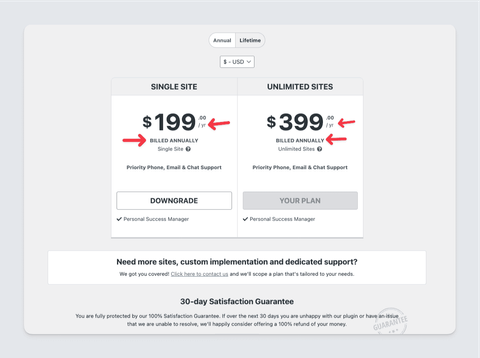
pricing/show_annual_in_monthly
By default, the pricing page shows monthly prices.
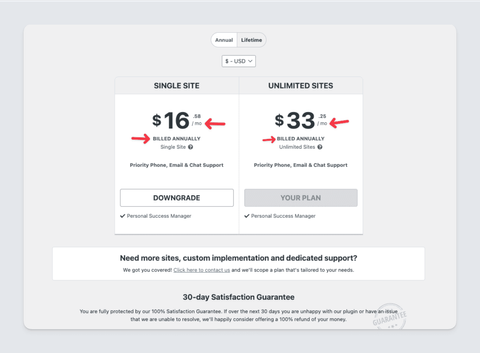
However, this behavior can be changed in the pricing page by including this single line of code in your SDK integration code and the pricing app will show the actual annual amounts.
my_fs()->add_filter( 'pricing/show_annual_in_monthly', '__return_false' );
checkout/parameters
Allows you to customize the Checkout with a subset of the options available in the Checkout JS API. For example, the snippet below enables the refund badge and reviews, and sets the billing cycle selector to a dropdown (bypassing the upsells UI).
Example
my_fs()->add_filter( 'checkout/parameters', function ( $existing_params ) {
    // You can use the $existing_params to check how the checkout is currently configured.
    // Everything you return from this callback will override the existing parameters.
    return [
        'show_refund_badge' => true,
        'show_reviews' => true,
        'billing_cycle_selector' => 'dropdown',
    ];
} );
To ensure the core checkout logic is not broken, only a specific set of keys is supported.
checkout/purchasedCompleted
Add custom JavaScript code to run after the user has successfully made a purchase. For example
my_fs()->add_filter('checkout/purchaseCompleted', function () {
    return <<<JS
function (data) {
    return fetch(myPlugin.ajaxUrl, {
        method: 'POST',
        headers: {
            'Content-Type': 'application/json',
        },
        body: JSON.stringify({
            action: 'my_plugin_purchase_completed',
            data: data,
            nonce: myPlugin.nonce,
        }),
    });
}
JS;
You can return a promise from the JS callback function and the UI will wait for the promise to resolve until the page is redirected. However for a seamless experience, we suggest to send a beacon request. Here is an example to track Google Analytics.
playground_anonymous_mode
On sandbox/playground sites, the opt-in process is skipped by default to allow for easier testing. This filter disables the playground anonymous mode, so the opt-in process is enabled when using the product on the playground sites.
add_filter( 'fs_playground_anonymous_mode-awesome-plugin-slug', '__return_false' );
show_customizer_upsell
Deactivate/remove the customizer upsell in the wordpress theme customizer.
add_filter( 'fs_show_customizer_upsell-awesome-theme-slug-theme', '__return_false' );
pricing/css_path
Customizes the CSS file used for the pricing page in the WP Admin dashboard enabling you to match the look and feel of your plugin or theme.
function my_custom_pricing_css_path( $default_pricing_css_path ) {
    return plugin_dir_path( __FILE__ ) . '/path/to/your/freemius-pricing.css';
}

my_fs()->add_filter( 'pricing/css_path', 'my_custom_pricing_css_path' );
pricing/disable_single_package
Set the value to true to disable the enhanced appearance of the single package plan, where every pricing takes a new column.
add_filter( 'pricing/disable_single_package', '__return_true' );
freemius_pricing_js_path
Customizes the default pricing page by adding custom pricing page in your Plugin or Theme requires you to set the custom pricing app path that expects the absolute path to the main JavaScript file. For example:
function my_custom_pricing_js_path( $default_pricing_js_path ) {
  // FOR PLUGINS:
  // return plugin_dir_path( __FILE__ ) . '/path/to/your/freemius-pricing.js';


  /**
   * FOR THEMES:
   *
   * To get the active theme directory.
   * return get_stylesheet_directory() . '/path/to/your/freemius-pricing.js';

   * If for some reasons, you are using a child theme and would like to refer to the parent  theme for the SDK and the pricing app, please use get_template_directory instead.
   * return get_template_directory() . '/path/to/your/freemius-pricing.js';

   * If for some reasons, the output of the get_stylesheet_directory is filtered in an  unexpected way, you can use this:
   * return get_theme_root( get_stylesheet() ) . '/path/to/your/freemius-pricing.js';
   */
}

my_fs()->add_filter( 'freemius_pricing_js_path', 'my_custom_pricing_js_path' );
plugin_icon
Customizes the plugin or theme icon used in the activation page, pricing page, and the updates section. The filter expects the absolute path to the icon file.
When you are running your plugin or theme on a localhost environment, if your product is hosted on WordPress.org, the SDK will automatically attempt to download the featured profile icon from WordPress.org and store it in /freemius/assets/img/{slug}.{png|jpg|gif|svg}. If it works, all you need is to deploy the zip with the downloaded file and you are good.
However, if you don't have a free product version on WordPress.org or would like to load an alternative icon, the best way is to use the plugin_icon filter:
function my_fs_custom_icon() {
    return dirname( __FILE__ ) . '/local/path/to/your/icon.{png|jpg|gif|svg}';
}
my_fs()->add_filter( 'plugin_icon', 'my_fs_custom_icon' );
permission_list
Customizes the permissions list shown in the opt-in screen`.
Here's an example that shows how to add custom Newsletter permission:
function add_helpscount_permission( $permissions ) {
    $permissions['helpscout'] = array(
        'icon-class' => 'dashicons <yourIconClass>',
        'label' => my_fs()->get_text_inline( 'Help Scout', 'helpscout' ),
        'desc' => my_fs()->get_text_inline( 'Rendering Help Scout\'s beacon for easy support access', 'permissions-helpscout' ),
        'priority' => 16,
    );
    return $permissions;
}
my_fs()->add_filter( 'permission_list', 'add_helpscount_permission' );
The 'priority' parameter determines the visual order of the permission on the permissions list. The default permissions priorities are: 5, 10, 13, and 20. So when using 15, the SDK will add the permission just before the last one (between permission 13 and 20).
templates/connect.php
Filters the HTML of the opt-in screen. This is a powerful filter that allows you to fully customize the opt-in screen.
function change_file_template_connect( $html ) {
    $html .= '<div>Some custom HTML added to the opt-in screen</div>';

    return $html;
}
my_fs()->add_filter( 'templates/connect.php', 'change_file_template_connect' );
Actions Hooks
Actions enable developers to execute custom code at specific points during the product’s execution. To add an action, use the following method from the Freemius instance:
my_fs()->add_action( string $tag, callable $function_to_add, $priority = 10, $accepted_args = 1 );
This method signature is similar to WordPress' add_action function. The following actions are available:
after_license_change
Executed after a license change occurs.
my_fs()->add_action( 'after_license_change', 'my_fs_log_after_license_change', 10, 2 );

function my_fs_log_after_license_change( $status, $plan ) {
    error_log( print_r( 'License status: ' . $status, true ) );
    error_log( print_r( 'Plan:', true ) );
    error_log( print_r( $plan, true ) );
}
after_license_activation
Executed after a license activation occurs. Example:
my_fs()->add_action( 'after_license_activation', 'my_fs_after_license_activation' );

function my_fs_after_license_activation() {
    // Handle successful activation.
}
On execution, this hook returns two arguments:
-
The status as a string, depending on the license change type (e.g.,
changed). -
The plan object with a schema similar to the retrieve a plan API endpoint.
after_license_deactivation
Executed after a license deactivation occurs. Example:
my_fs()->add_action( 'after_license_deactivation', 'my_fs_after_license_deactivation' );

function my_fs_after_license_deactivation( $license ) {
    if ( ! empty( $license->id ) ) {
        // Success, do something with the license.
    } else {
        // Failure, handle the error.
        // echo $license->error->code;
        // echo $license->error->message;
    }
}
On execution, the hook provides a license object with a schema similar to the retrieve a license API endpoint.
after_plans_sync
Runs after the product's plans are synchronized with Freemius.
after_account_details
Triggered after account details on the “Account” page are outputted (before the billing and payments sections).
after_account_user_sync
Executed after user account synchronization.
after_account_plan_sync
Runs after account plan synchronization.
before_account_load
Triggered before an account is loaded.
after_account_connection
Executed after a successful activation connection (when an account is successfully created).
account_email_verified
Triggered when an account email address is verified.
account_page_load_before_departure
Executed before finishing the loading of the Account page.
before_account_delete
Runs before an account is deleted.
after_account_delete
Executed after an account is deleted.
sdk_version_update
Triggered after the SDK version is updated.
plugin_version_update
Executed after the product version is updated.
initiated
Runs after the Freemius SDK is initialized.
after_init_plugin_registered
Runs after the Freemius SDK is initialized and the user is registered.
after_init_plugin_anonymous
Runs after the Freemius SDK is initialized and the user is anonymous.
after_init_plugin_pending_activations
Runs after the Freemius SDK is initialized and the user’s activation is pending confirmation.
after_init_addon_registered
Runs after the Freemius SDK is initialized for an add-on and the user is registered.
after_init_addon_anonymous
Runs after the Freemius SDK is initialized for an add-on and the user is anonymous.
after_init_addon_pending_activations
Runs after the Freemius SDK is initialized for an add-on and the user’s activation is pending confirmation.
after_premium_version_activation
Triggered after a premium version of the product is activated.
after_free_version_reactivation
Executed after reactivating the free version of the product.
after_uninstall
Runs after the product is uninstalled.
before_admin_menu_init
Runs before the product’s menu and submenus are added.
More action hooks
We have more action hooks related to the:
Checking if a hook is registered
Just like in WordPress core, the Freemius SDK instance provides a has_filter() method, which you can use to check whether a specific hook has been registered. This works for both actions and filters. The method signature is:
my_fs()->has_filter( string $tag, callable|bool $function_to_check );
You can omit the second parameter to check for any registered filter or action.