

Offering Free Trials
The Freemius WordPress SDK allows you to seamlessly offer free trials for your freemium WordPress plugins and themes. This enables potential customers to experience your premium features before making a purchase.

The image above shows how the built-in pricing page looks when a trial is available for a product plan.
Offering Free Trials
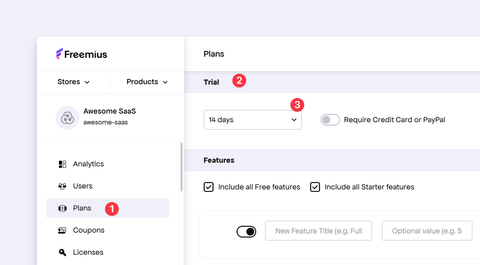
If you haven't already, please follow our documentation to activate and configure trials from your Freemius Developer Dashboard.
Integrating with the Freemius WordPress SDK
If you haven't yet integrated the Freemius WordPress SDK into your product, get started here.
If you are using the licensing methods is_plan() or is_plan__premium_only() in your integration with the WP SDK, then transition to the is_plan_or_trial() and is_plan_or_trial__premium_only() methods accordingly.
Finally, you need to update the SDK integration snippet in your product to enable trial support. This is done by adding a trial array to the integration snippet, as follows:
  'trial' => array(
      'days'               => 14,
      'is_require_payment' => false,
  ),
The exact code will differ based on your product's configuration. The best way to get the correct code snippet is to copy it from the Freemius Developer Dashboard.
Now the SDK will automatically handle trial related logic and UI.
Trial Admin Notice
For a freemium product integrated with the Freemius WordPress SDK, a dismissible admin notice with a trial offer will automatically appear in the WP admin dashboard 24 hours after installing the free product (plugin/theme) version.

In addition to the admin notice, the Upgrade submenu item changes its label to Start Trial, and its color matches the blue of the promotional admin notice:

Clicking the Start Trial button redirects the user to the product's in-dashboard pricing page with the option to start a trial for any of the plans.
Once the user selects a plan and starts the trial, the premium version becomes securely accessible through a download link that appears in an admin notice and in an automated customer email.

Product Admin Menu Item
If you have a top-level menu item, the SDK will automatically add a counter to attract additional attention:

Custom Trial Upgrade Links
Since the Freemius WordPress SDK automatically handles the trial offer display and logic, you can easily add links to the trial page in your free product version. You might want to add such links in various locations, such as under the plugins menu or in your plugin's settings page.

The SDK includes a built-in method to provide the trial upgrade link, which you can wrap in your HTML anchor tags.
 // Make sure to change my_fs() to your Freemius instance name.
 my_fs()->get_trial_url();
You need to replace my_fs() with your actual Freemius instance name.
Customizing the Free Trial Notice
The free trial promotional offer includes default text and descriptions.
These strings are customizable using the following filters:
 <?php
 my_fs()->override_i18n( array(
    'hey' => 'Hey',
    'trial-x-promotion-message' => 'Thank you so much for using %s!',
    'already-opted-in-to-product-usage-tracking' => 'How do you like %s so far? Test all our %s premium features with a %d-day free trial.',
    'start-free-trial' => 'Start free trial',
    // Trial with a payment method required.
    'no-commitment-for-x-days' => 'No commitment for %s days - cancel anytime!',
    // Trial without a payment method.
    'no-cc-required' => 'No credit card required',
) );
Customizing the Free Trial Offer Timing
Initial Display Timing
Instead of the notice appearing the default 24 hours after installation, you can control when it appears using the following filter:
// Show the 1st trial promotion after 7 days instead of 24 hours.
function my_show_first_trial_after_7_days( $day_in_sec ) {
    // 7 days in sec.
    return 7 * 24 * 60 * 60;
}

my_fs()->add_filter( 'show_first_trial_after_n_sec', 'my_show_first_trial_after_7_days' );
Resurfacing the Free Trial Offer
Customers who have dismissed the free trial offer admin notice can be shown the offer again after a certain period. By default, this period is set to 30 days. You can customize this period using the following filter:
function my_reshow_trial_after_every_60_days( $thirty_days_in_sec ) {
    // 60 days in sec.
    return 60 * 24 * 60 * 60;
}

my_fs()->add_filter( 'reshow_trial_after_every_n_sec', 'my_reshow_trial_after_every_60_days' );