

Custom Download Links for Apps & Products
If you're selling downloadable applications (for example, desktop apps or Chrome extensions), you might want to provide download links to your customers after they purchase your product. Freemius allows you to add such links directly in your product settings.
Configure Custom Download Links
- Log in to your Freemius Developer Dashboard and navigate to your product.
- Go to the Settings page.
- Select the Download Links tab.
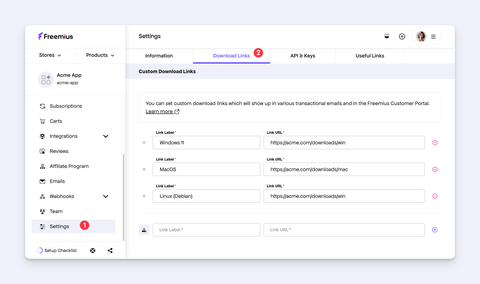
Here, you can set up as many download links as needed. For each link, you can specify a label and the download URL.
Where Download Links Appear
Your customers will see these download links in the following locations:
Purchase Emails
The links appear automatically in several transactional emails:
- New subscription confirmation email
- Lifetime or one-off purchase confirmation email
- Trial start email
Here is an example of how the links will look in the new subscription email:
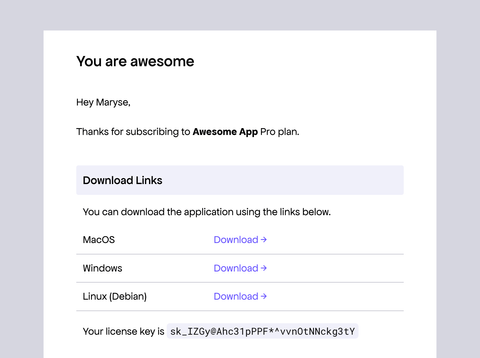
In addition to listing the links, the email will also show the license key below the links, so your customers can easily copy the license key and use it to activate their app.
Customer Portal
The Downloads section in the customer portal displays the custom download links you configured in the product settings.
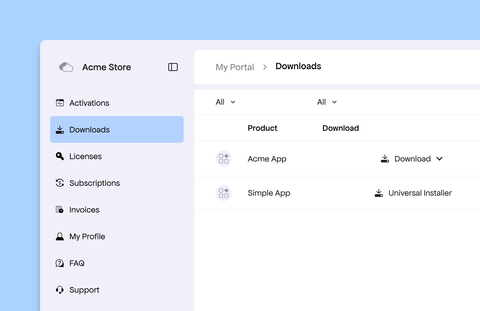
Here's how the links are displayed based on the number of links you have configured:
- Multiple links: The system displays a dropdown menu labeled "Download" with all available links.
- Single link: The system displays the link label as the download button.
Supported Product Types
Custom download links are available exclusively for apps. If you have a SaaS product and would like this feature, please contact our support team with your specific use case.