

Giving Coupons to Your Affiliates to Boost Promotions
Creating coupons for your affiliates can help them promote your products more effectively. Freemius supports this natively through the affiliate program.
To set this up:
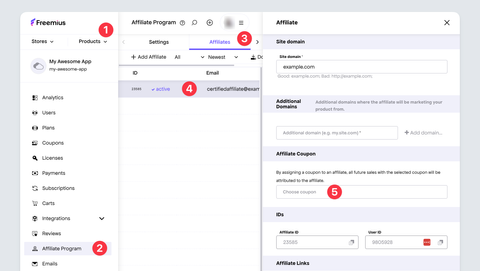
- Create a general coupon for the specific product. Follow these steps.
- Scroll down and select the Affiliate Program page.
- Click the specific affiliate to open the advanced panel.
- Scroll to the Affiliate Coupon section and enter the coupon name.
- Select the desired coupon.
Once saved, the affiliate can use that coupon code to drive and attribute discounted sales.
note
When a buyer uses an affiliate coupon the sale will be automatically attributed to the affiliate regardless if the buyer followed the affiliate link or not. This is a great way to implement affiliate promotions resisting cookie blockers.