

Freemius for WordPress
If you are using WordPress with the Block Editor, the Freemius for WordPress plugin enables you to integrate the Freemius checkout directly and quickly while building landing/sales pages for your Freemius product. No JavaScript, theme hacking, or coding required!
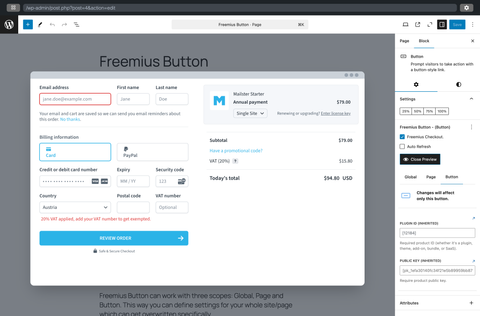
See how to use the overlay checkout or the hosted checkout.
Out of the box, Freemius for WordPress gives you:
-
Native Block Editor support (Gutenberg): Drop checkout buttons or pricing tables directly into your page layouts - just like adding any other block. For example: Add a "Buy Now" button to your landing page in seconds.
-
Dynamic pricing tables: Display different plans with clear comparisons and calls-to-action. Example: Showcase "Starter / Pro / Agency" tiers side by side, with checkout built in.
-
Plan switching and trials: Let customers upgrade, downgrade, or start with a free trial seamlessly. Example: Offer a 14-day free trial that auto-converts to a paid plan without extra coding.
-
Full compatibility with modern WordPress block themes and plugins: Works out of the box with your existing WordPress block site setup - no theme hacks required.
-
100% free and open source: Transparent, community-driven, and extensible. Example: Extend the plugin with your own block variations, or contribute improvements back to the repo.
Resources
- Download from WordPress.org.
- GitHub repo.
- ️Test now on Playground.
- Features, roadmap and the changelog.
How do I set up a Freemius checkout button?
- Download, install, and activate the plugin on your WordPress site.
- Add a button block to your page or post, then enable the Freemius checkout option in the button settings.
- Configure your product details, and the button will automatically handle the checkout process.
Here is a quick video demonstrating how to set up a Freemius checkout button:
FAQs
Can I customize the checkout experience?
Yes, you can customize various aspects of the checkout process through the plugin settings, including product details, pricing, and the checkout flow.