|
|
A freemium pricing strategy works only when three conditions align:
- You gate features that push users to upgrade
- You support free users without destroying your margins
- You convert strategically rather than hoping users upgrade on their own
Miss any one of these, and the model falls apart — free users drain support resources, paid features stay locked behind gates nobody reaches, and conversion prompts appear at the wrong moment and get ignored.
This guide walks through each of these elements step by step. It also covers two foundational questions: whether freemium is the right pricing model for your product and what infrastructure you need to run it without the operational overhead eating into your time.
Whether you’re building a SaaS product, desktop application, AI-powered tool, or WordPress plugin, the same core principles apply — even if your customers and use cases differ.
TL;DR — What is a freemium pricing model and is it right for my software business?
A freemium pricing model gives users free access to basic features, while charging for premium features, higher usage limits, or advanced functionality. Unlike free trials, which provide time-limited access, freemium keeps the free plan indefinitely with limited functionality and a clear path to the premium version when users need more.
Choose freemium if:
- Your product costs very little to serve each additional free user
- Your product brings in new users through referrals, shared work, or organic discovery
- You can reserve valuable features or higher usage limits that make upgrading a natural next step
Avoid freemium if:
- Every free user significantly increases your infrastructure, AI, or support costs
- Only the person using your product ever sees what it produces
- Your core value comes from a single feature that can’t be meaningfully divided into free and paid tiers
If you choose freemium:
- Gate features that users naturally need as they grow, rather than blocking the core experience
- Define the scope of free support from day one
- Trigger upgrade prompts when users reach meaningful limits, not at random moments
The rest of this guide explains how to evaluate whether freemium fits your product, design a free plan that encourages upgrades, and manage the model without letting acquisition costs or support demands overwhelm your business.
Does a freemium business model fit your product?
Freemium fits your product if you can afford to support a free tier, your product delivers value quickly, and your paid features solve meaningful problems that users are willing to pay for. If any of those pieces are missing, the model becomes difficult to sustain.
Before choosing freemium, answer these three questions honestly.
Does your product scale without burning cash on every free user?
If each free user costs you in hosting, bandwidth, compute, or third-party API calls, freemium strategy works only when upgrades can cover those costs and the additional support burden.
Raymond Girbes, CEO of Xootle B.V., decided that tradeoff simply wasn’t worth it:
“Free users generally require the same level of support as paying customers. Supporting a large number of free users would increase our workload and costs without guaranteeing additional revenue.”
Tetiana Hnatiuk, COO at Skylum, made a similar call for Aperty, an AI portrait-editing tool for professional photographers.
A free tier would have forced us to severely restrict our core value proposition — advanced AI retouching functionality. In addition, a free tier would attract many hobbyists to our platform, thus flooding our infrastructure and customer care with them.
Instead, they shipped an unlimited-access free trial, converting at over 15%, well above the 2-5% freemium norm she cites.
Will free users create distribution that compounds?
A freemium model works best when users help bring in more potential customers through:
- Public artifacts: websites built with your theme, workflows shared in a marketplace, or content created with your tool
- Word-of-mouth: users recommending your product in communities, teams, or professional networks
- Organic discovery: a growing user base that creates more searchable content, listings, integrations, reviews, or examples that help new users discover your product or service
If your product is invisible to anyone except the person using it, you lose one of the biggest advantages of the freemium model: turning users into a growth channel.
This is the thinking behind JournoFinder‘s freemium model.
Co-founder Sacha Fournier carved out one whole feature (a journalist request aggregator) as its free plan:
Our competitors are unicorns and nine-to-ten figure businesses; we can’t outspend them, so we needed a reason for anyone to know our name at all.
The result: referring domains grew 4x (mostly from people writing about the free offering itself) and more than 300 PR agencies have signed up since.
Can you create a free plan with a clear upgrade path?
The free tier needs to provide enough value that users keep using it, with basic services available at no cost while the paid upgrade unlocks supplemental or advanced features when their needs grow.
Michael Ko, co-founder and CEO of Suped, designed this kind of path into the product: one domain monitored for free, with multi-domain monitoring, automated alerts, and reporting reserved for paid plans.
Over six months, free-to-paid conversion rose 46% and median time to upgrade fell from 41 to 26 days.
If your product’s entire value comes from one core feature that customers either need or don’t need, freemium may not be the right fit.
If it is, the next step is designing where the free version ends and the paid experience begins.
What to gate and what stays free?
The line between free and paid determines whether your freemium model works. Give away too much, and users have little reason to upgrade. Restrict too much, and users never experience enough value to adopt the free tier.
Deciding this line often means revisiting it as the market changes.
Vikrant Jha, founder of Only PDF Editor, frames it as “complexity vs. commodity”:
“Simple, high-frequency tasks like merging or splitting are free. Value-add, resource-intensive, or professional tasks, such as OCR, batch processing, or AI summarization are gated.”
Deepak Singla, co-founder of the AI customer support platform Fini, says the rise of AI-built competitors has sharpened that line:
Anyone can build a basic, free Q&A bot that hallucinates. We believe basic knowledge base search should be inexpensive or free, but the true value — advanced reasoning over complex business rules, live API data integrations, and human-in-the-loop fallback — must stay behind a premium paywall.
There are three common ways to create this boundary.
1. Gate by feature set
This works when the free version is genuinely useful on its own, while the premium version adds additional features that solve more advanced needs.
TablePress, a WordPress table plugin, is a clean example: the free version handles table creation and basic display, and the premium version adds responsive layouts, advanced sorting and filtering, and spreadsheet import.
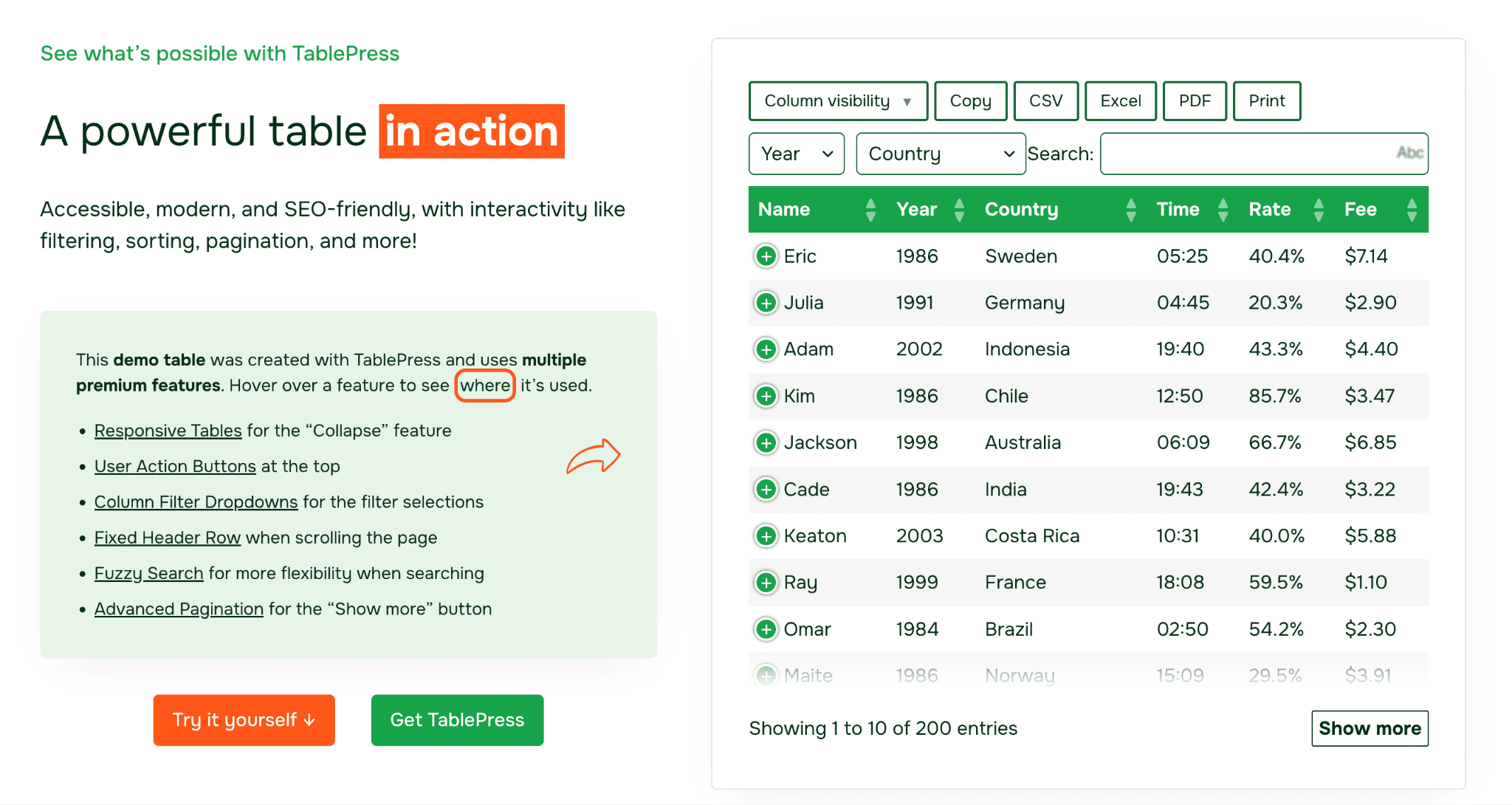
Users adopt the free version because it solves the immediate problem: adding a table to their website. They upgrade when they need a better mobile experience or want to pull data from a spreadsheet instead of manually entering it.
2. Gate by usage limits
This gives free users access to the product but limits how much they can use it. Common examples include a set number of projects, websites, API calls, team members, more storage, or exports per month. Paid plans increase those limits or remove them entirely.
The key is setting the limit where users actually experience the need for more.
Pavankumar Kamat, co-founder and CEO of the AI-native developer tool Panto AI, rebuilt his usage limits around exactly this logic. After rejecting a wide-open free tier, Panto shipped a single-user developer seat with strict usage caps, plus a 14-day full-feature trial for teams.
Over nine months, free-to-paid conversion rose from roughly 0.9% to 3.6%, and trial-to-paid conversion for teams reached 12%, up from about 5% before.
His framing: treat the free tier as “a lead qualifier more than a revenue channel,” designed to surface real intent, like team invites and repeat active sessions, rather than just raw signups.
3. Gate by commercial use rights
This keeps the product free for personal projects, learning, or testing, while requiring payment from users who use it to run a business, serve clients, or generate revenue.
It works best when commercial users clearly receive more value from the product and the pricing feels small compared to the business outcome it enables.
For example, WinRAR uses this approach by allowing individuals to continue using the software after the trial period, while businesses are expected to purchase a license for commercial use.
If users can easily avoid the limitation without changing how they use the product, the gate is probably too weak. If the limitation stops them before they experience the product’s value, it’s too aggressive.
Based on American Impact Review, feature-gated freemium typically converts in the low single digits (2.1%). But conversion rates can reach 7.4% when companies add stronger product-led growth tactics, such as better onboarding, in-app purchases, usage-based triggers, and smoother paths from free to paid.
Those numbers are a benchmark, not a reason to make the free tier more restrictive. The size of your conversion pool depends on whether free users stay engaged long enough to experience the product’s value — and that requires enough support to help them succeed before they upgrade.
Support boundaries that protect margins without abandoning free users
Support costs can quickly get out of control when free and paid users receive the same level of help. The goal isn’t to ignore free users, but to create clear boundaries that help them succeed while reserving high-touch support for paying customers.
Automate triage and route support by tier
Free users should have access to self-service resources like documentation, FAQs, and community forums. Paid users can get direct support through email or tickets with faster response times.
This keeps support costs predictable instead of letting them grow with every new free user.
Automation tools like chatbots, help widgets, and searchable knowledge bases can also reduce repetitive questions by helping users find answers before contacting your team.
Define what support includes
Support boundaries should be based on the type of help users need, not just response times.
Free support might cover installation, setup, and basic feature questions. Paid support can include customization, integrations, and more complex troubleshooting.
Make these limits clear early. If users don’t know what’s included, you’ll end up handling requests you can’t scale and disappointing users when you say no.
Use response times as an upgrade incentive
A difference in response times can give users a reason to upgrade. Free users might receive help within a few business days, while paid customers get faster responses.
But free support still needs to be useful. Long delays won’t push users to upgrade — they’ll simply push them away.
Chongwei Chen, CEO of the data-recovery company DataNumen, took this approach:
“Moving from open support to email-only for free users, with priority support and screen-share for paid customers, cut support tickets by 38% and lifted the upgrade rate by 19% among free customers who’d hit a limit.”
Tiering isn’t universal, though.
Girbes made the opposite bet at Xootle: heavier upfront support during onboarding, on the theory that a properly onboarded customer converts and stays rather than churning quietly.
The right approach depends on your product and users. The important thing is setting clear support boundaries from the start. Otherwise, support costs can grow faster than revenue and turn freemium into a burden.
Once support is sustainable, the next step is helping free users recognize when they’re ready to upgrade.
Mechanics that convert users from free to paid
The best conversion moments happen when users hit a limit, discover a premium feature, or reach a point where they clearly see the value of your product.
Five tactics help create these moments consistently.
1. Show upgrade prompts at the right moment
The best upgrade prompts appear when users try to access a locked feature or reach a usage limit. Explain what the paid plan unlocks and give users a direct path to upgrade.
This works better than generic banners because users already understand the value of what they are trying to do.
Andrew Murray tested this across Get SEO Medic and AlertBar Pro and found that upgrade prompts shown at the exact feature users wanted converted 34% better.
Vikrant’s team at Only PDF Editor found that timing matters too:
A modal triggered immediately after a free task completes (“Need to process 50 more files? Upgrade to Batch Pro”) got a 70% higher click-through rate than the same offer sent by email 24 hours later, and the tactic alone produced a 40% lift in free-to-paid conversion over 30 days.
The closer the upgrade message is to the moment of value, the more effective it becomes.
2. Let users try premium features
Users are more likely to upgrade when they have experienced the benefit of the paid version. A limited trial or preview removes uncertainty about whether the upgrade is worth paying for.
JournoFinder uses this approach by letting the team activate free trials for users instantly:
“We can activate a free trial for any of our free customers in one click, which helps with uptake because we can activate this with zero friction for them and no credit card required,” Sacha says.
The goal isn’t to show users more features. It’s to help them feel the difference between free and paid.
3. Use urgency only when it’s genuine
Discounts, limited offers, and pricing changes can encourage upgrades, but only when the reason is real.
Avoid fake countdowns or offers that reset. Instead, tie urgency to actual events, such as a launch promotion, a pricing change, or limited availability.
4. Trigger emails based on user actions
Generic feature emails rarely convert because they aren’t connected to what users need.
A better approach is to send emails based on milestones:
- Creating a first project
- Reaching a usage limit
- Inviting teammates
- Using the product regularly
For example, “You’ve created 9 tables this month. Pro unlocks advanced sorting and Excel import” is more relevant than a general list of premium features.
5. Recover abandoned checkouts and failed payments
Some users are ready to pay but never finish checkout. Others churn because their payment fails.
Automated recovery flows can bring back this lost revenue by:
- Reminding users to complete checkout
- Updating expired payment methods
- Retrying failed payments
This requires billing infrastructure that can manage subscriptions, failed payments, and customer recovery.
Once these conversion mechanics are in place, the final question is making sure your infrastructure can support freemium without adding unnecessary complexity.
Infrastructure that removes the operational burden of freemium pricing strategy
Freemium is not just a pricing decision — it is an operational challenge. To run it successfully, you need to manage subscriptions, licensing, failed payments, taxes, fraud prevention, and refunds.
Many founders start with a DIY setup: Stripe for payments, custom code for licensing, spreadsheets for tracking plans, and a separate tax tool. This can work early on, but complexity grows quickly as more users and customers join.
Common problems appear as the business scales:
- Licensing becomes harder to manage: You need systems to prevent account sharing, unauthorized usage, and users exceeding plan limits. Manual checks and one-off fixes do not scale.
- Tax compliance gets more complicated: Selling globally means dealing with different VAT, GST, and sales tax rules, registration thresholds, and filing requirements. Missing a threshold can create unexpected compliance work.
- Subscription management requires constant maintenance: Upgrades, downgrades, renewals, pauses, and failed payments all require billing logic, access controls, and account updates. Edge cases quickly add up.
Stripe Managed Payments, launched in April 2025, solves some payment and tax challenges for eligible businesses, but it does not include software-specific needs like licensing, feature gating, cart recovery, or a customer billing portal.
A merchant of record (MoR) built for software takes care of the entire commerce layer. It becomes the legal seller, managing payments, subscriptions, tax compliance, fraud prevention, and refunds, while you focus on building the product and serving customers.
Freemius combines MoR capabilities with software-specific tools like built-in licensing, feature gating, and automated cart and subscription recovery, without setup fees or monthly minimums.
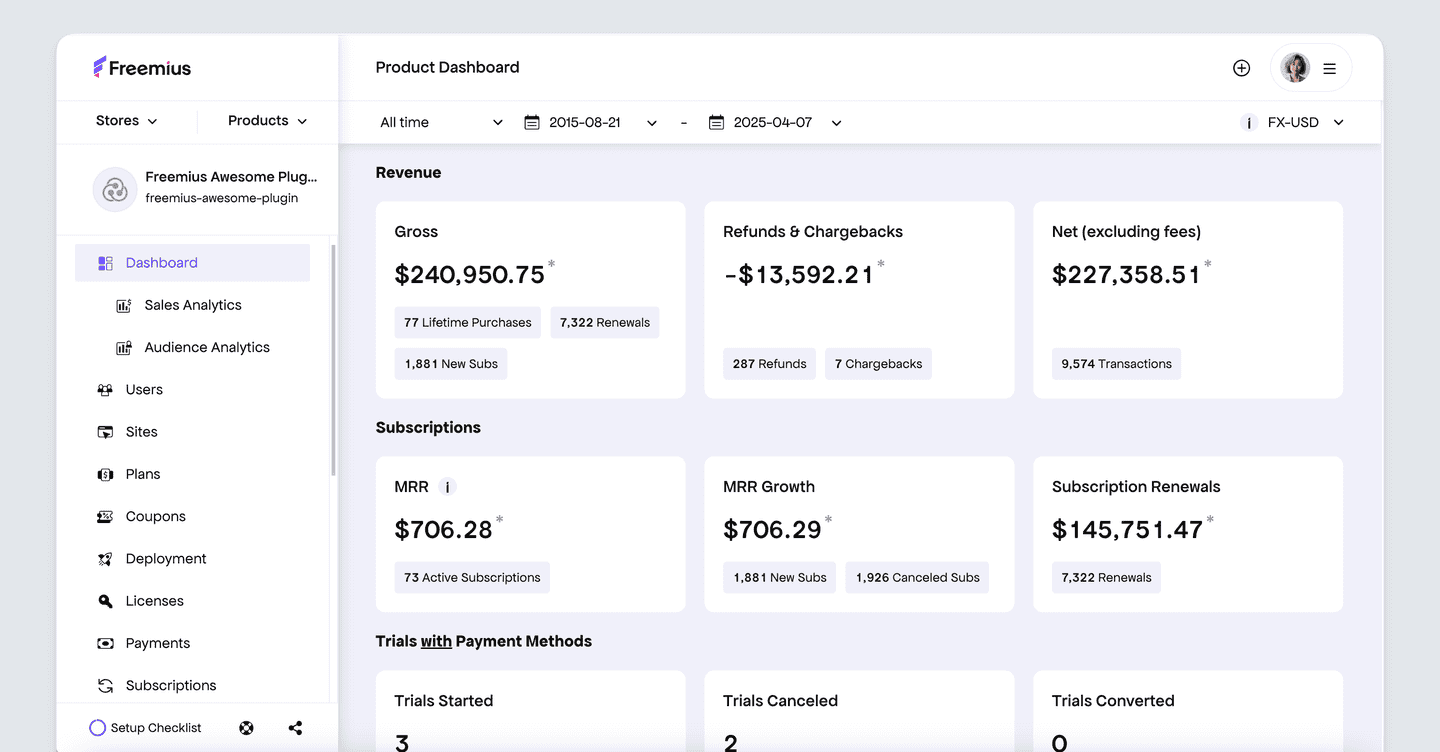
The work behind a freemium business doesn’t disappear. But instead of spending time maintaining payment, tax, and licensing infrastructure, you can focus on improving your product, increasing conversions, and supporting your customers.
Start with strategy, validate with real behavior, and adjust what converts
Freemium is not a set-it-and-forget-it pricing model. The strongest freemium businesses start with a clear strategy, watch how users behave, and adjust based on what actually drives upgrades.
A practical approach:
- Validate the model before launching: Make sure your product is inexpensive to deliver, free users help you grow, and you have valuable features to reserve for paid plans. If not, a different pricing model may fit your product better.
- Build upgrade paths around real needs: Use feature limits, usage caps, or commercial licenses only when users naturally need more value, capacity, or flexibility.
- Set support boundaries early: Define what free and paid users receive before support requests start consuming your time.
- Create conversion moments that match user behavior: Show upgrade options when users reach meaningful limits, let them try premium features, send relevant usage-based messages, and recover abandoned checkouts and failed payments.
- Reduce operational complexity with the right tools: Choose tools that handle billing, subscriptions, licensing, and tax compliance so you can focus on improving the product and growing revenue.
Once the model is live, pay attention to what users actually do. If users leave when they hit a limit instead of upgrading, the gate may be too restrictive or the paid plan may not offer enough value. If users never convert, you may need stronger upgrade paths or better timing.
Don’t judge freemium by signups alone. Track metrics like customer lifetime value and profitability to understand whether the model works long term.
Freemium succeeds when the full system works together: users discover value, reach meaningful limits, and upgrade when paid features solve problems they are ready to pay for.
See how Freemius handles billing, licensing, and tax compliance for freemium products, so you can spend more time improving your product and growing revenue.
FAQ — Freemium pricing strategy
What is a freemium pricing model?
A freemium pricing model offers users free access to a basic version of your software while charging for premium features, higher usage limits, or advanced functionality. Unlike a free trial, a freemium plan is designed to remain available indefinitely, giving users ongoing value while creating opportunities to convert them into paying customers.
Is freemium pricing right for every software product?
No. Freemium works best for products with low costs per additional user, strong potential for organic growth, and clear ways to separate free and paid value. It is usually a poor fit for products where every user creates significant infrastructure costs or where the main value comes from one essential feature that cannot be split into free and paid tiers.
How much of my software should I give away for free?
The free version should solve a specific problem and give users enough value to adopt the product, but it should leave strong reasons to upgrade. A good free tier helps users experience the product’s value, while paid plans unlock more advanced features, higher limits, or commercial capabilities.
What features should I gate in a freemium model?
Common approaches include gating advanced features, limiting usage, or restricting commercial use. The best features to gate are those users naturally need as they grow, such as higher capacity, automation, integrations, customization options, or business-related functionality.
Should my free plan be available forever or only for a limited time?
A traditional freemium model provides free access forever. If access expires after a set period, that is usually a free trial rather than freemium. Free forever plans work when the free tier remains useful but encourages upgrades as users need more.
How do I support free users without increasing costs too much?
Set clear support boundaries from the beginning. Free users can rely on documentation, FAQs, community resources, and self-service support, while paid customers receive higher-touch support. Automation and a strong knowledge base help reduce support costs across both tiers.
Should I use a free trial or freemium model?
Choose freemium when the free version can deliver ongoing value and help attract new users. Choose a free trial when your product’s value is easier to demonstrate through a temporary experience of the full product and you need users to see premium functionality before paying.
Do I need a merchant of record (MoR) for a freemium product?
Not necessarily, but freemium products often create additional operational complexity as they grow. A merchant of record like Freemius can handle payments, subscriptions, tax compliance, refunds, and other commerce operations so software makers can focus on the product instead of maintaining payment and compliance infrastructure.