Changelog

Welcome to the changelog section of Freemius, here you'll find our weekly technical update notes. You can subscribe to all posts via Newsletter or follow us on Twitter to stay updated.

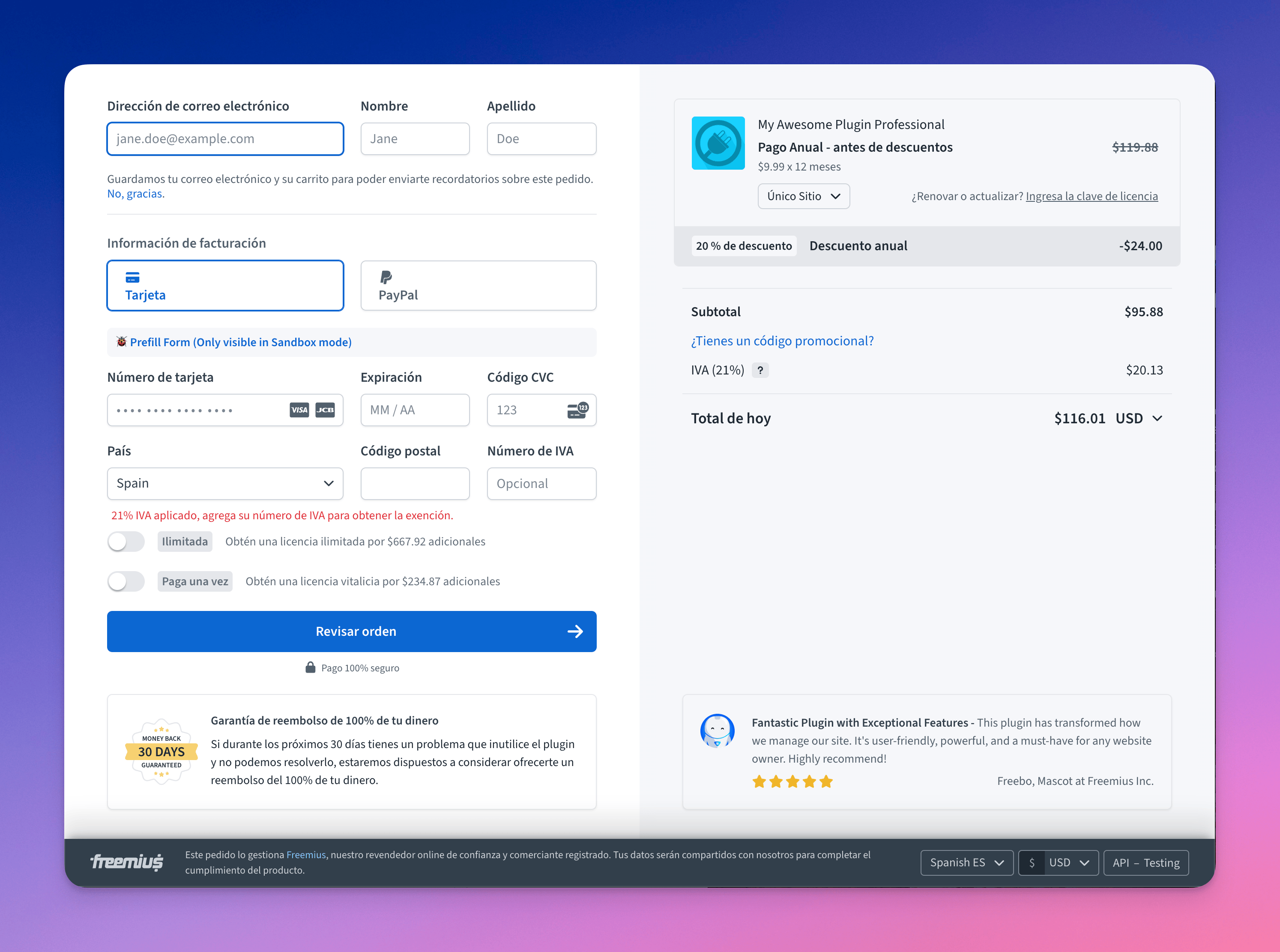
The new phase2 Checkout is officially live

We are glad to announce the new phase2 Checkout is officially in production starting today.

We’ve been doing a gradual rollout for quite some time and the time has finally come for the first production rollout.
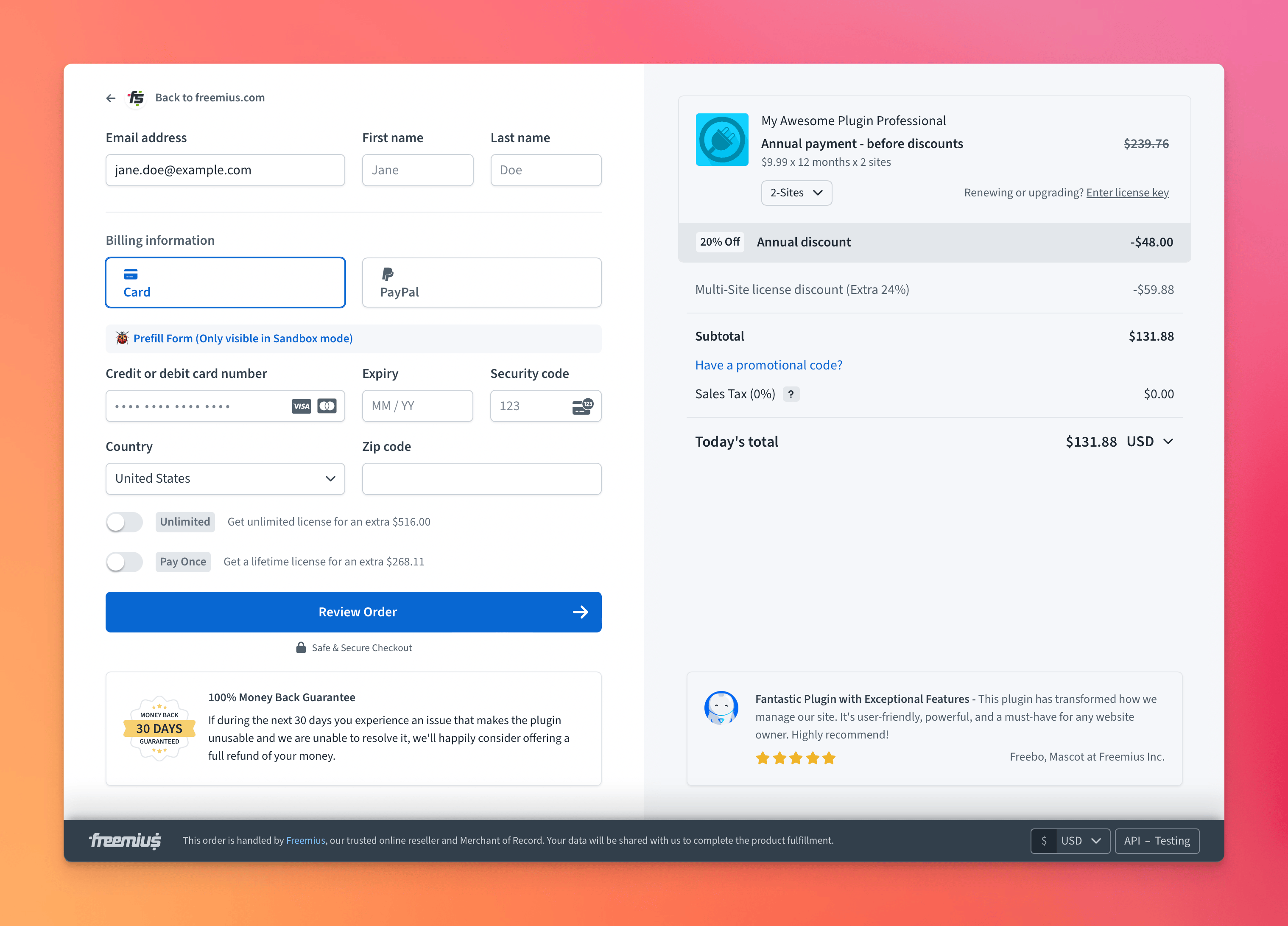
Freemius Checkout Phase2 - Release Candidate

If you do not use custom CSS to modify the Checkout, then the new Checkout will start showing up for you without any changes.

However, if you are using custom CSS, then you have until August 18th to migrate your CSS. You can read about the features, migration tips, and full rollout schedule here.

Frequently Asked Questions (FAQ)

I have migrated CSS and put a new URL under Customization, but the new Checkout is still not showing up, why?
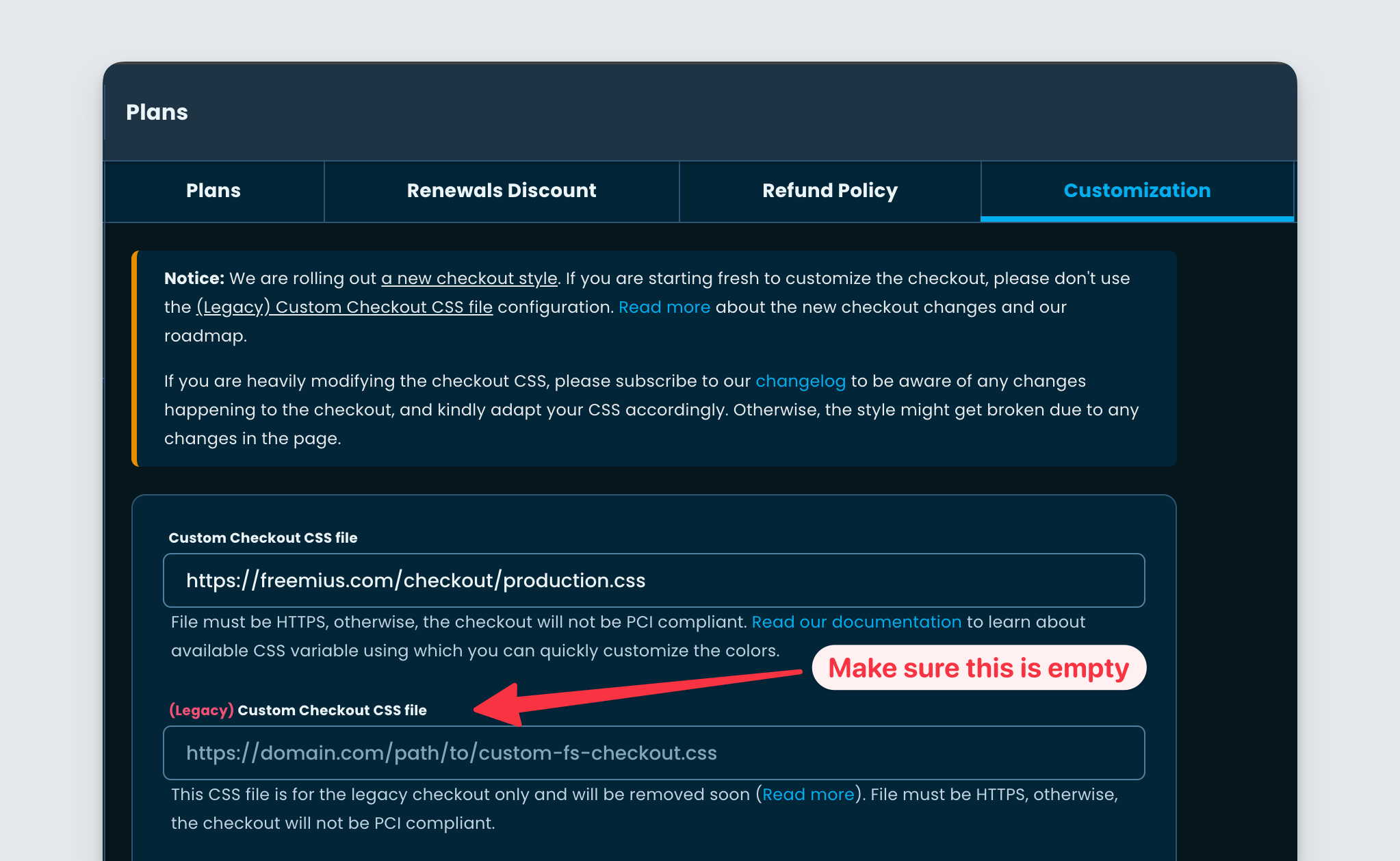
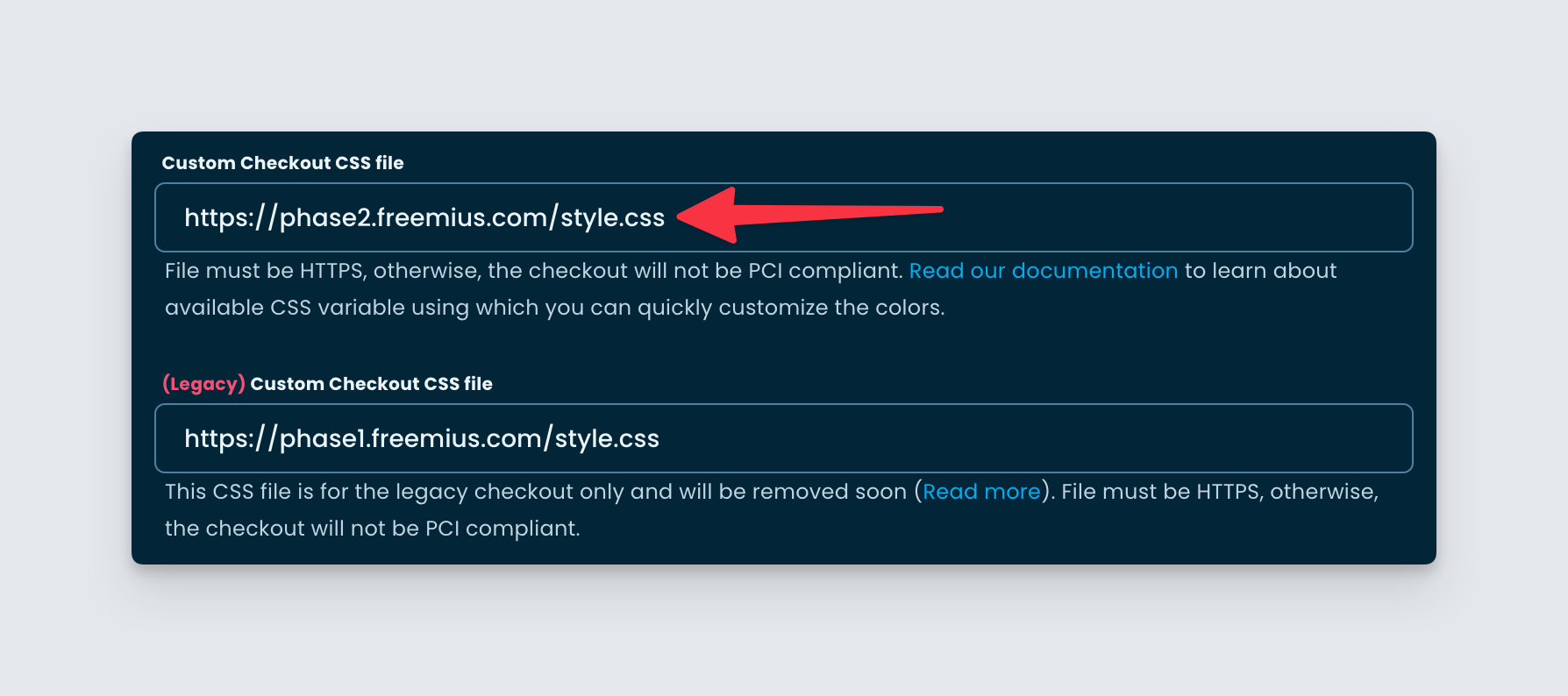
Freemius Developer Dashboard Checkout Customization for disabling the legacy Checkout

Please note that after you’ve migrated your CSS, you will need to clear the field of the “(Legacy) Custom Checkout CSS file” under the “Customization” section of the “Plans” page. Only then will the new checkout start showing up everywhere (on the Customer Portal and inside the WP SDK).

Can I have more time to migrate my CSS?

From August 18th, we will set the new Checkout as default. However, you can force-load the old checkout with checkout_style: 'legacy' in the JS configuration. Please note that you will have until September 29th, after which we will completely remove the legacy Checkout. Also, you cannot force the legacy Checkout on the Customer Portal and inside the WP SDK.

How can I have the option in the Checkout to switch to a monthly billing cycle?

We removed the billing cycle UI from the Checkout and have introduced the “Upsells” concept. Therefore, when the Checkout is loaded with an Annual billing cycle, we do not show the UI to downgrade to a Monthly billing cycle.
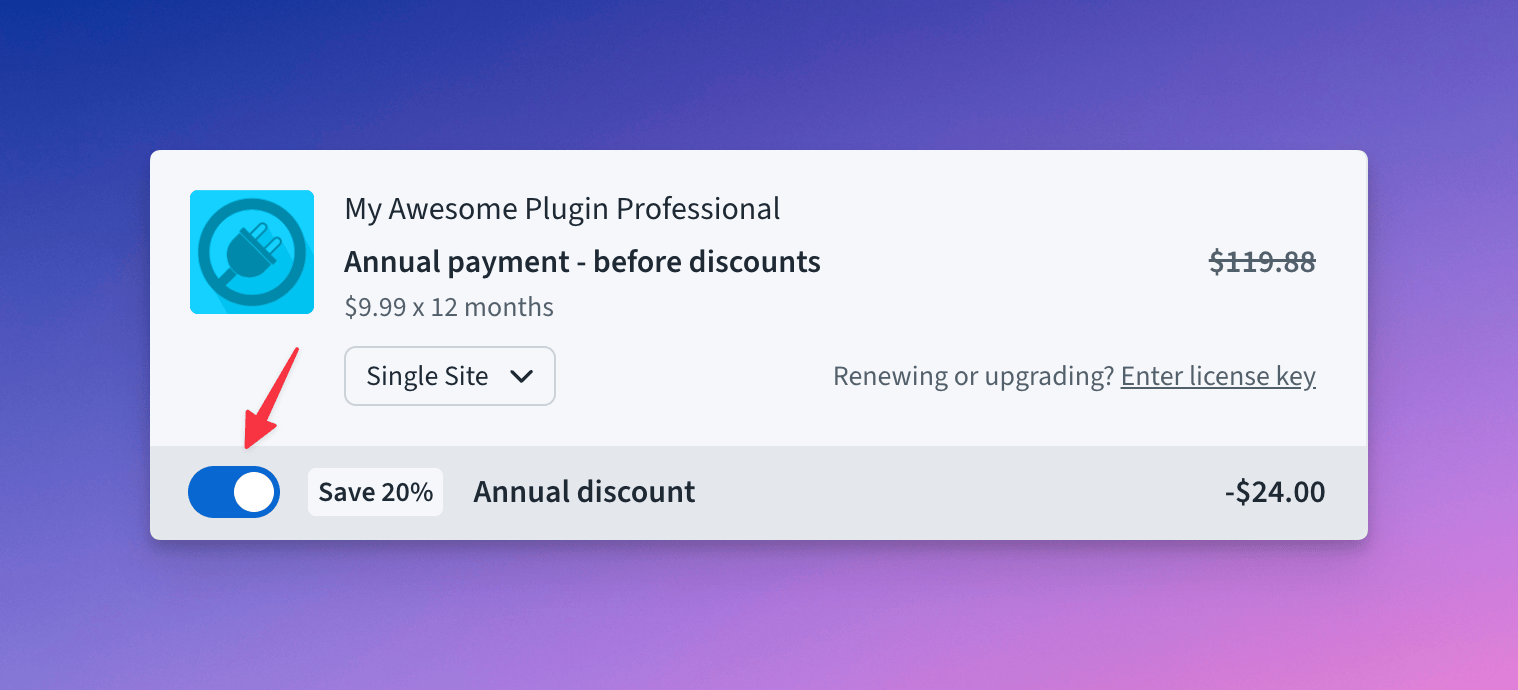
However, you can use the configuration option show_monthly_switch and set it to true to show it anyway.

What are the new configurations available to tweak the Checkout UI

You can find them here inside our JavaScript SDK documentation.
Freemius for SaaS – Ability to expose license keys to buyers

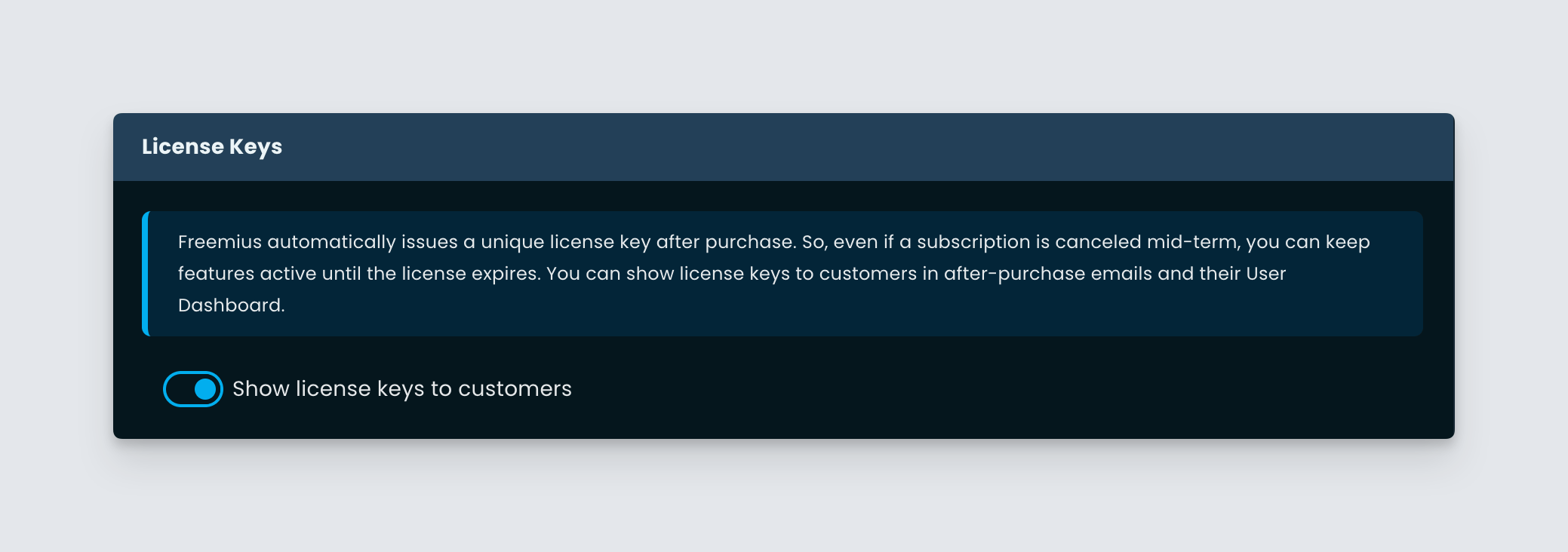
In yet another improvement for “Freemius for SaaS”, we are pushing the ability to expose license keys to the buyers. During our previous update, we removed the license keys for SaaS products. We thought license keys were not relevant for SaaS. However, after having some discussions with our makers, we understood, that for some SaaS it is preferred to expose license keys. It becomes handy when a subscription is canceled mid-term and you want to keep the features active until the license itself expires.

So in this iteration, we are giving the option to show license keys to customers for SaaS products.

Go to the “Settings” page from your Developer Dashboard. You will find a new section labeled “License Keys”. From there you can enable or disable the visibility of license keys for your customers.

If this is disabled, then none of the payments or subscription emails will have the license key-related information. By default, this setting is disabled for SaaS products. If you want your customers to see the license keys, then please enable this configuration explicitly.

Checkout Spanish translation out of beta

We are glad to announce that the Spanish translation of our Checkout is out of beta.

Long ago we introduced translation capability to our Checkout. Displaying the checkout in the buyer’s local language significantly boosts the conversion rate. At that time we used AI to generate the following translations for the Checkout:

  • Spanish
  • German
  • French
  • Italian
  • Dutch

But we marked the translations as “beta” as those were not proof-read or approved by professionals.

Now we have started to hire professional translators to finalize the translation and the first language to go through the process is Spanish.

Passing the language parameter with an auto value to the Checkout ensures that if your buyers are from Spanish-speaking regions, the Checkout will automatically load in Spanish. You can also pass static values like es to the language parameter. See here for an example. When the Checkout is loaded in a different language or when the language parameter is present, we show a dropdown in the footer of the Checkout to change the language.

More information about it can be found in our documentation (search for “language”). Very soon we will finalize more languages. Please note that only the languages for the new phase2 Checkout are being worked upon. Just a reminder on August 4th, we will switch the phase2 Checkout as default. You can read more about it here.

Misc enhancements and various bug fixes

This week we are also deploying some enhancements and bug fixes for the Developer Dashboard.

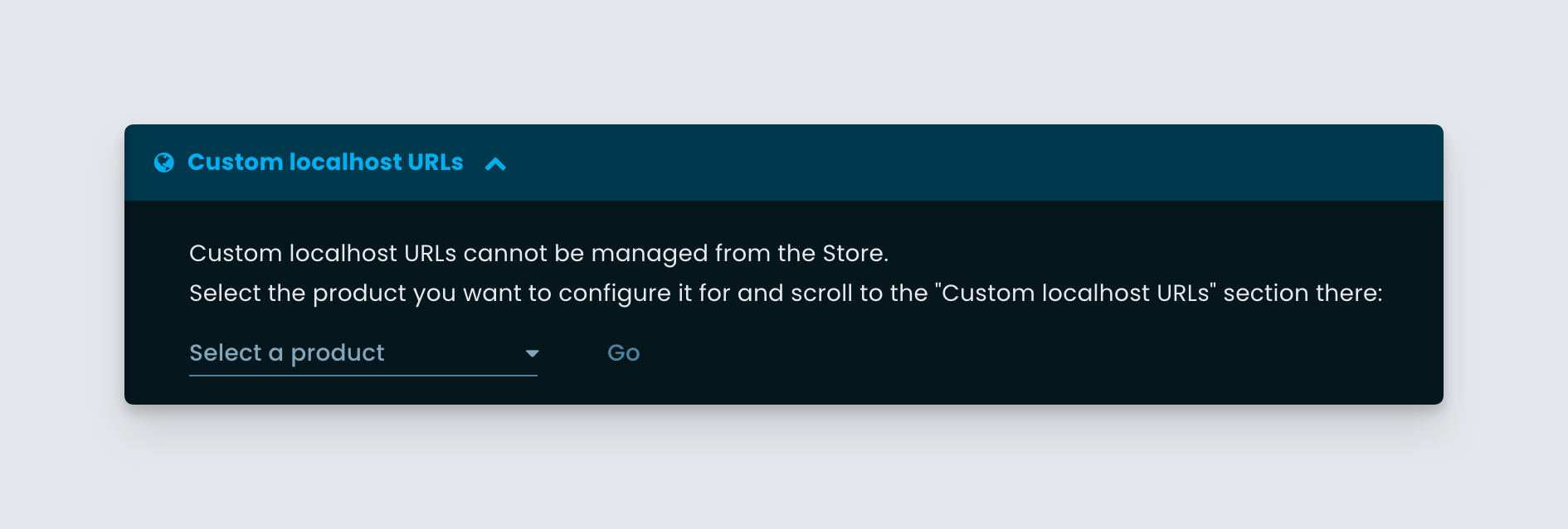
Improved “Custom localhost URLs” UI from store

When viewing a user from a Store, we have improved the Custom localhost URLs section to include instructions on how to change it from the relevant product.

Freemius stores page "Custom localhost URLs" section

Previously we allowed changing it directly for the product associated with the latest license of the user. Since a user can have licenses for multiple products from a store, it created some confusion. To avoid such confusion, we have improved the UI to tell explicitly what action needs to be taken and for what product.

Bug fix for the new product form

We noticed a bug in the “New Product Form” when it was loaded directly due to some race condition. We have deployed a fix for the same.

Analytics bug fix

We noticed that for some makers, the store-level analytics were generating some API errors. We identified the root cause and have deployed a fix.

Minor Checkout enhancement

We noticed some redundant API requests being made from our Checkout when calculating taxes. We have pushed a fix to make the system more efficient while making network requests.

New action to copy license renewal link with UI/UX refresh

We made some noticeable UI/UX overhauls to the Licenses page in your Developer Dashboard. We wanted to add a new action item in the table and while doing so, we noticed that over the time, the table UI has gotten bloated with many actions.

So we took the opportunity to make some refreshing changes.

Refreshed Licenses table with consolidated actions

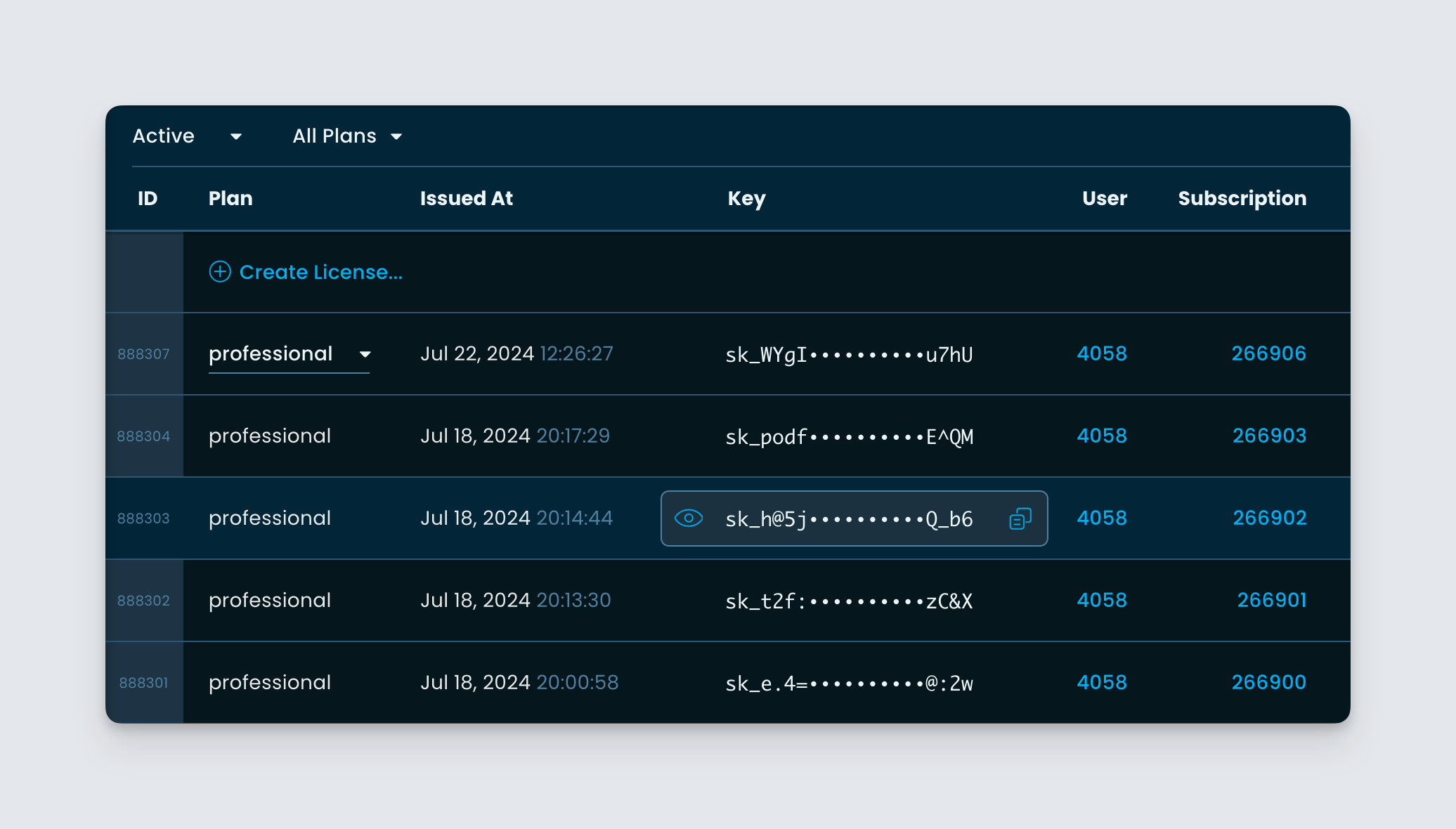
We replaced some old designs and components inside the licenses table.

Freemius Developer Dashboard Licenses table page

For example, we removed some space between the columns and used a new component to display the license key with the copy and reveal button.

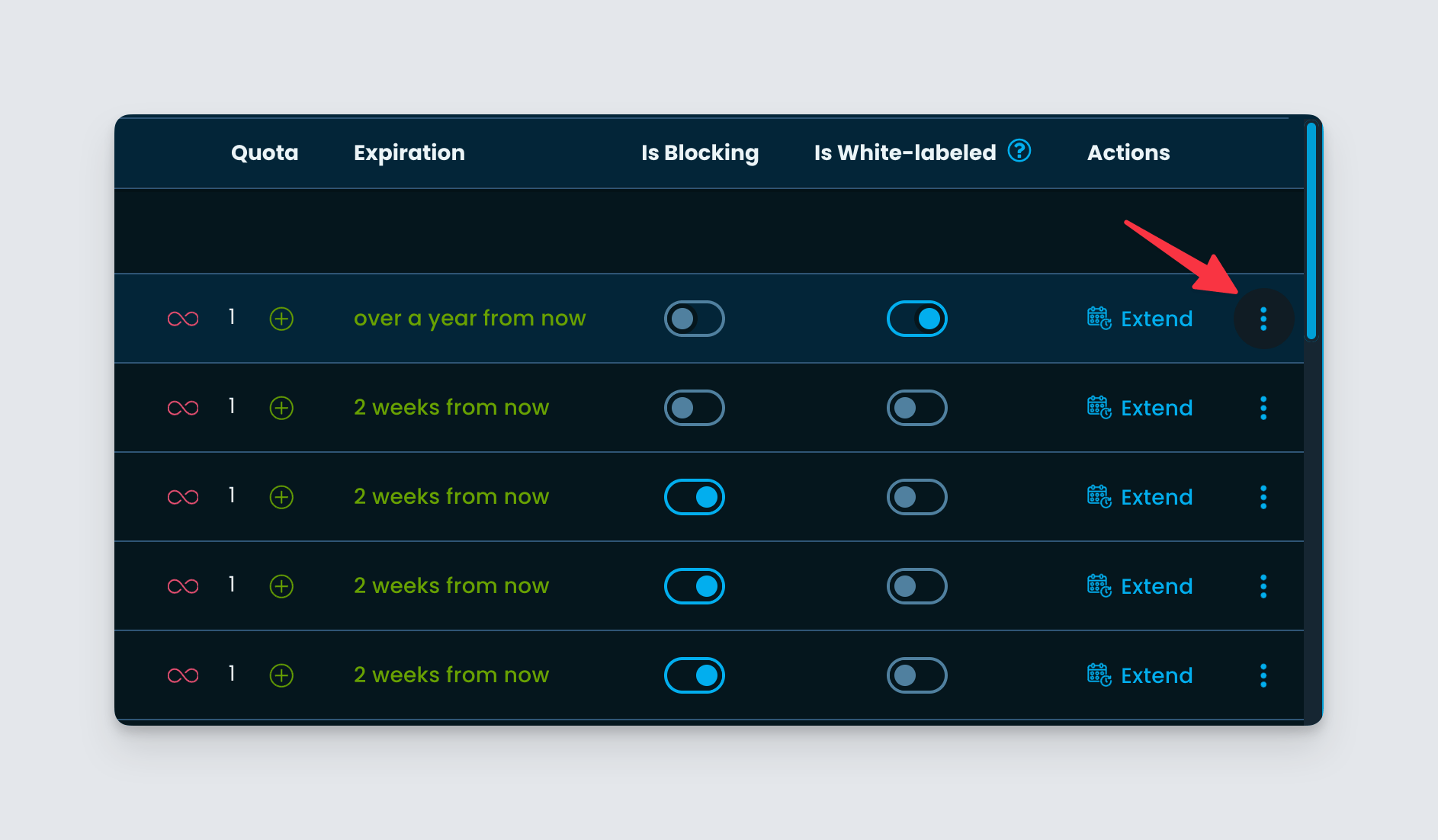
Grouped actions button inside Freemius Developer Dashboard's License page

We grouped all available actions, which are non-frequent, at the end of the column inside a dropdown menu.

We hope this change will help you make the most use of the table, by showing the most important things at first.

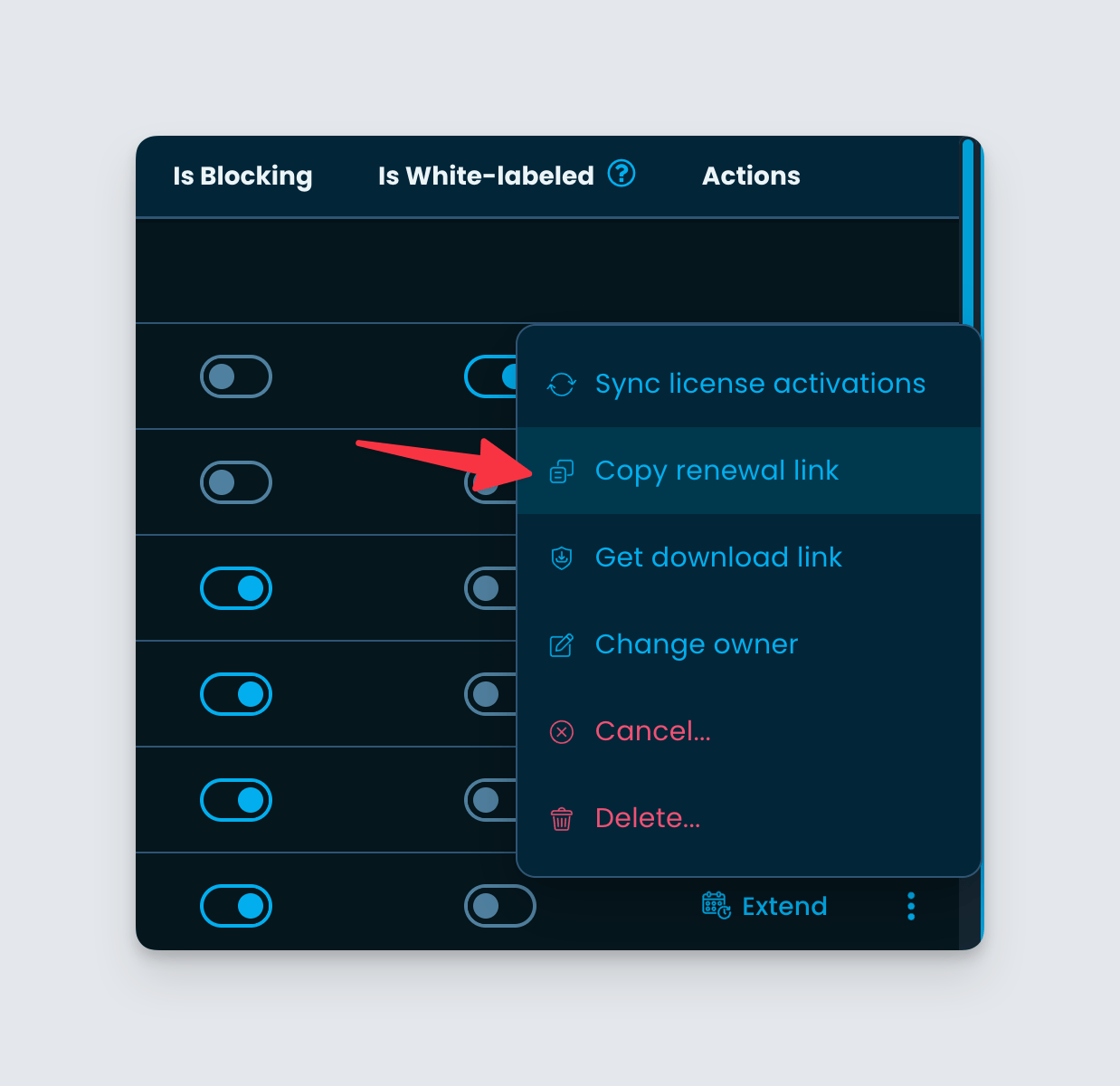
New action to copy renewal link

Sometimes customers ask our makers to share some links from where they can renew expired licenses or update billing methods. We do provide a Customer Portal from where your customers can self-serve. But sometimes sharing a direct link helps in quicker conversion.

Copy renewal link action inside Licenses page of Freemius Developer Dashboard

To help you quickly generate such links, we have added a new action item beside every license row. Simply click on the “Copy Renewal Link” button and share the link with your customer. This will open the checkout with the license key prefilled from where they can update the renewal mechanism.

Fixed bug in Developer Dashboard’s new product form

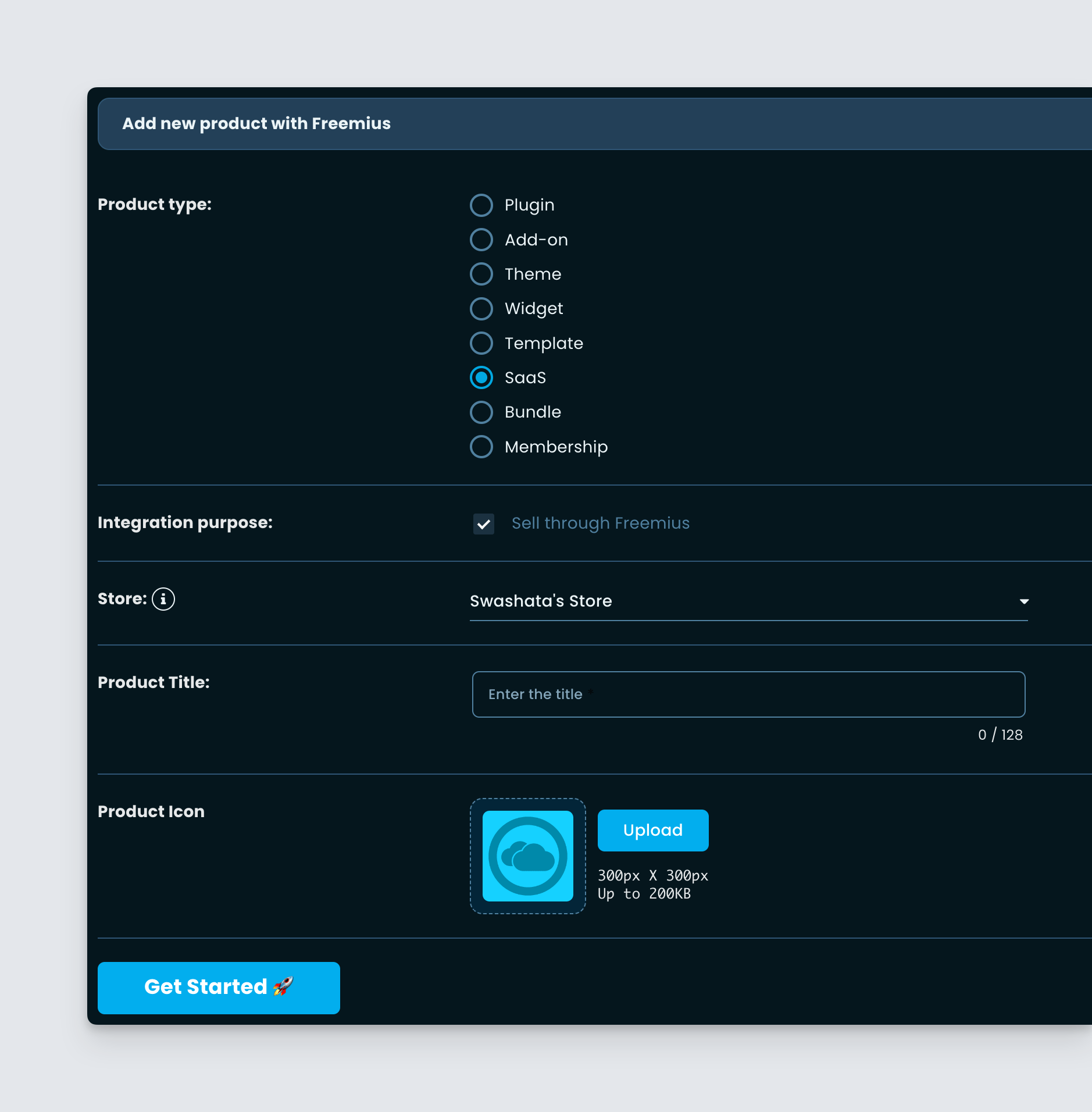
We noticed a bug where creating a new SaaS from the Developer Dashboard would incorrectly show the business model option, asking whether to create a Free plan.

Freemius Developer Dashboard New Product Form for SaaS

In this deployment, we removed the choice, since it was not intended.

Checkout Reskinning phase2 production rollout

Following up on last week’s announcement, today we are marking the checkout phase2 as production-ready.

Freemius Checkout Phase2 - Release Candidate

The deployment comes with a few improvements too.

  • We have optimized various UI and UX as it has gone through many QA tests.
  • We identified a bug where some strings were not translated and have fixed them.
  • The form focus and validation experience have also been improved.

Rollout Strategy

While the new checkout is production-ready, we have not yet made it the default. The old checkout will still show up unless you have specifically opted into the new system with checkout_style: 'phase2' JS parameter. For more information, please read our announcement post here.

Bug fixes for the old checkout

We noticed a bug in the old checkout where the form could not handle some errors in rare cases. We have deployed a fix for the same.

Checkout Reskinning: Preparing the phase2 version for production rollout

It has been a couple of weeks since we pushed updates to the new phase2 checkout and this week, we are starting to push it for production. Like before, we will do it gradually, without breaking any custom CSS you might be using. Please read below to learn more.

Freemius Checkout Phase2 - Release Candidate

Recap: Beta releases so far

We first released the phase2 checkout on May 20, 2024. Since then there have been a few iterations and improvements.

Today with a few more bug fixes we are finally marking the checkout as release-candidate and preparing for the production switch.

Gradual rollout

  • On August 4th, 2024 we will make the phase2 checkout the default in production. However, if you have a custom checkout CSS for the phase1 checkout but not for the phase2 checkout, we will keep on showing the phase1 checkout for you. Only when you clear the Custom CSS from the legacy section, the new Checkout will show up by default.
  • On August 18th, 2024 two weeks after the production rollout, we will enable it for everyone. However, you will still have the option of using checkout_style=legacy to force load the phase1 checkout.
  • On September 29th, 2024 we will completely remove the legacy phase1 checkout.

Until the rollout

  1. You can switch to the new checkout by using the configuration checkout_style=phase2 in the URL parameter or JS snippet. More on it later in.
  2. You now have two different CSS configurations, one for the existing checkout and one for the new phase2 checkout.

Custom CSS migration

Starting today, you will notice that your existing checkout CSS style (if any) has been moved to the “(Legacy) Custom Checkout CSS file” under the plans page of the Developer Dashboard. The first input field is now empty.

CSS migration guide for Freemius Checkout phase 2

To migrate your CSS for the new version, simply put the stylesheet URL in the first input field and you are good to go. Please read our documentation to learn about CSS customization.

Remember to clear out the (Legacy) Custom Checkout CSS file after you’ve migrated to have the new checkout show up by default.

Call for testers

We would be glad to get your help to test the new checkout out in the wild.

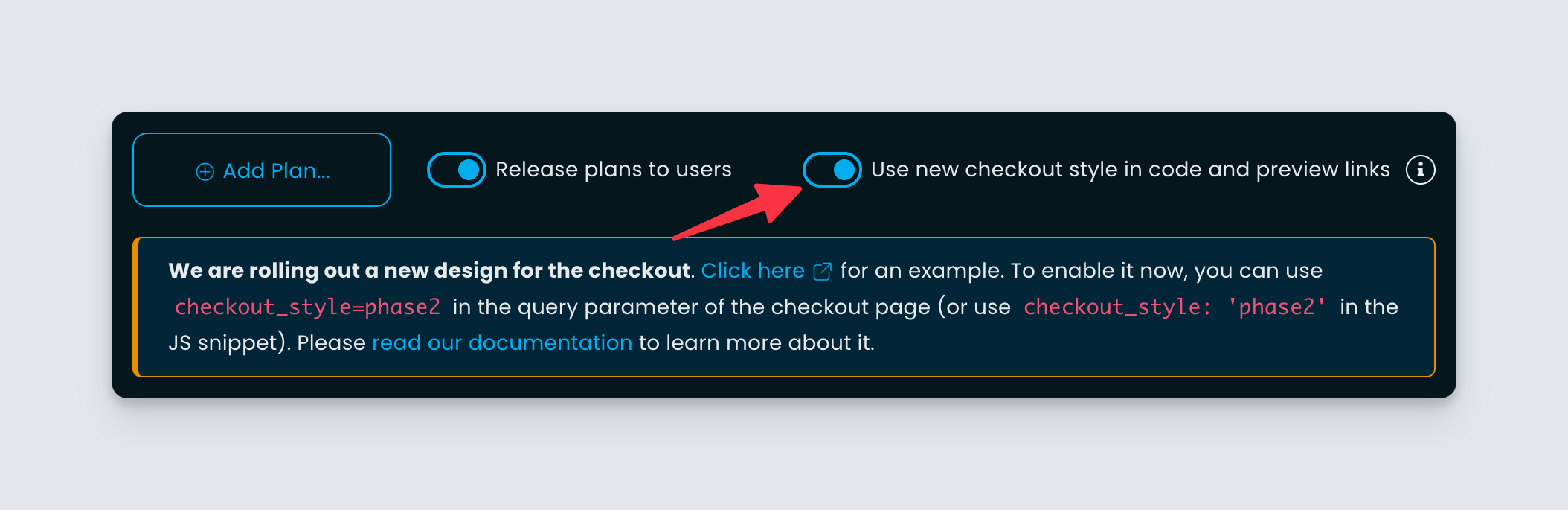
Testing out phase2 checkout from the Freemius Developer Dashboard

Kindly go to the plans page and toggle the new configuration to get URLs and JS snippets to load the new checkout.

Alternatively, you can just add checkout_style=phase2 or checkout_style: 'phase2' in the URL or JS snippet to see it live. Here are some live demos:

If you find any issues please get in touch with our support.

We will make another announcement in July when we believe the checkout is ready to go into production. Until then, please stay tuned.

Checkout phase2 improvements and bug fixes

We are bringing a few small enhancements and bug fixes to the phase2 checkout (beta).

  • Fixed a regression in the money-back UI appearing below the breakdown, even when the product does not have a refund policy.
  • Fixed boolean values coming from the JS SDK which were not being respected in some cases.
  • Fixed a small glitch in the license input UI on smaller devices.
  • We improved the form validation UX by not showing errors under a field that was not focused specifically by the user.
  • Fixed a typo in the license dropdown where it said “Unlimited Site” instead of “Unlimited Sites”.
  • We updated the Spanish translation from a professional translator.
  • We did some performance improvements.

We are also getting ready to rollout the new checkout in production. Please read our announcement post here.

Various bug fixes for the Developer Dashboard

  • Fixed some edge case bugs when navigating between products of the same store could lose the current context.
  • Fixed a regression in the Tax Refund form, for old payments. The “Yes – Refund” button stayed disabled in some cases even after filling out the form. We have fixed this issue.

SaaS related improvements and tweaks to our system

We are rolling out various SaaS-related improvements and tweaks to our Developer Dashboard and marketing automation system. Please find the details below.

Removed unrelated features from the Developer Dashboard

Our Developer Dashboard is heavily tuned for WordPress.org products (plugins, themes, add-ons, etc). It has many pages, such as Deployment, Integration, etc., that are only relevant to a WP product. It also shows several notices and pop-ups for the SDK integration.

All these features have no meaning for a SaaS product and can create confusion. So we have improved the system by scoping those features only for a WordPress product and keeping the SaaS interface clean.

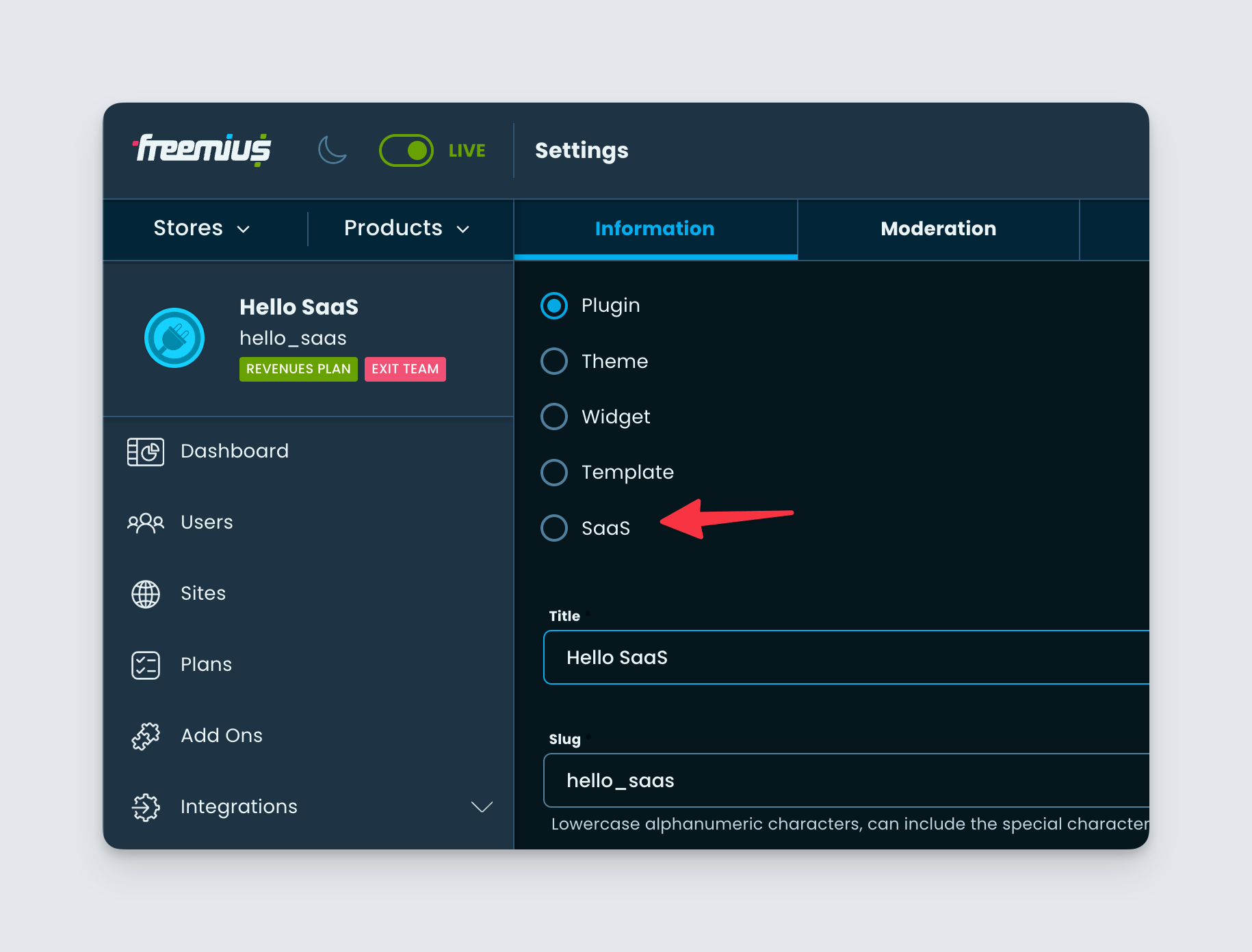
Introduced the option to change a product’s type to SaaS

We introduced the option to create a SaaS product from the Developer Dashboard a while back. But we didn’t allow changing an existing product to SaaS yet. A few of our partners have already been using our platform to facilitate their SaaS products. We have been asking our partners to use the “Plugin” type for SaaS products while we manually adjusted the platform to their specific needs. This gave us enough time to learn the specific necessities for SaaS and improve our system accordingly.

Change product type to SaaS - Freemius Developer Dashboard

Now that we have rolled out many platform improvements, we are opening up the settings to change your product type to SaaS. Simply navigate to the Settings page of your product from the Developer Dashboard and you can change the type from there.

Improvements to our marketing automation

We have made some more improvements to our marketing automation system to use the right terminology and phrases when dealing with a SaaS product.

Better ordering of upgrade option in User Dashboard

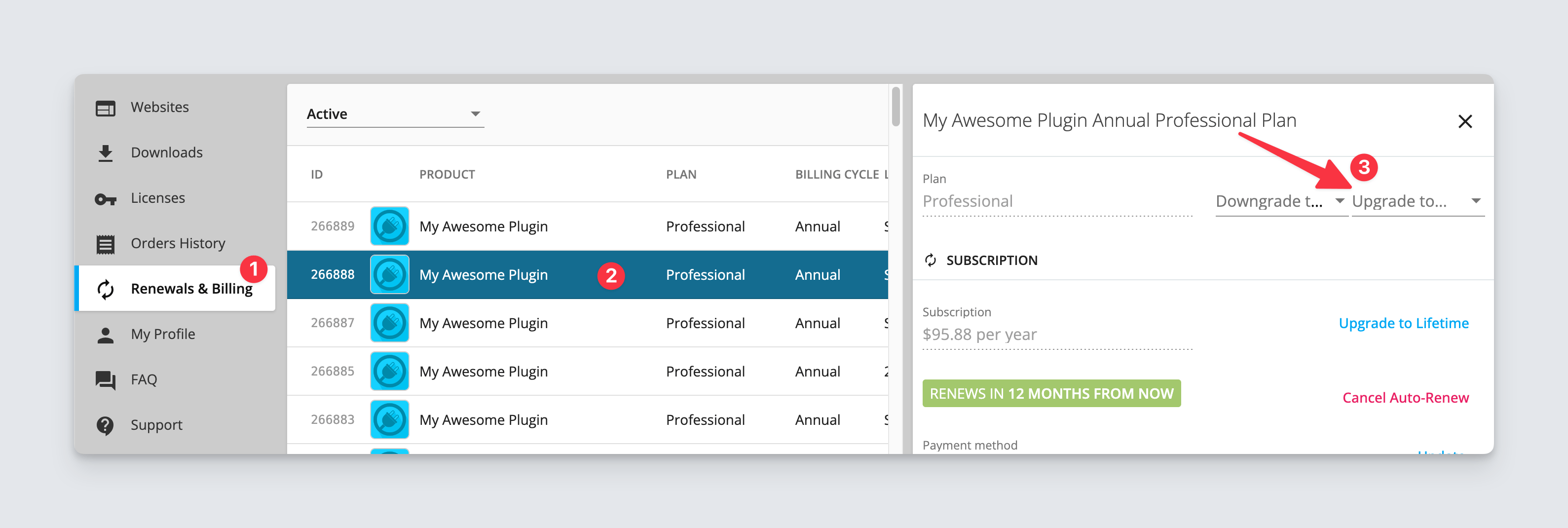
From the User Dashboard, we offer a way for the buyers to upgrade their subscriptions. One would simply need to navigate to a subscription from the “Renewals & Billing” page.

Option to upgrade a subscription from the Freemius User Dashboard

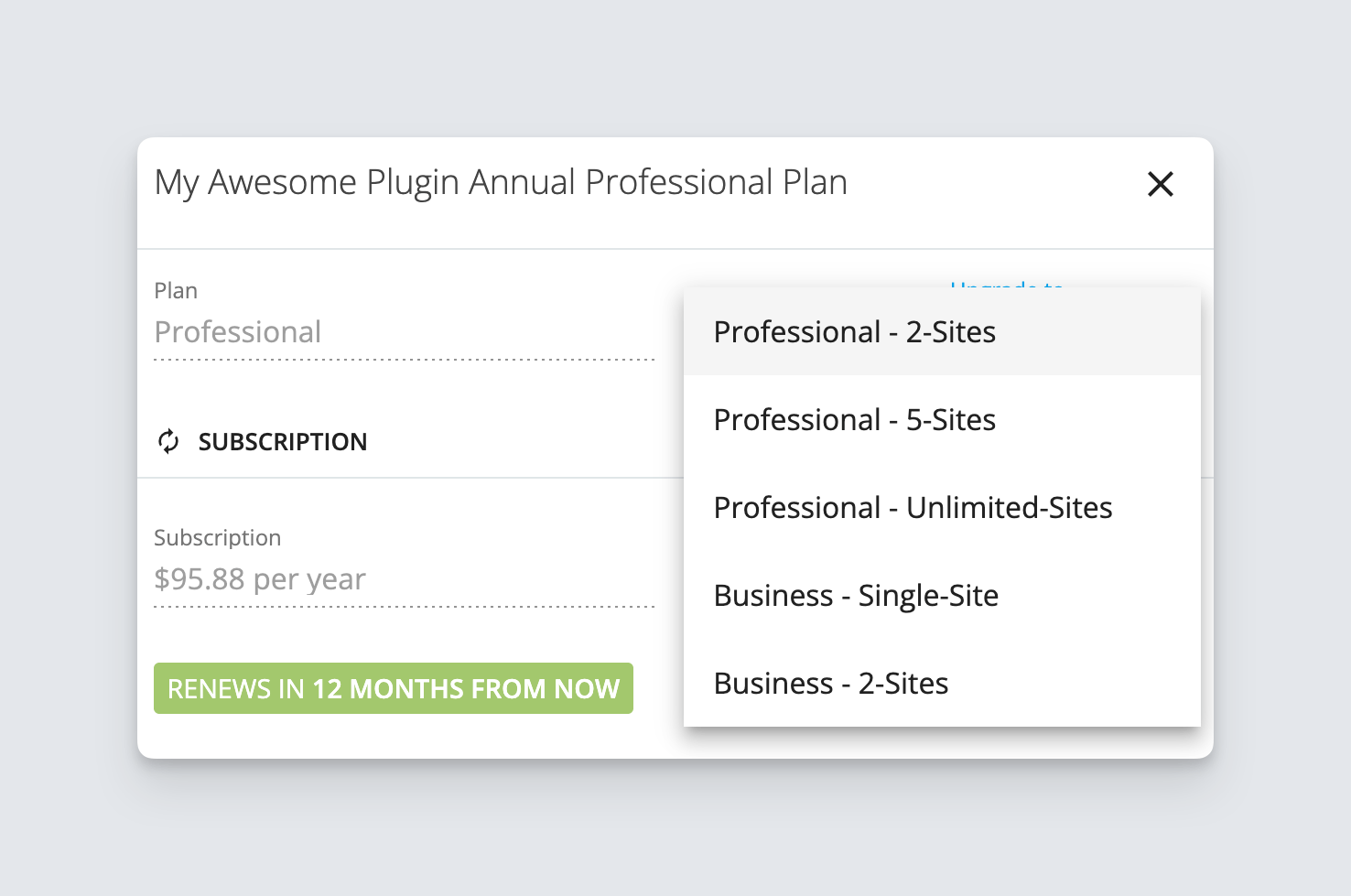
Previously the list was showing different options ordered by the quota of the licenses. This resulted in items with heavy pricing showing up on the top of the list, which could discourage the buyer from exploring other cheaper options. This issue was reported to us by a partner.

Optimized ordering of different upgrade option under Freemius User Dashboard

To fix this, we are now ordering the items showing the cheapest plan and pricing first and then gradually moving towards more expensive options.

Various UI/UX enhancements for the Developer Dashboard

With this week’s deployment, we are bringing some small yet meaningful enhancements to the Developer Dashboard. Please read below.

Dismiss option under store dashboard page

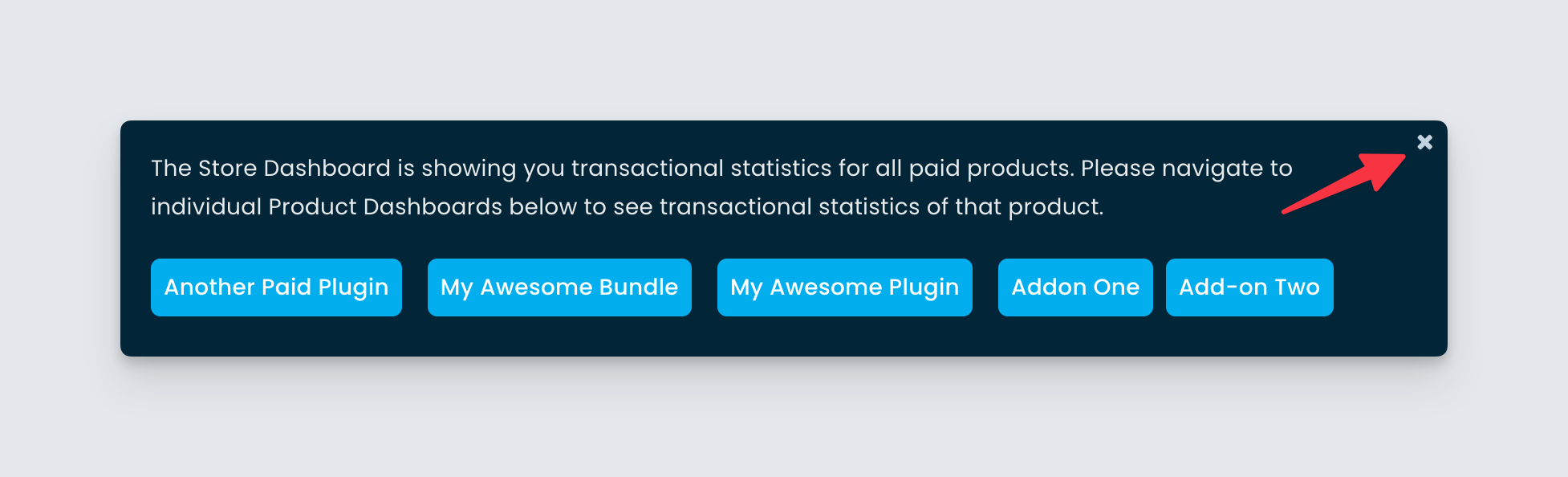
We’ve been showing a small notice under the store page to mention the list of products the data is relevant for.

Button to dismiss the store dashboard page notice

This notice can become overwhelming for stores with many products, taking up much real estate. Our partners suggested that we introduce an option to remove the notice. In this update, we did just that. Now you can click the close icon to make the notice disappear and it will not appear again under the same browser.

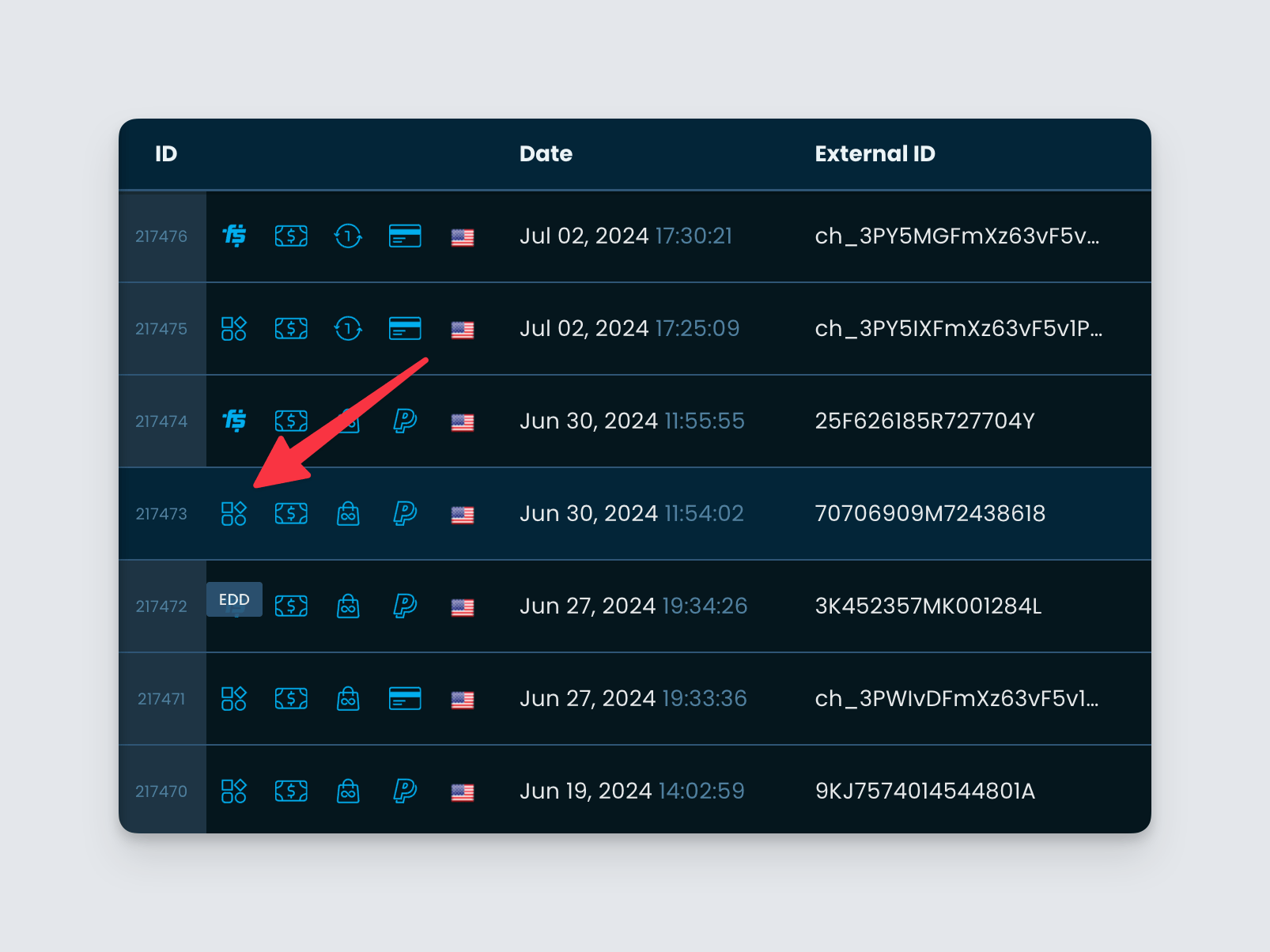
Icons to clarify the source of different entities

We’ve been offering migration services to partners coming from different platforms like EDD, CodeCanyon, ThemeForest, etc. We not only offer the first-time migration of payments, subscriptions, licenses, etc, but we also do ongoing sync for incoming payments from the subscription of the previous platforms. We do this to give a seamless licensing experience to the buyers.

As an advantage, partners can see the existing subscriptions and associated payments in the Developer Dashboard. But we understand the list can become confusing when there is a mixture of Freemius-sourced entities and migrated entities.

Icons to indicate source of payments, subscription, licenses etc in Freemius Developer Dashboard

To solve this, we have introduced a new icon in the columns, which will indicate whether the entity came from Freemius or the old platform. Please note the icons will show up when there are any migrated entities to save real estate.

Other fixes

  • We fixed some alignment issues in different UIs.
  • We made improvements to the different icons we show throughout the app.

Beta Checkout Updates: Flexible discounts and more

We have pushed various updates to the beta checkout. Just like before, to try it out, use checkout_style=phase2 in the URL parameter or checkout_style: 'phase2' in the JavaScript integration. If you’ve missed the various updates to the phase2 beta checkout, you can find it here and here.

Flexible discounts parameters

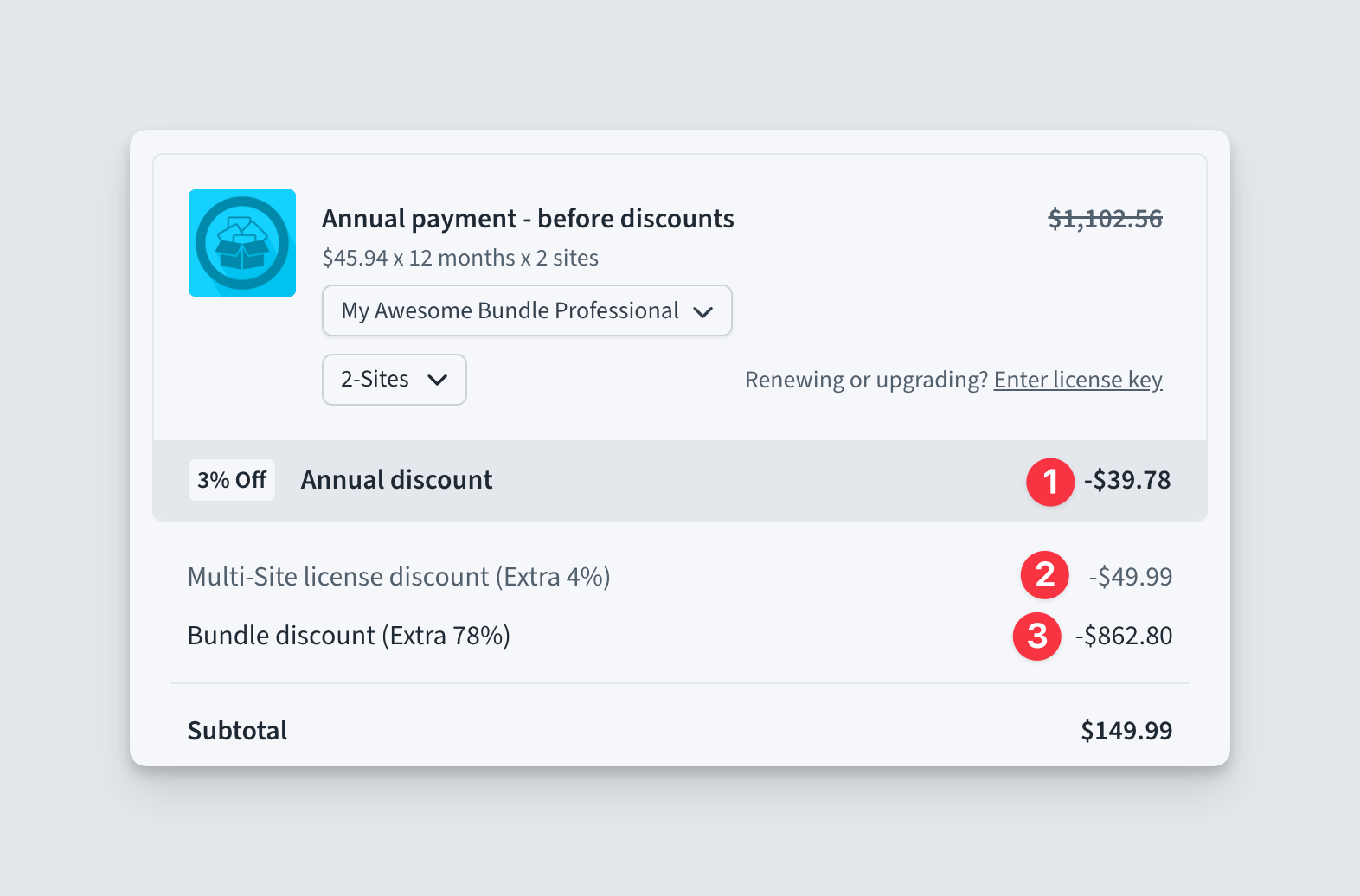
We have three kinds of discounts we show in the checkout before the subtotal.

Different discounts in Freemius Checkout

  • Annual Discount – The difference between the monthly billing cycle price and the annual billing cycle price.
  • Multisite Discount – The difference between the single license/site price and the multi-license/site price.
  • Bundle Discount – The difference between the compounded price of a bundle’s children and the price of the bundle itself.

The reason we show all these discounts is to encourage the purchase of a higher billing cycle, licenses, or bundles.

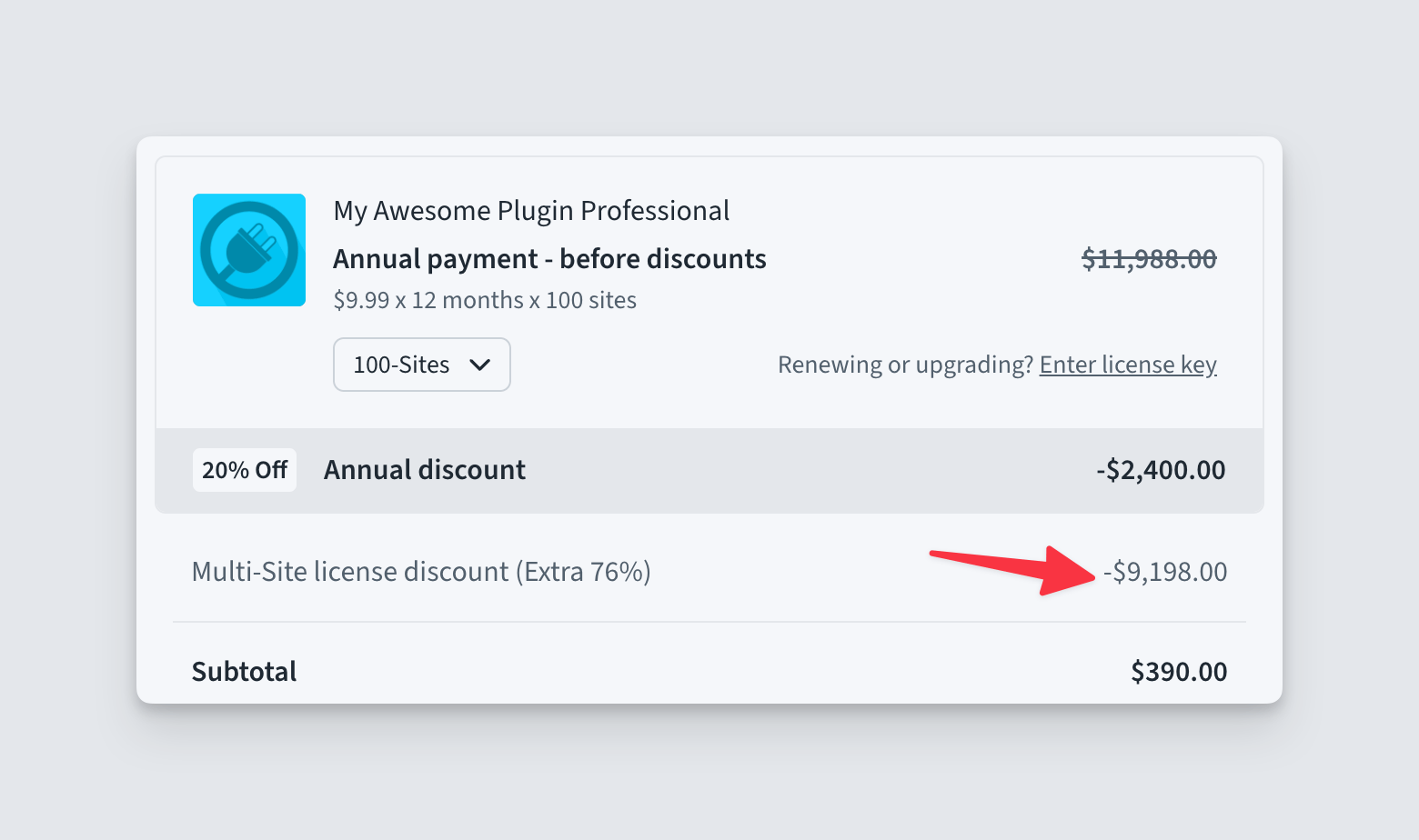
But over the year we received feedback from our partners asking us to give the flexibility to determine which discounts are to be shown. There are cases where a huge discount can discourage a buyer. For example, if a seller is providing 100-site pricing, then it can often result in an undiscounted price of $10,000, whereas the amount to pay could be less than $500.

Big multi site discount

So in this update, we are not only giving the ability to turn off discounts through configuration but also remade our discounting system from the ground up, making it smarter. Please find below the three newly introduced configuration parameters and their different values.

Property Description Accepted values Default value
annual_discount Determines whether the annual discount will be shown in the checkout. true | false true
multisite_discount Determines whether the multi-site discount will be shown. When the value is auto, the discount will only be shown if the single license pricing difference does not exceed 10 times more than the current pricing.

For example, say you have single-license pricing at $10 and a 100 license price at $90. For this configuration, the difference is 10*100 - 90 = 910 which is more than 10 times the current price (9*100 = 900). So by default when auto is selected, the discount will turned off. Please note, that the discount turns off for all license quotas, not just the one where the difference is high.

true | false | 'auto' 'auto'
bundle_discount Determines whether the bundle discount will be shown. The bundle discount itself depends on the compound price of its children. By default with maximize, we try to take the compound price from the lowest billing cycle and license. But with the value of true, we take it from the closest billing cycle and licenses.

While introducing this parameter, we also deprecated the old maximize_discounts parameter. The old parameter will only be used if the bundle_discount parameter is not explicitly set.

true | false | 'maximize' 'maximize

Please do give the new discounting system a try. The new system is meant to be backward compatible. The only exception is that the multi-site discount can be turned off depending on the pricing. You can always set a hard value of true to enable it back.

Here are some examples and live demos you can check. Feel free to modify the URL parameters.

Other UI configuration parameters

We have also introduced three new UI parameters to give more flexibility.

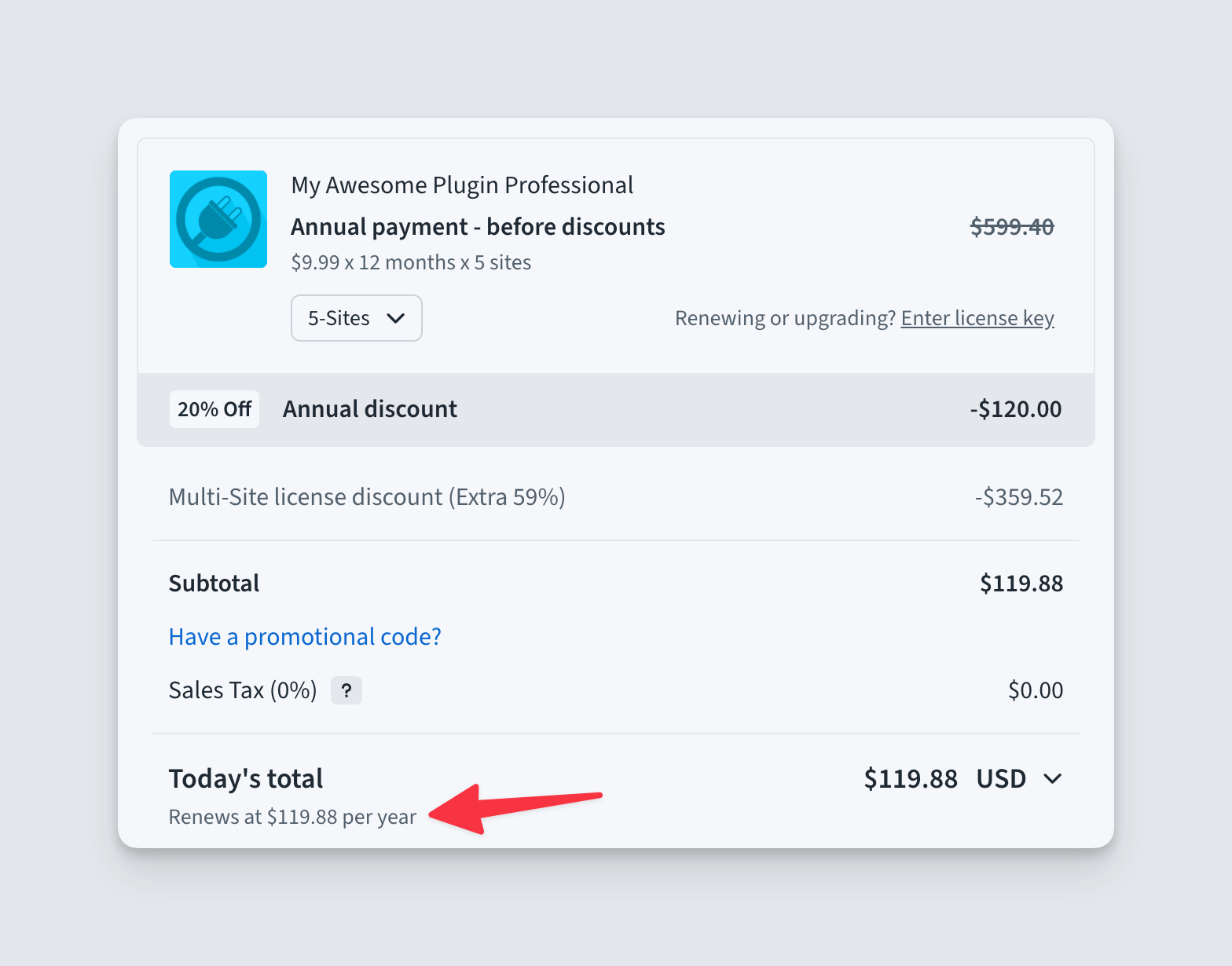
always_show_renewals_amount (true | false, default false)

Always shown renewal amount in Freemius Checkout

When set to true, a small line mentioning the total renewal price per billing cycle will shown below the total. By default, it only shows up when there is a renewal discount involved. We introduced this option because it can help provide more context with different discounts already shown in the UI. For example, one can see that there is a 30% annual discount and wonder if the discount is only for the first payment. There could also be a coupon that is applicable for the first payment only. With a clear line mentioning the renewal amount, the confusion goes away.

show_inline_currency_selector (true | false, default true)

Freemius checkout - Inline currency selector

We recently introduced an inline currency selector in the total line. Now you can hide it if you want by setting the value to false. We gave this option, because in some cases, the seller may not want to show an UI to change currencies for various reasons.

refund_policy_position (below_form | below_breakdown | dynamic, default dynamic)

Dynamic refund policy badge position in Freemius Checkout

Many partners asked us to give the option to specify where to place the refund policy badge. For some partners, there were no reviews, so placing it below the breakdown instead of the form was the natural choice. For some products, the breakdown area can be slim (without discounts or upsells). So by placing the UI below the breakdown optimizes the real-estate.

We realized we cannot decide the best positioning because it depends. So we are giving full control over where you want to place the refund policy UI in the horizontal dual-column layout. Depending on your preference you can place it below the form or the breakdown. We recommend using the default value dynamic. Depending on the width and height of the page the UI will be placed optimally either below the form or below the breakdown.

Please note when there are no reviews, the badge will always be positioned below the breakdown. Also this settings has no effect for mobile or single column view.

Other noteworthy updates

  • We have fixed and enhanced various responsiveness issues, layout, spacing, etc.
  • The VAT disclaimer line will now expand to the empty space.
  • We identified and fixed a glitch in the form validation mechanism in mobile devices.

Kickstart LiteSDK Project – Two new endpoints to activate and deactivate licenses

We are super stoked to announce that we have kickstarted the LiteSDK project. The LiteSDK is meant to be a lightweight alternative to our classic WordPress SDK. It will have minimal features, for example, license activation, software updates, etc. We aim to make the project as modular as possible, to gradually add features that can optionally be included in a WordPress product.

To ease the communication layer of the LiteSDK, we have introduced two new endpoints in our API.

License Activation endpoint

/v1/plugins/:plugin_id/activate.json (public)

Use this endpoint to activate a license on a new or existing site. It expects the following required parameters:

  • license_key – The license key
  • uid – A unique identifier of the site

UID: The generation of the UID must be done by the client. More on it later.

Optionally it also accepts the following parameters:

  • url – The URL of the site
  • title – The title of the site
  • version – The version of the WordPress plugin/theme.
  • install_id – The ID of an existing install/site (must belong to the same user and must have the same UID when it was created).

On a POST request, with the above parameters the endpoint can

  • Create an Install and/or activate the license on the existing install.
  • Create a user if the license does not have a user already (ghosted licenses that partners can create from the Developer Dashboard).
    • In such case, the endpoint will expect first_name, last_name and user_email parameters.
  • If the install already had an activation of the plugin for a different license, it will be deactivated.

Upon success, it returns the id, public_key and secret_key of the user and the install entities.

License deactivation endpoint

/v1/plugins/:plugin_id/deactivate.json (public)

Use this endpoint to deactivate the previously activated licenses on an installation. It expects the following required parameters:

  • uid – The same UID used when activating the license
  • install_id – The ID of the install from where you want to deactivate the license
  • license_key – The key of the license you want to deactivate

On a POST request, the endpoint will deactivate the license from the install entity. It will return the properties of the install entity on success.

Usage POC

We have created a POC (Proof-of-Concept) of a WordPress project demonstrating the new endpoints. This POC is still under heavy development and we are yet to write documentation. But if you want to take a look, you can visit our GitHub project.

The project has the following features at the moment:

  • Provides abstraction for the API communication.
  • Generation and storage of the uid parameter.
  • Storing license activation status and providing methods to check for updates, sync license status with the server etc.

Call for Testers

Over time, we aim to turn it into a proper LiteSDK that can be used in production. At this stage, please help us identify more use cases by trying out the POC in your projects. We are always listening to understand how we can make our products better. If you need help trying out the POC, please get in touch with our support. You can also “watch” the project under GitHub to subscribe to updates.

Load more