

Effectively use Coupons with the Freemius Checkout
The Freemius Checkout supports the use of coupons to provide discounts and promotions to your customers.
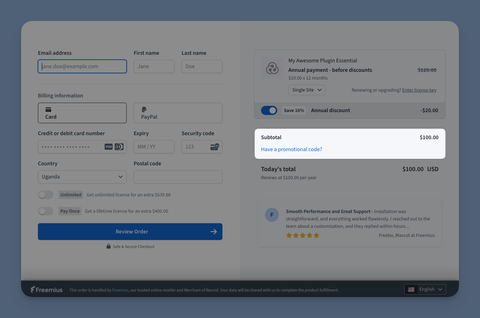
Configuring Coupons
Start by creating coupons in the Freemius Developer Dashboard, where you can set up various types of discounts, such as percentage-based or fixed amount discounts, and configure their usage rules and limitations. Here are the steps to create a coupon.
You can configure various settings for each coupon, such as the:
Your coupon can include a blend of the settings mentioned above, allowing you to create highly targeted promotions for specific customer segments or behaviors; e.g., a coupon that offers a 20% discount, is valid for seven days, can be redeemed only once per user, is tied to a specific plan, and is available only to new customers.
Once your coupon is created and configured, you can apply it to the checkout in several ways. For example, you can share the coupon code with your customers through various marketing channels, or you can set up automated triggers to apply coupons based on specific conditions or customer behaviors.
Manual Application
In this case, the customer enters the coupon code in the designated field on the checkout page to receive the discount.
This method is ideal for promotions where you want to encourage customers to take action, such as signing up for a newsletter or following your social media channels to receive the coupon code.
Automated Application
In this case, coupons are applied automatically based on specific conditions or triggers, such as:
Special Coupons & Discounts
- Cart Abandonment Recovery Coupon
- Exit Intent Coupon (+ 1 Hour FOMO)
- Subscription Cancellation Coupon
- Manual Subscription Renewal Recovery Coupon
Preload the Checkout with Coupon
The checkout can be preloaded with a coupon code that is visible to the customer, allowing them to see the applied discount.
This is possible with the coupon configuration, which can be used to automatically apply a specific coupon when the customer visits the checkout page. Here's how to use it for Overlay Checkout and Hosted Checkout:
- Hosted Checkout
- Overlay Checkout
https://checkout.freemius.com/product/{product_id}/?coupon=DISCOUNT10
checkout.open({
  coupon: 'DISCOUNT10',
});
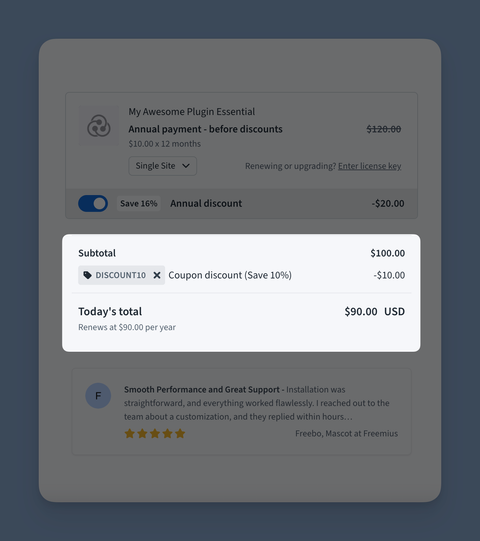
This will apply the DISCOUNT10 coupon to the checkout, and the customer will see the discount reflected in their order summary.
Preload the Checkout with Hidden Coupon
In this case, the checkout is preloaded with a hidden coupon code, applying the discount without displaying the coupon code to the customer.
For this process, use hide_coupon in combination with the coupon configuration.
- Hosted Checkout
- Overlay Checkout
https://checkout.freemius.com/product/{product_id}/?coupon=DISCOUNT10&hide_coupon=true
checkout.open({
  coupon: 'DISCOUNT10',
  hide_coupon: true,
});
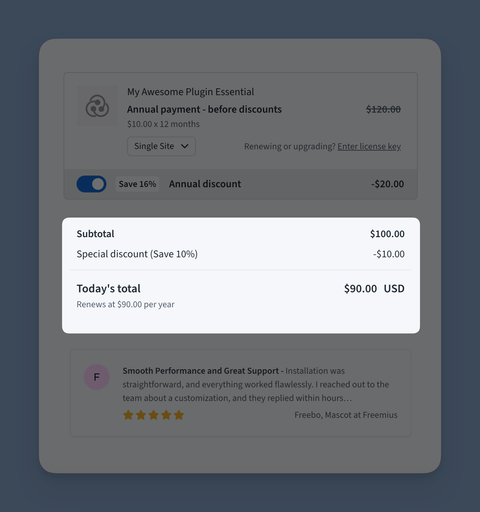
The coupon code will not be visible to the customer, but the discount will still be applied to their order. The checkout calls it a Special Discount, and it will be displayed as such in the order summary.
This is useful for offering exclusive discounts or promotions without revealing the specific coupon code. This method is ideal for targeted promotions, such as offering a discount to specific customer segments or during special events, without making the coupon code widely known.