

Prepopulate user information in the Freemius Checkout
This feature improves user experience and conversion rates by securely loading the Freemius Checkout with prepopulated user information. It is especially useful when you have an existing user base and want to streamline the checkout flow for returning customers.
When you generate a user_token for a specific user, the Freemius Checkout automatically prefills the checkout fields with the information associated with that user in Freemius. This includes details such as name, email address, VAT ID, country, and ZIP or postal code, etc.
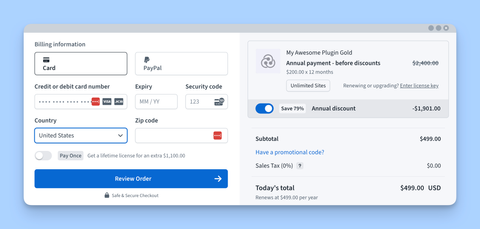
By reducing manual input during checkout, this approach minimizes friction and can lead to higher conversion rates.
Pre-Requisites
To use this feature:
- You must know the Freemius User ID of the user initiating the checkout.
- You must make a Freemius API call in the context of the same plugin or product for which the checkout is being loaded.
- The token must be used immediately when loading the checkout, as it is valid for only 1 minute.
High Level Process
- When the user clicks on the purchase button, make a call to YOUR backend.
- Your backend will figure out the ID of the user and the ID of the product they are trying to purchase.
- The backend will call Freemius API to generate a token.
- The token would be given back to the JavaScript application which intercepted the "click".
- The JavaScript application will then
openthe Freemius checkout while passing in the generated token asuser_tokenin the configuration.
For SaaS integrations, set the readonly_user parameter to true to make the user details (name and email) readonly.
Generating User Tokens
For logged out users, your software needs to generate user tokens. We have different ways to generate them for the different scenarios, for example:
- Using Freemius PHP SDK as shown in the backend code example.
- Using the Freemius API Checkout token endpoint. This can work in any backend language that can make HTTP requests.
Please generate the user_token right before opening the checkout and open the checkout as soon as the token is generated. The token has a short life-span and you must not generate it before hand.
Code Example
Here is a complete code example demonstrating how to implement this feature.
Frontend
Initialize the checkout on your website with this JavaScript code:
<!-- Init the Freemius Checkout JS SDK. -->
<script>
    const checkout = new FS.Checkout({
        plugin_id:  '9889',
        plan_id:    '16645',
        public_key: 'pk_6405fe361ba0a6e68d14fb480d98b',
        image:      'https://your-plugin-site.com/logo-100x100.png'
    });

    // Assume the purchase button has an ID `#purchase`
    const purchaseButton = document.querySelector('#purchase');

    purchaseButton.addEventListener('click', async (e) => {
        e.preventDefault();

        // First make an API call to YOUR backend to generate the user token.
        const userToken = await fetch('https://yoursite.com/generate-user-token.php', { method: 'POST' })
                                  .then(response => response.json())
                                  .then(data => data.token);

        // Now load the Freemius Checkout with the freshly generated token.
        checkout.open({
            // Add the user Token as `user_token` parameter.
            user_token: userToken,
            // ....other configuration option
        });
    });
</script>
Backend
The JS code would make an round-trip request to this PHP code to get the token:
<?php

// Use the Freemius PHP SDK
define( 'FS__API_SCOPE', 'developer' );
define( 'FS__API_DEV_ID', 1234 );
define( 'FS__API_PUBLIC_KEY', 'pk_YOUR_PUBLIC_KEY' );
define( 'FS__API_SECRET_KEY', 'sk_YOUR_SECRET_KEY' );

// Init SDK.
$api = new Freemius_Api(FS__API_SCOPE, FS__API_DEV_ID, FS__API_PUBLIC_KEY, FS__API_SECRET_KEY);

// Figure out the product ID and the user ID.
$plugin_id = '...';
$user_id   = '...';

// Make an API call to the token generator.
$result = $api->Api("plugins/{$plugin_id}/users/{$user_id}/tokens/checkout.json");

// Send the token back to your JS application.
echo json_encode(array(
  'token' => $result['token'],
));