

How to Offer Trials With or Without Requiring a Payment Method
The Freemius Checkout allows you to set up trial periods for your products, enabling potential customers to experience your product before committing to a purchase.
Offering a free trial can help increase your product’s distribution and sales. Check out The Ultimate Guide To Free Trials For Premium WordPress Plugins And Themes.
How to Activate and Use Trials
Trials must be set up in each plan's configuration settings. To configure a trial period for your product, follow these steps:
- Log in to your Freemius Dashboard.
- Navigate to the Products section and select the product you want to configure.
- Go to the Plans page.
- Select the desired plan and scroll to the Trial section.
- Specify the duration of the trial period (e.g., 7 days, 14 days). This setting is saved automatically when you select the duration.
- Choose whether to require a payment method.
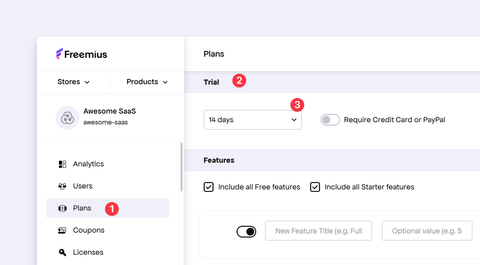
Trials are available for all product types using the Freemius Checkout.
Supported Trial Types
Freemius supports two types of trials based on whether a payment method is required:
Free Trial — Without a Payment Method
When customers sign up for this option, they are not asked for a payment method.
To set up this trial option in your plan settings, toggle OFF the “Require Credit Card or PayPal” option.
Paid Trial — Requiring a Payment Method
When customers sign up for this option, a payment method is required.
To set up this option in your plan settings, toggle ON the “Require Credit Card or PayPal” option.
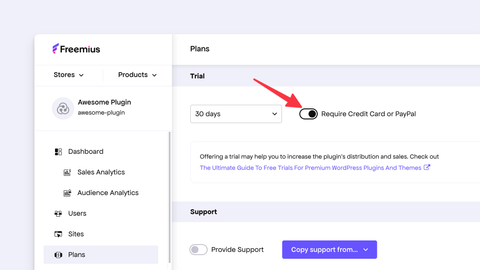
Requiring payment details means that the user will be charged automatically when the trial period ends unless they cancel beforehand. Customers will be notified via email before the trial ends to remind them of the upcoming charge.
Share Trial Links With Customers
After activating trials in your Freemius Dashboard, you can make trial option links available to your customers. These links can direct users to start a trial for your product. For example:
Simple HTML Buy Buttons
You can create simple HTML buy buttons that include the trial option. You can obtain these from the Freemius Dashboard as explained in Generating Freemius Checkout Buy Buttons.
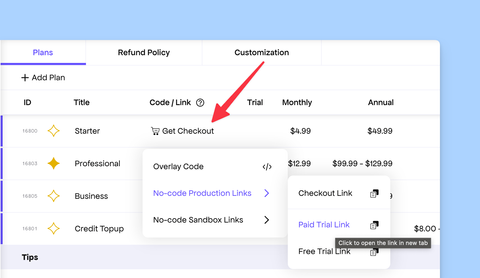
Checkout Links With the Trial
You can also create direct checkout links that lead users to start a trial for your product. Do this by adding the trial parameter to your pricing page URL.
https://checkout.freemius.com/product/{your-product-id}/?trial={true|false|free|paid}
Integration With the Freemius WordPress SDK
If you prefer customers to purchase from the WordPress dashboard, integrate the Freemius WordPress SDK into your WordPress products. See how to leverage trials in your free product version with the Freemius WordPress SDK.