

Integrating Freemius into Your SaaS Application
Integrate with your AI Agent
This guide will walk you through the essential steps to integrate Freemius into your SaaS application. It covers everything from setting up the checkout process to managing user licenses and subscriptions, setting up webhooks for real-time updates, and providing a customer portal for your users.
Are you building a SaaS application using Next.js? You can skip this and check out our Next.js SaaS Starter Guide for a complete walkthrough and starter repository on integrating with Freemius.
You can also check our JavaScript SDK or Framework Integration Guide for other popular frameworks. Read on to learn the core concepts that apply to any technology stack!
In this guide, we will share examples using both our JavaScript SDK and PHP. However, you can easily adapt the examples to your preferred programming language or framework, or simply use your AI agent.
The JavaScript examples assume that you have installed the SDK and configured a freemius instance for your product.
import { Freemius } from '@freemius/sdk';

export const freemius = new Freemius({
  productId: process.env.FREEMIUS_PRODUCT_ID!,
  apiKey: process.env.FREEMIUS_API_KEY!,
  secretKey: process.env.FREEMIUS_SECRET_KEY!,
  publicKey: process.env.FREEMIUS_PUBLIC_KEY!,
});
At the end of the integration, you will have
- A working end to end checkout flow for your SaaS product.
- A database table to store the mapping between your users and their entitlements.
- A set of library functions to check the user's entitlement and plan.
- A webhook listener to keep your database in sync with Freemius.
- A Customer Portal for your users to manage their subscriptions and billing information.
Product Setup
- Sign-up to Freemius
- Create a new SaaS product
- Go to Plans and configure the plans and prices
- Optionally, customize the unit label
We recommend that you set up the subscription pricing for your SaaS product, as it is the most common pricing model. However, you can also set up one-off pricing or a combination of both.
Restricting or Relaxing Single Subscription Per User
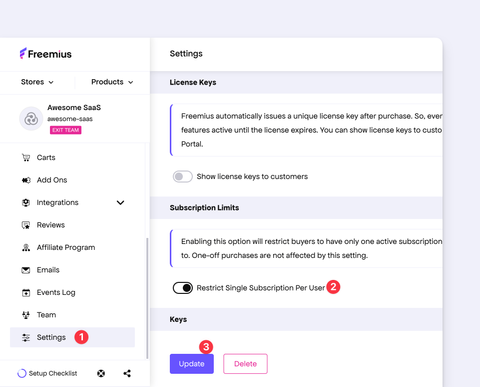
Please note that by default, for SaaS products, users can have only one active subscription at a time. You can relax this limitation if needed by going to Settings and disabling the Restrict Single Subscription Per User toggle.
To learn how to facilitate upgrades, please continue reading.
If you don't envision supporting multiple subscriptions per user, we recommend keeping the restriction enabled. This approach simplifies your integration, provides a better experience to your customers, and reduces potential support requests and disputes. Find our case study.
Database Updates
Your database likely has a user table with the following columns:
idemail- …
To store the entitlement mapping between your users and Freemius, we recommend creating a new user_fs_entitlement table in your database with the following columns:
id- The primary key.user_id- A foreign key referencing yourusertable.fs_license_id- A unique identifier for the Freemius license (text/string).fs_plan_id- The Freemius plan ID (text/string).fs_pricing_id- The Freemius pricing ID (text/string).fs_user_id- The Freemius user ID (text/string).type- The entitlement type (e.g.,subscription,lifetime, etc.).expiration- The license expiration timestamp (nullable).is_canceled- A boolean flag indicating if the license is canceled.created_at- Timestamp when the record was created.
This table will hold the mapping between your user entities and their corresponding Freemius licenses, plans, and entitlements.
Example Database Schema
Use the example for your technology stack to create the user_fs_entitlement table:
- SQL (PostgreSQL)
- JS SDK
- PHP (Eloquent)
-- First create the enum type
CREATE TYPE fs_entitlement_type AS ENUM ('subscription', 'lifetime');

-- Then create the table
CREATE TABLE user_fs_entitlement (
    id              TEXT PRIMARY KEY,
    "user_id"       TEXT NOT NULL,
    "fs_license_id" TEXT NOT NULL UNIQUE,
    "fs_plan_id"    TEXT NOT NULL,
    "fs_pricing_id" TEXT NOT NULL,
    "fs_user_id"    TEXT NOT NULL,
    type            fs_entitlement_type NOT NULL,
    expiration      TIMESTAMP(3) WITHOUT TIME ZONE,
    "is_canceled"   BOOLEAN NOT NULL,
    "created_at"    TIMESTAMP(3) WITHOUT TIME ZONE NOT NULL,
    CONSTRAINT      fk_user FOREIGN KEY ("user_id") REFERENCES "User"(id) ON DELETE CASCADE
);

-- Index on type for faster filtering
CREATE INDEX idx_user_fs_entitlement_type ON user_fs_entitlement (type);
Add the following enum and model to your Prisma schema. Also add an fsEntitlements UserFsEntitlement[] relation field to your existing User model.
enum FsEntitlementType {
  subscription
  lifetime

  @@map("fs_entitlement_type")
}

model UserFsEntitlement {
  id     String @id @default(cuid())
  userId String @map("user_id")
  user   User   @relation(fields: [userId], references: [id], onDelete: Cascade)

  fsLicenseId String            @unique @map("fs_license_id")
  fsPlanId    String            @map("fs_plan_id")
  fsPricingId String            @map("fs_pricing_id")
  fsUserId    String            @map("fs_user_id")
  type        FsEntitlementType
  expiration  DateTime?
  isCanceled  Boolean           @map("is_canceled")
  createdAt   DateTime          @default(now()) @map("created_at")

  @@index([type], map: "idx_user_fs_entitlement_type")
  @@map("user_fs_entitlement")
}
The JS SDK expects entitlement properties in camelCase. The Prisma @map attributes above keep the generated Prisma Client fields in camelCase while mapping them to snake_case database columns. Alternatively, create the database columns in camelCase or write mapping functions that convert between the database record and the SDK format.
Create a Laravel migration for the table:
<?php

use Illuminate\Database\Migrations\Migration;
use Illuminate\Database\Schema\Blueprint;
use Illuminate\Support\Facades\Schema;

return new class extends Migration
{
    public function up(): void
    {
        Schema::create('user_fs_entitlement', function (Blueprint $table) {
            $table->string('id')->primary();
            $table->string('user_id');
            $table->string('fs_license_id')->unique();
            $table->string('fs_plan_id');
            $table->string('fs_pricing_id');
            $table->string('fs_user_id');
            $table->enum('type', ['subscription', 'lifetime'])->index();
            $table->timestamp('expiration', precision: 3)->nullable();
            $table->boolean('is_canceled');
            $table->timestamp('created_at', precision: 3);

            $table->foreign('user_id')
                ->references('id')
                ->on('users')
                ->cascadeOnDelete();
        });
    }

    public function down(): void
    {
        Schema::dropIfExists('user_fs_entitlement');
    }
};
Then add the corresponding Eloquent model:
<?php

namespace App\Models;

use Illuminate\Database\Eloquent\Attributes\Table;
use Illuminate\Database\Eloquent\Model;
use Illuminate\Database\Eloquent\Relations\BelongsTo;

#[Table('user_fs_entitlement', keyType: 'string', incrementing: false)]
class UserFsEntitlement extends Model
{
    public const UPDATED_AT = null;

    protected $fillable = [
        'id',
        'user_id',
        'fs_license_id',
        'fs_plan_id',
        'fs_pricing_id',
        'fs_user_id',
        'type',
        'expiration',
        'is_canceled',
    ];

    protected function casts(): array
    {
        return [
            'expiration' => 'datetime',
            'is_canceled' => 'boolean',
        ];
    }

    public function user(): BelongsTo
    {
        return $this->belongsTo(User::class);
    }
}
Relation with Freemius Licenses
With Freemius, a user’s License is what governs their account level, providing you with significant flexibility. This setup allows you to maintain feature access even if a subscription is canceled mid-term, or restrict access even if a subscription remains active. To effectively manage user account levels, ensure that your webhook is configured to handle license-related events (a webhook implementation can be found below).
If you prefer not to store canceled or deleted licenses, you can remove the is_canceled column and instead add a license_id column to the user table, establishing a 1:1 relationship. For the purposes of this example, however, we'll assume that you want to preserve the entire license history.
Checkout Integration
You can integrate the Checkout as a modal dialog triggered using JavaScript, or by using direct checkout links.

Rendering a Pricing Page
You can call the Freemius API endpoint for pricing table to retrieve all the data to create your own pricing table.
If your tech stack is JavaScript (Backend) & React (Frontend), you can use our Pricing Table Component to render the pricing table in your SaaS application.

Prefill Logged-In User Information
Regardless of the method you choose, ensure that you set user_email to the logged-in user’s email. To ensure that the purchase is made with the same customer email as in your system, you can direct the checkout to set the email input as read-only by setting readonly_user to true.
- Hosted Checkout
- Modal Checkout
Here’s an example of a direct checkout link:
https://checkout.freemius.com/product/{product_id}/plan/{plan_id}/?user_email={email}&readonly_user=true
When readonly_user is set in a direct link, the checkout will auto redirect to
https://checkout.freemius.com/product/{product_id}/plan/{plan_id}/
to ensure the user can’t easily tinker with the email address.
import { Checkout } from '@freemius/checkout';
const checkout = new FS.Checkout({
  product_id: 'your_product_id',
  plan_id: 'your_plan_id',
});

checkout.open({
  user_email: 'user_email',
  readonly_user: true,
});
When constructing the URL manually, be sure to URL encode the email address and other parameters. The JavaScript SDK handles this for you.
- JS SDK
- PHP
import freemius from '@src/lib/freemius';

async function generateCheckoutLink(planId, email, name) {
  const checkout = await freemius.checkout.create({
    planId,
    user: { email, name },
  });

  return checkout.getLink();
}
function generateCheckoutLink($productId, $planId, $email, $otherParams = []) {
  $baseUrl = "https://checkout.freemius.com/product/{$productId}/plan/{$planId}/";
  $params = array_merge([
    'user_email' => $email,
    'readonly_user' => 'true',
  ], $otherParams);

  $queryString = http_build_query($params);

  return "{$baseUrl}?{$queryString}";
}
Passing Purchase Information to the Backend
- If you’re using the hosted Checkout, we recommend setting up a redirection URL so your app can immediately process the purchase information.
- If you're using the modal integration, use the
successorpurchaseCompletedcallback handler to receive the purchase data.
Read on to learn how to store the purchase information in your database and manage user entitlements.
Saving Purchase Information
When a user completes a purchase, you will receive the purchase data either through the redirection URL (hosted Checkout) or the callback function (modal Checkout). You should then save the relevant information in your user_fs_entitlement table.
Our recommendation is to capture the license_id from the purchase data, query the Freemius API to retrieve the complete license details, and then store the necessary fields in your database. Here is an example of how to achieve this:
- JS SDK
- PHP
import { type PurchaseInfo } from '@freemius/sdk';
import { freemius } from './freemius'; // our freemius instance
import { db } from './db'; // our database instance

// #region Entitlement Library Functions

// Our main library functions to process the purchase data and store it in our database.
export async function findUserByEmail(email: string) {
  // Replace with your actual user lookup logic
  return db.user.findUnique({ where: { email } });
}

export async function processPurchaseInfo(purchase: PurchaseInfo) {
  const user = await findUserByEmail(purchase.email);

  // We exit if the user hasn't registered to our application yet.
  // Alternatively, you can register the user automatically here if desired.
  if (!user) {
    return;
  }

  // Insert or update the purchase in our local database
  await db.userFsEntitlement.upsert({
    where: {
      fsLicenseId: purchase.licenseId,
    },
    update: purchase.toEntitlementRecord(),
    create: purchase.toEntitlementRecord({ userId: user.id }),
  });
}

// #endregion

// #region Example Usage

// 1: We somehow retrieve the licenseId from the request query or the modal callback data
const licenseId = request.query.license_id as string;
// 2: Retrieve the purchase data from Freemius API
const purchase = await freemius.purchase.retrievePurchase(licenseId);
// 3: And process it to store in our database
await processPurchaseInfo(purchase);

// #endregion
#region Entitlement Library Functions
function findUserByEmail(string $email): ?User {
  // Replace with your actual user lookup logic
  $user = db()->user->where('email', $email)->first();

  return $user;
}

function processPurchaseInfo(string $license_id) {
  // @see https://freemius.com/help/api/licenses/retrieve/
  $license = getLicenseFromFreemiusApi($license_id);
  // @see https://freemius.com/help/api/users/retrieve/
  $user = getUserFromFreemiusApi($license->user_id);
  // @see https://freemius.com/help/api/licenses/retrieve-latest-subscription/
  $subscription = getSubscriptionFromFreemiusApi($license_id);

  $local_user = findUserByEmail($user['email']);

  // We exit if the user hasn't registered to our application yet.
  // Alternatively, you can register the user automatically here if desired.
  if (!$local_user) {
    return;
  }

  // Insert or update the purchase in our local database
  db()->user_fs_entitlement->updateOrInsert(
    ['fs_license_id' => $license['id']],
    [
      'user_id'       => $local_user->id,
      'fs_plan_id'    => $license['plan_id'],
      'fs_pricing_id' => $license['pricing_id'],
      'fs_user_id'    => $user['id'],
      'type'          => is_null($subscription) ? 'lifetime' : 'subscription',
      'expiration'    => $license['expiration'],
      'is_canceled'   => $license['is_canceled'],
    ]
  );
}

#endregion

#region Example Usage

// 1. We somehow retrieve the license_id from the request query or the modal callback data
$license_id = $_GET['license_id'];
// 2. Call the function to process the purchase and store it in our database
processPurchaseInfo($license_id);

#endregion
A more reliable alternative for capturing this information is to set up a webhook listener (see below). This method ensures that you receive all purchase events, even if the user does not complete the redirection process after checkout.
Checking User’s Plan
To determine the account level of a logged-in user, search for an active/non-canceled license associated with the user. Ensure the license has not expired (via expiration) to confirm the user is on the right plan and pricing indicated by user_fs_entitlement.fs_plan_id or user_fs_entitlement.fs_pricing_id. We recommend using the pricing_id for more granular control, especially if you have multiple quotas for the same plan.
- JS SDK
- PHP
import { freemius } from './lib/freemius'; // our freemius instance
import { db, type UserFsEntitlement } from './lib/db'; // our database instance

// ... Existing code ...

/**
 * Get the user's entitlement.
 *
 * @returns The user's active entitlement or null if the user does not have an active entitlement.
 */
export async function getUserEntitlement(
  userId: string
): Promise<UserFsEntitlement | null> {
  const entitlements = await db.userFsEntitlement.findMany({
    where: { userId, type: 'subscription' },
  });

  // The JS SDK handles the expiration and is_cancelled.
  return freemius.entitlement.getActive(entitlements);
}

export async function getUserPlanId(userId) {
  const activeEntitlement = await getUserEntitlement(userId);

  return activeEntitlement?.fsPlanId ?? null;
}

export async function getUserPricingId(userId) {
  const activeEntitlement = await getUserEntitlement(userId);

  return activeEntitlement?.fsPricingId ?? null;
}
function getActiveEntitlements(array $entitlements): ?array
{
  $active_entitlements = array_filter($entitlements, function ($entitlement) {
    if ($entitlement->is_canceled) {
      return false;
    }

    // In case you want to support a concept of non-expiring entitlementss,
    // you can set their expiration to `null`.
    if (is_null($entitlement->expiration)) {
      return true;
    }

    $expiration = new DateTime($entitlement->expiration, new DateTimeZone('UTC'));
    $now = new DateTime("now", new DateTimeZone('UTC'));

    return $now < $expiration;
  });

  return !empty($active_entitlements) ? $active_entitlements : null;
}

function getUserEntitlement($userId)
{
  $entitlements = loadFsUserEntitlements([
    "user_id" => $userId,
    "is_canceled" => false,
    "type" => "subscription",
  ]);

  if (empty($entitlements)) {
    return null;
  }

  // Filter the first non expired active entitlement
  $active_entitlements = getActiveEntitlement($entitlements);

  if (empty($active_entitlements)) {
    return null;
  }

  // You can take the first one, or implement your own logic to select the most relevant one.
  $active_entitlement = reset($active_entitlements);

  if (is_null($active_entitlement->expiration)) {
    return $active_entitlement;
  }

  $expiration = new DateTime($active_entitlement->expiration);
  $now = new DateTime("now");

  return $now < $expiration ? $active_entitlement : null;
}

function getUserPlanId($userId)
{
  $activeEntitlement = getUserEntitlement($userId);

  return $activeEntitlement ? $activeEntitlement->fs_plan_id : null;
}

function getUserPricingId($userId)
{
  $activeEntitlement = getUserEntitlement($userId);

  return $activeEntitlement ? $activeEntitlement->fs_pricing_id : null;
}
How to Get the Plan ID or Pricing ID?
To get the plan ID, simply navigate to the Plan page under your SaaS product in the Freemius Developer Dashboard.
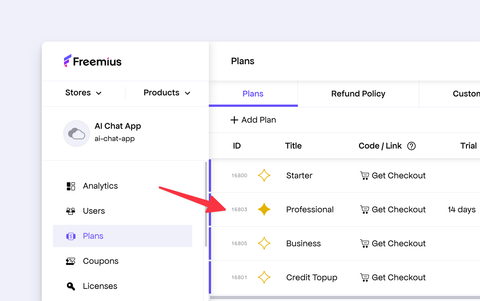
The ID of the plan is displayed next to the plan name.
To get the pricing ID, click on the specific plan to view its details. The pricing ID is listed next to each pricing option within the plan.
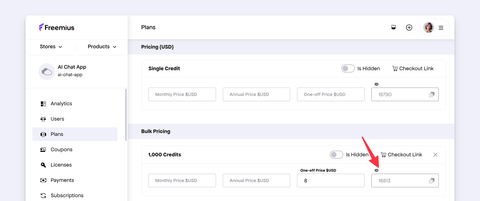
You can maintain a map of features or entitlement per pricing_id in your application and use it to determine the user's access level.
- JS SDK
- PHP
const userPricingId = await getUserPricingId(userId);

// Example mapping of pricing IDs to features
const pricingFeaturesMap = {
  pricing_id_1: ['featureA', 'featureB'],
  pricing_id_2: ['featureA', 'featureB', 'featureC'],
};

const userFeatures = pricingFeaturesMap[userPricingId] ?? [];
$userPricingId = getUserPricingId($userId);

// Example mapping of pricing IDs to features
$pricingFeaturesMap = [
  'pricing_id_1' => ['featureA', 'featureB'],
  'pricing_id_2' => ['featureA', 'featureB', 'featureC'],
];
$userFeatures = $pricingFeaturesMap[$userPricingId] ?? [];
Handling License or Subscription Upgrades
Freemius allows your users to upgrade the plan or license quota of their subscription. The upgrade process goes through our Checkout again, which collects up-to-date information from the user. After a successful purchase, the license object will be updated with the new information.
The flow involves:
- Sending an API request from your app with the
license_idto generate the upgrade Checkout URL. - Passing the URL to your user or triggering the modal Checkout (depending on your integration).
- Synchronizing your SaaS with the up-to-date information.
Below is the API endpoint and an example of how to call it:
- JS SDK
- PHP
- API Request
const result = await freemius.api.license.retrieveCheckoutUpgrade(licenseId, {
  plan_id: planId,
  billing_cycle: 'annual',
  quota: 1,
  currency: 'usd',
});
function generateUpgradeCheckoutLink($productId, $licenseId, $planId, $billingCycle = 'annual', $quota = 1, $currency = 'usd') {
    $url = "https://api.freemius.com/v1/products/{$productId}/licenses/{$licenseId}/checkout/link.json";

    $data = [
        'plan_id' => $planId,
        'billing_cycle' => $billingCycle,
        'quota' => $quota,
        'currency' => $currency,
    ];

    $options = [
        CURLOPT_URL => $url,
        CURLOPT_RETURNTRANSFER => true,
        CURLOPT_POST => true,
        CURLOPT_POSTFIELDS => json_encode($data),
        CURLOPT_HTTPHEADER => [
            'Content-Type: application/json',
            'Accept: application/json',
            'Authorization: Bearer <token>',
        ],
    ];

    $curl = curl_init();
    curl_setopt_array($curl, $options);
    $response = curl_exec($curl);
    curl_close($curl);

    return json_decode($response, true);
}
POST /v1/products/{product_id}/licenses/{license_id}/checkout/link.json HTTP/1.1
Content-Type: application/json
Accept: application/json
Authorization: Bearer 123
Host: api.freemius.com
Content-Length: 127

{
  "plan_id": "planID",
  "billing_cycle": "annual",
  "quota": 1,
  "currency": "usd"
}
The API will return an object with three properties:
url- The upgrade link of the hosted checkout that you can share.settings- Configuration parameter that you can use with the modal Checkout.expires- Expiration date of the link.
You will need to use a Bearer Token to authenticate the request from your backend. More information about our REST API is available here.
Once the upgrade is complete, depending on your integration, the Checkout will either redirect to the success URL on your SaaS website or pass the data through the modal integration. From there, you can update your own system to reflect the changes in real time.
Freemius includes a built-in dunning mechanism. If a subscription renewal fails, the system will automatically attempt to process the payment through a series of emails sent over several days following the original renewal date. The subscription will remain active during this period, even though the license may expire, until the recovery process is complete or the subscription is eventually canceled.
Creating a Webhook Listener
We strongly recommend setting up webhooks to ensure your backend reliably receives upgrade and license change notifications, even if the user's browser fails to complete the redirect or if network interruptions occur during the Checkout process.
License-related events are the definitive webhooks for entitlement changes from subscriptions, one-off purchases, and other purchase types. For all license events except license.deleted, the listener retrieves the latest purchase data from Freemius and updates the corresponding entitlement in your database. For license.deleted, it removes the corresponding entitlement.
First, create a webhook listener endpoint in your backend. The following examples demonstrate how to implement one using either the JS SDK or PHP.
- JS SDK
- PHP
import { freemius } from './lib/freemius'; // our freemius instance
import { processPurchaseInfo } from './lib/user-entitlement'; // Our shared entitlement logic
import { db } from './lib/db'; // our database instance

async function syncEntitlementFromWebhook(licenseId) {
  const purchase = await freemius.purchase.retrievePurchase(licenseId);

  await processPurchaseInfo(purchase);
}

export async function deleteEntitlement(fsLicenseId) {
  await db.userFsEntitlement.delete({
    where: { fsLicenseId },
  });
}

export default {
  async fetch(request) {
    if (request.method !== 'POST') {
      return new Response('Method Not Allowed', { status: 405 });
    }

    const listener = freemius.webhook.createListener();
    const licenseEvents = [
      'license.created',
      'license.extended',
      'license.shortened',
      'license.updated',
      'license.cancelled',
      'license.expired',
      'license.plan.changed',
    ];

    listener.on(licenseEvents, async ({ objects: { license } }) => {
      if (license?.id) {
        await syncEntitlementFromWebhook(license.id);
      }
    });

    // Specific listener for the license deletion event, which is fired when a license is deleted from the Freemius system.
    listener.on('license.deleted', async ({ data} }) => {
      await deleteEntitlement(data.license_id);
    });

    return freemius.webhook.processFetch(listener, request);
  },
};
<?php
require_once __DIR__ . '/../lib/user-entitlement.php';

// Retrieve the request's body payload.
$input = @file_get_contents("php://input");
$hash = hash_hmac("sha256", $input, "<PRODUCT_SECRET_KEY>");
$signature = $_SERVER["HTTP_X_SIGNATURE"] ?? "";

if (!hash_equals($hash, $signature)) {
  // Invalid signature, don't expose any data to attackers.
  http_response_code(200);
  exit();
}

$fs_event = json_decode($input);

function syncEntitlementFromWebhook(string $license_id): void
{
  processPurchaseInfo($license_id);
}

function deleteEntitlement(string $fs_license_id): void
{
  db()->user_fs_entitlement
    ->where('fs_license_id', $fs_license_id)
    ->delete();
}

$license_events = [
  'license.created',
  'license.extended',
  'license.shortened',
  'license.updated',
  'license.cancelled',
  'license.expired',
  'license.plan.changed',
];

if (in_array($fs_event->type, $license_events, true)) {
  $license_id = $fs_event->objects->license->id ?? null;

  if ($license_id) {
    syncEntitlementFromWebhook($license_id);
  }
} elseif ($fs_event->type === 'license.deleted') {
  $license_id = $fs_event->data->license_id ?? null;

  if ($license_id) {
    deleteEntitlement($license_id);
  }
}

http_response_code(200);
Next, open the Freemius Developer Dashboard and set the webhook URL to your webhook listener endpoint.

Select the following events for your webhook:
- license.created
- license.extended
- license.shortened
- license.updated
- license.cancelled
- license.expired
- license.plan.changed
- license.deleted
Use subscription.* events only for subscription-specific workflows, such as sending custom emails. Do not use them to synchronize entitlements.
Customer Portal
There are multiple options for providing your customers with a self-service portal to manage their subscriptions, billing information, and more.
Hosted Customer Portal

Freemius comes with a self-service customer dashboard out-of-the-box, allowing your customers to easily access their order history, subscriptions, billing information, license keys, and more. They can change plans, update payment methods, and cancel subscriptions, putting control directly in their hands.
We recommend presenting a link that, when clicked, sends a request to your backend. Your backend will call the Freemius API to generate a Customer Portal link and redirect the user to it. This ensures that the link is generated securely and is valid for a limited time.
- JS SDK
- PHP
import { freemius } from './lib/freemius'; // our freemius instance

async function generateCustomerPortalLink(
  email: string
): Promise<string | null> {
  const result =
    await freemius.api.user.retrieveHostedCustomerPortalByEmail(email);

  return result?.link ?? null;
}
function generateCustomerPortalLink($productId, $email) {
    $url = "https://api.freemius.com/v1/products/{$productId}/portal/login.json";

    $data = [
        'email' => $email,
    ];

    $options = [
        CURLOPT_URL => $url,
        CURLOPT_RETURNTRANSFER => true,
        CURLOPT_POST => true,
        CURLOPT_POSTFIELDS => json_encode($data),
        CURLOPT_HTTPHEADER => [
            'Content-Type: application/json',
            'Accept: application/json',
            'Authorization: Bearer <token>',
        ],
    ];

    $curl = curl_init();
    curl_setopt_array($curl, $options);
    $response = curl_exec($curl);
    curl_close($curl);

    return json_decode($response, true)['link'] ?? null;
}
More information can be found in our magic portal login guide.
Embedded Customer Portal

Alternatively, if your front-end is using React, you can integrate the Customer Portal Component directly into your SaaS application.
You need to create a dedicated route in your SaaS application that will handle the backend requests. A full, detailed guide can be found in our React Starter Kit Guide.
Building Your Own Customer Portal
If you’d like to implement your own, within your SaaS, here are the API endpoints that will help you out:
GET https://api.freemius.com/v1/products/{product_id}/users/{user_id}/payments.json
GET https://api.freemius.com/v1/products/{product_id}/users/{user_id}/payments/{payment_id}/invoice.pdf
POST https://api.freemius.com/v1/products/{product_id}/licenses/{license_id}/checkout/link.js
Content-Type: application/json
Accept: application/json
Authorization: Bearer 123
Host: api.freemius.com
Content-Length: 127

{
  "is_payment_method_update": true
}
POST https://api.freemius.com/v1/products/{product_id}/licenses/{license_id}/checkout/link.js
Content-Type: application/json
Accept: application/json
Authorization: Bearer 123
Host: api.freemius.com
Content-Length: 127

{
  "plan_id": "newPlanID”
}
GET https://api.freemius.com/v1/products/{product_id}/licenses/{license_id}/subscription.json
GET https://api.freemius.com/v1/products/{product_id}/users/{user_id}/subscriptions.json
Cancel subscription by license
DELETE https://api.freemius.com/v1/products/{product_id}/licenses/{license_id}/subscription.json
DELETE https://api.freemius.com/v1/products/{product_id}/subscriptions/{subscription_id}.json
GET https://api.freemius.com/v1/products/{product_id}/users/{user_id}/licenses.json
Other Resources
You can find more information about integrating Freemius into your SaaS application in the following resources:
- SaaS SDKs - For different programming languages and frameworks.
- React Starter Kit - A complete React Starter Kit for SaaS applications that provides several front-end UI components out of the box, including a pricing table, checkout modal, and customer portal.
- Checkout Integration - For more advanced checkout integration options, including modal and hosted checkout.
- Selling AI Credits - For SaaS products that sell AI credits, this guide explains how to integrate Freemius with your AI credit system.
If you have any questions or need assistance, please reach out to our support team using the help button in the bottom right corner of the Developer Dashboard. We are happy to help you with your integration.