Changelog

Welcome to the changelog section of Freemius, here you'll find our weekly technical update notes. You can subscribe to all posts via Newsletter or follow us on Twitter to stay updated.

New geolocation-based payments distribution chart & Audience Analytics charts UX improvements

Geo Payments chart (Sales Analytics dashboard)

We are super happy to announce the immediate availability of a geolocation-based payments distribution chart. This chart shows the total distribution of payments by geolocation or country.

The chart helps determine the country of your major target audience.

The chart also shows the gross volume of payments that occurred per day distributed over countries by default. It can also show the payment count (instead of gross).

You can also customize the chart to show the total gross volume of payments that occurred from the beginning to the selected day, plotted over a stacked area chart or a simple area chart, along with a tabular view to see the total volume of payment gross and payment count until the end date.

Enhancements to the existing Audience Analytics charts

Following the development of the Geo Payments chart, we piggybacked the features to the existing charts in the Audience Analytics page.

As you can see, the charts can now be plotted as ‘Area’ or ‘Diff’, along with the already existing ‘Stacked Area’ visualization.

Data export permission-related improvements

We’ve improved the data export-related permissions in the Developer Dashboard. Only a Product Owner or an Admin can export data from the ‘Users’ page.

Freemius User Export

The rest of the roles can either have view-only permissions (for example Developer or Support) or be completely blocked from viewing Users (for example Accountant).

The ‘Download’ button will now be hidden for roles with view-only permission. The API will also block a request to the .csv endpoint.

Checkout improvements — better mobile UX

Mobile UX improvements

We noticed that our checkout’s footer was being cut off on some mobile devices.

In this iteration, we fixed this regression. Additionally, we also improved the native scrolling experience on mobile browsers. The mobile menu bar will now automatically be hidden when scrolling down, giving more real estate to the Checkout app.

Fixed a typo

We’d been using the term “Annually” in the billing cycle UI for a long time. While this was not technically incorrect, the term ‘Annual’ fits better (kudos to our Support Lead, Leo, and Digital Copywriter, Robert).

In this update, we changed the term.

Improvements to developer transactional emails

We’ve added a small enhancement to include the customer’s ‘Store Profile’ link in the transactional emails we send to developers.

Freemius transactional emails with "Store Profile" link.

This helps developers quickly view the customer’s profile in the context of the product’s store. Transactional emails are sent for new purchases, renewals, etc.

SaaS-related improvements

We’ve pushed a few more improvements to make our system more SaaS-friendly.

Using the title ‘One Time’ instead of ‘Lifetime’ in the billing cycle

In the context of SaaS, ‘Lifetime’ often doesn’t make a lot of sense.

Billing Cycle UI showing "One Time" instead of "Lifetime"

To improve the checkout experience, we’ve changed the title to ‘One Time’ instead.

Bug fix in the multi-license discount UI

We noticed a small edge-case regression where the checkout line item and subtotal were not matching in cases of SaaS products. We’ve pushed a fix.

Enabled the new Checkout style by default

Today, we’re rolling out the new Checkout for everyone.

New checkout style

The new style will show up regardless of whether you have a custom CSS setting for the legacy checkout or not.

If you want to customize the new Checkout with CSS, please see our official guide here.

Freemius Developer Dashboard - Checkout CSS setting

Make sure to save the URL in the ‘Custom Checkout CSS file’ under the Developer Dashboard and not the one marked as (Legacy).

If for some reason you’d still like to use the legacy Checkout, we are offering it for a limited time. You must pass the checkout_style: 'legacy' in the JS snippet configuration.

    const handler = FS.Checkout.configure({
        plugin_id:  '9987',
        plan_id:    '16744',
        public_key: 'pk_f6ac0907ee421b1db0c94833cf26b',
        image:      'https://your-plugin-site.com/logo-100x100.png'
    });
    
    $('#purchase').on('click', function (e) {
        handler.open({
            // Force load the legacy checkout
            checkout_style: 'legacy',
            name     : 'My Awesome SaaS',
            // ...
        });
        e.preventDefault();
    });

We urge you to stop using the legacy Checkout and migrate to the new one as soon as possible.

SaaS-related improvements to the Checkout

In a bid to make our system more friendly to SaaS businesses, we’ve implemented the following improvements to our Checkout.

Modified license unit label

Following up on a request from our makers, we’ve introduced month as a license unit label (for example 5 Months API access).

Freemius SaaS license unit improvements

Notably, we’ve also removed the word License from the dropdown as it makes little to no sense for SaaS checkouts. You’ll also notice that the input field asking for an existing license key to ‘upgrade’ the license is also hidden for SaaS.

If you’d like to customize the license unit of your SaaS, please get in touch with us.

Customizing the post-purchase message

Because SaaS requires different post-purchase instructions, we’ve added the capability in our system to modify the message shown after making a payment.

Freemius SaaS post message improvements

This feature is still in beta. If you’d like to change your post-purchase message, please get in touch with us.

Improvements to the Invoice

Freemius SaaS invoice

We’ve stopped adding the word Lifetime before the plan name in the ‘Item Description’ for SaaS products and lifetime billing cycles. Usually, one-time payments for a SaaS business means purchasing a specific amount of resources. Therefore, the word Lifetime could be confusing.

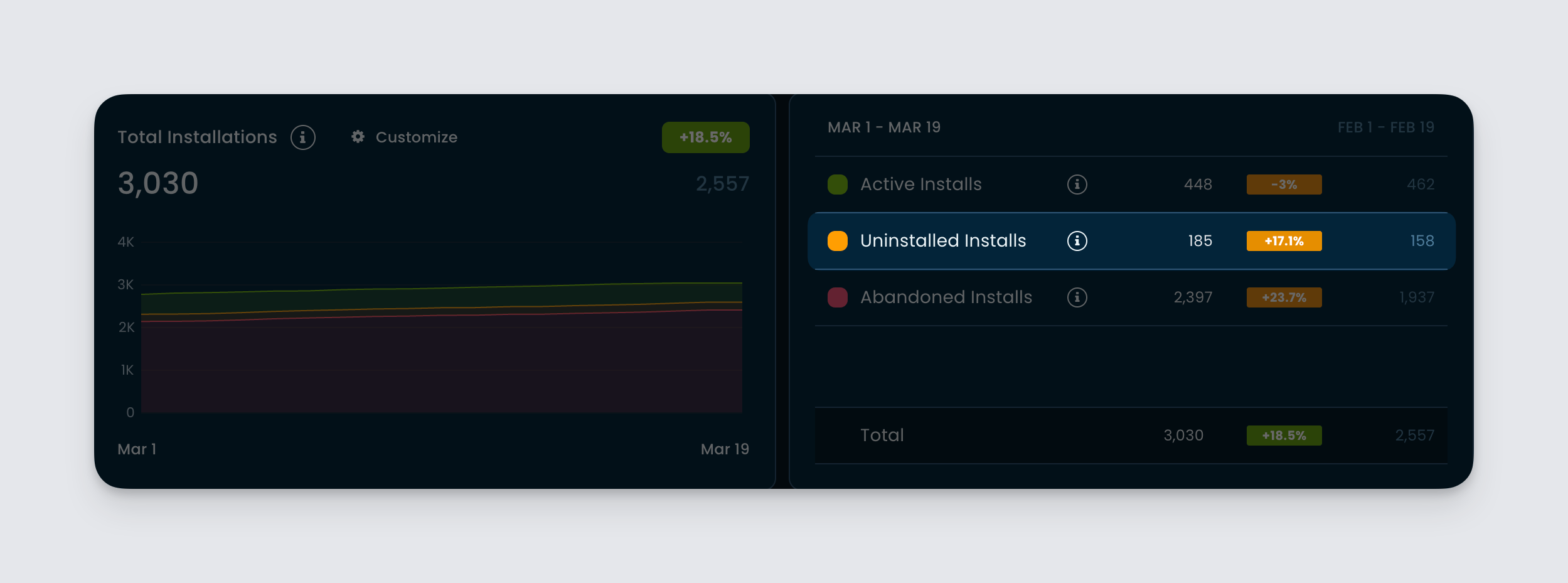
New analytics metrics: Total Installs

We’re pleased to announce the immediate availability of a new metric in your Developer Dashboard.

Total Installs (Audience Analytics)

Previously, we relied on the ‘Activations’ and ‘Deactivations’ events to determine or project the number of active installations or sites a plugin might have. We realized this metric was error-prone because of how the SDK can be used.

Total, active and abandoned installs

We’ve introduced a much better metric to more accurately determine total Active and Abandoned Installs.

Improved lifetime installs cards and statistics

The same metric is now used to accurately determine the ‘Opted In Active Installs’ and ‘All-time Installs’ in the lifetime data section.

Improved GDPR cookie tracking in embedded pricing page

We noticed that when the pricing page is loaded through our WordPress SDK, the cookie consent UI is always being shown, regardless of whether the user has already consented or rejected it.

The issue was rooted in how modern browsers are now treating iFrames and third-party cookies. We have fixed this issue. Additionally, to make it future-proof and more secure, we have implemented the partitioned cookie policy.

Fixed logging of license events for bundle purchases

We noticed an edge case where if a bundle was being manually renewed, the license.extended event of the child licenses was not being logged.

In this deployment, we have fixed the issue. So, in case you are listening to this through a webhook, you will now get the said event for child licenses.

Fixed bug of extending license with deleted plans

We noticed that if a plan was deleted with active subscriptions, the associated license would fail to extend its expiration date when renewals took place.

With today’s deployment, we’ve fixed this issue. However, we still recommend not deleting a plan with active subscriptions.

Hide plans from Freemius Developer Dashboard

If you do not want the plan to appear on the pricing page, consider hiding it.

Fixes to the sales charts in the Developer Dashboard

We noticed that we had two issues with the sales charts in our Developer Dashboard.

Fixed charts showing future data points

If today’s date was selected as the ‘End Date’ with an ‘Hourly’ resolution, then the charts were showing future hours.

Clamping chart dates to current UTC time - Freemius Developer Dashboard

As you can see – after the fix – the charts will show until the current GMT hour from now on.

Fixes in the trial chart

We noticed that we’ve been incorrectly showing ‘Trial cancellation count’ on the ‘Trial cancellation volume’ chart. We’ve fixed this typo.

Trial cancellation charts - Freemius Developer Dashboard

Additionally, we’ve also added the missing ‘Trial cancellation count’ chart to the page.

Improvements to the new checkout app and changes in rollout plan

Following feedback from our makers, we’ve made several improvements to the new version of our checkout app.

Fixed sticky footer issue

We noticed that – in some cases – during browser and/or UI resizing, the sticky footer was not properly stuck.

We were able to identify and fix the root cause.

Form font size improvements

We’ve increased the font size from 14px to 16px for better readability and more breathing space.

Form validation and UX improvements

We’ve made several improvements to the form validation, notably:

  1. Clicking on the ‘Review Order’ or ‘Subscribe’ buttons would sometimes not focus the first visible invalid form element. For example, if both the email and credit card fields were empty, clicking on the ‘Review order’ might have focused the credit card field instead of the email field. This has been fixed. The first visible invalid form element will now be focused.
  2. We identified an edge case where the zip code field was incorrectly focused even after entering a valid value. We fixed it.
  3. In sandbox mode, using the autofill button would sometimes not clear some form-validation errors. We have fixed them as well.

Improvements to the country picker

We’ve integrated a custom dropdown with a search capability in the country picker form field. This improves the UX when going through a large list of countries.

Fixing hidden currency bug

We noticed that if the default USD currency was configured as hidden and the checkout was loaded with another currency, then the currency picker in the front end would still show up, and selecting the USD will cause bugs.

We fixed it by not letting the currency picker show up in such cases. Loading the checkout without specifying a currency will still load the hidden USD by default, though. In the future, we will further enhance it to properly load the first visible currency by default instead of always loading the USD.

New licensing unit credit

Following a request from our maker, we’ve implemented credit as a valid licensing unit.

If you’re using Freemius for your SaaS or plugins and need a custom licensing unit, please get in touch with us.

Making the new checkout the default

Due to the holiday season and to give some more time to our makers, we are enabling the new checkout for everyone who isn’t using a custom CSS for the legacy checkout starting 14 January. Please note that you can always use the checkout_style parameter to force-load the style of your choice. You can find more about it here.

Following the timeline of rollout, we plan to make the new checkout default for everyone, starting 1st February. Please read the migration guide and prepare any custom CSS before the date.


Improvements to the events log table

Following our push to improve the table UX of the Developer Dashboard, we’ve made subtle improvements to the events log table.

  1. You will see that hovering on the Type will give you the full text.
  2. You can use the copy button to quickly copy the event type for your custom code.
  3. The Created on column has been made consistent with other tables.
  4. The Trigger will also show the type and have a copy button for copying the user or developer ID.

You will find these improvements wherever the events log table is visible, for example:

  • The Events Log page.
  • Events & Webhooks under the Sites and Users, etc.
Load more