

Customize Transactional Email Content
Freemius sends transactional emails to your customers to keep them informed about their purchases, licenses, and other important updates. These emails include valuable information that is generated dynamically based on the customer's interactions with your products and services.
You also have the ability to add an additional content block to these emails:
- Lifetime purchase email
- New subscription email
- Subscription renewal email
- Trial started email
This content block is useful if you want to share additional information with your customers, for example:
- Custom download links for Apps
- Onboarding instructions for new customers
- Link to your support page or knowledge base
or any other information that you think would be helpful for your customers to have in their transactional emails.
Customizing Email Content
To customize the content of an email, you need to:
- Select the product you want to customize. Configurations are saved per product.
- Navigate to the Emails Page.
- Select the Customization Tab.
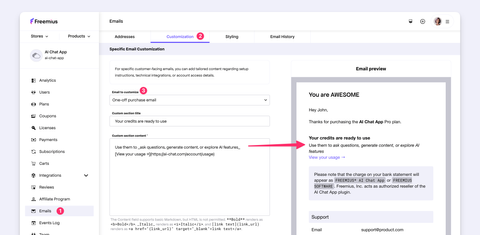
- Select the desired template by clicking the Email to customize dropdown.
- Enter the content of the custom section and optionally enter a title.
After completing these steps, the preview on the right side of the page will display how the email will appear to your customers, with the custom content included.
You can make a sandbox purchase to see the email in action in the Email History. To customize colors, fonts, and layout to match your brand, use the Email Styler tool.