

In-dashboard Upgrading in WP Admin
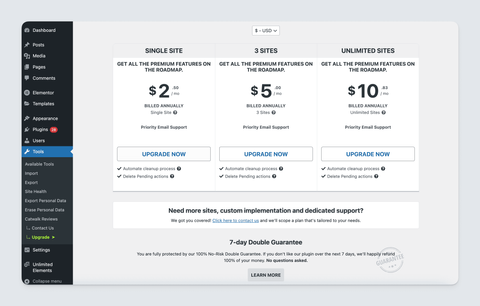
When you integrate Freemius’ WordPress SDK into your plugin or theme, the free version automatically includes a pricing table and a purchase button, enabling customers to purchase directly from their WP Admin dashboard. We call this In-Dashboard Upgrading.
The pricing and features on this table automatically sync with what you’ve configured in the Plans section of your Developer Dashboard, keeping everything up-to-date and consistent.
Customizing the Pricing Table
If you’d like to hide a plan from the WP Admin pricing table, you can do so by toggling the Is Hidden switch in the Plans section.
Customizing the Pricing Page
You can customize the appearance of the pricing table displayed in the WP Admin dashboard by modifying the CSS styles. This allows you to match the look and feel of your plugin or theme.
Alternatively, you can create a completely custom pricing page by following the steps outlined in our Custom Pricing Page public repo.
Customizing with Hooks
The WordPress SDK provides several hooks that allow you to customize the pricing table and purchase process. You can use these hooks to modify the content, appearance, and behavior of the pricing table to better suit your needs.
- Show pricing besides default monthly setting.
- Override the default Freemius WordPress SDK pricing page url
- Controls the visibility of the pricing link for the product
More hooks and filters can be found under the Filters & Actions Hooks section.