

Customize Email Sender and Reply-To Addresses
Freemius allows developers to customize the sender and reply-to email addresses used in transactional emails sent to customers. These settings can be configured at both the store level and the product level within the Freemius Developer Dashboard.
This guide provides instructions for configuring email settings and invoice details to reflect your brand appropriately.
Customizing Email Addresses
Store-Level Email Settings
When configured at the store level, the custom email addresses will be applied to all products under the selected store by default. Here is how to customize the email addresses:
- Log in to your Freemius Developer Dashboard.
- From the top-left menu, select the relevant Store under the Freemius logo.
- Scroll down in the sidebar and select the Emails panel.
- Fill in the required details for label and email address. The details are automatically saved once you focus out of the field.
Product-Level Email Settings
If you wish to override the store-level settings for a specific product, you can configure email addresses at the product level. Here is how to customize the email addresses:
- Log in to your Freemius Developer Dashboard.
- From the top-left menu, select the relevant Product.
- Scroll down and click on the Emails panel.
- Fill in the required details for label and email address. The details are automatically saved once you focus out of the field.
Make sure you setup DKIM to verify your custom email addresses so as to minimize delivery issues. Otherwise Freemius will fallback to using its own email addresses for sending transactional emails.
Understanding Different Email Configurations
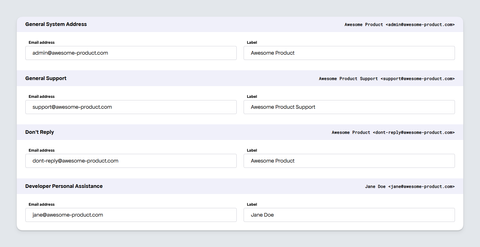
Freemius uses the following configuration for various emails:
General System Address
Primarily used for all commerce-related transactional emails, such as purchase receipts, subscriptions, renewals, license expirations, and similar notifications.
We strongly recommend customizing this email address to reflect your brand.
Don't Reply Address
Used as the reply-to address for transactional (e.g., payments, subscriptions, trials, and licenses) and other system emails where replies are not expected. However, if monitoring customer replies is desired, configure this field with an address that is regularly reviewed.
If you do not set this, your account's email address will be used instead.
Developer Personal Assistance
This email address is used as the sender for specific customer cancellation actions; for example, when a trial is canceled or when a user immediately uninstalls a product.
General Support
Used as the:
- Reply-To address for cart recovery emails sent to customers.
- Recipient of contact form submissions from the Customer Portal.
Fallback Sender Behavior for Transactional Emails
While the above configuration customizes the sender and reply-to addresses, Freemius will apply a fallback to ensure deliverability in the following situations:
- Your domain is not authenticated with DKIM.
- The sender email does not belong to the authenticated domain.
- You are using a common email provider like Gmail or Outlook.
In these cases:
- The sender address will be
[email protected]. - The sender name will be
{{ productTitle }} via Freemius(e.g., "Awesome Product via Freemius"). - The
reply-toaddress will remain the email address configured in the Developer Dashboard.
This fallback ensures reliable delivery of important transactional commerce emails.
You can configure custom addresses and authenticate your domain to avoid this fallback behavior.