

Deployment Process
When the integration and testing process is completed, you're ready to upload your plugin or theme to the Freemius Developer Dashboard.

Deploying Your WordPress Plugin or Theme
First, compress (Zip) the root folder of your product that will be uploaded to the Freemius Developer Dashboard. Now, you can deploy your product by:
- Go to the Deployment page.
- Click the Add New Version button.
- Upload the product ZIP file.
The product code will then be parsed and checked before the final free and premium versions are generated and compressed into production-ready ZIP files.
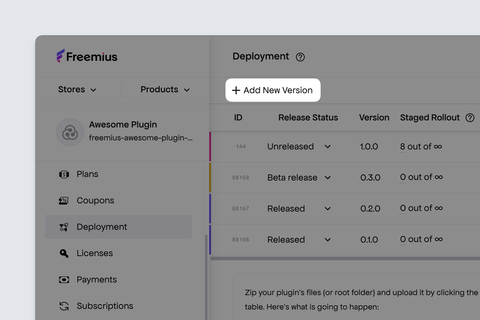
- Finally set the Release Status to Released to make the new version available for download and updates.

For detailed instructions, and tips for automation, see the release management guide.
Free and Premium Version Generation
The deployment process lets you maintain one codebase for both the free (WordPress.org compatible) and premium versions of your Freemium product.
It works by combining the Freemius WordPress SDK markers in your product with the preprocessor that runs from the Freemius Developer Dashboard Deployment page.
The Freemius preprocessor will auto-generate two versions of your plugin/theme:
Premium Version
This is identical to your uploaded version. This includes all the code and will be available for download only for customers with a valid license (paid or trial).
The generated premium version supports licenses with various plans and pricing depending on your plans configuration.
The premium version, along with all future updates, will be served directly to paying customers with an active license (they'll see update notifications via the WP Admin).
Free Version
The same code with all paid features and premium-only code removed.

It's also the version that can be submitted to the WordPress.org repository or distributed on your website.
How the Free Version is Generated
The Freemius WordPress SDK includes:
- Special logic for wrapping premium-only code with special conditional statements for PHP code.
- Special meta tags to define which files and folders should be included in the respective versions.
- Special meta comments for readme.txt files, JavaScript, and CSS that are used as annotations by the preprocessor to understand what should be included in the free and premium versions.
In practical terms, the preprocessor looks for Freemius markers in your codebase and removes those premium-only parts from the generated free version. That can include full files, folders, PHP methods, PHP if blocks, JavaScript blocks, CSS blocks, and paid-only readme.txt content.
In the examples below, the Source / Premium Version tab represents the code you upload to Freemius. The Generated Free Version tab shows what remains after the preprocessor removes premium-only code.
Example: Multiple Paid Plans With Trials
For a plugin with Professional and Business plans, where both plans can be used during a trial, wrap the premium feature in is_plan_or_trial__premium_only(). For example, a booking plugin could make calendar sync available to Professional trials, Professional customers, and higher plans:
- Source / Premium Version
- Generated Free Version
add_action( 'admin_init', 'my_plugin_register_basic_booking_fields' );


if ( my_fs()->is_plan_or_trial__premium_only( 'professional' ) ) {
    add_action( 'admin_init', 'my_plugin_enable_calendar_sync' );
}

if ( my_fs()->is_plan_or_trial__premium_only( 'business', true ) ) {
    add_action( 'admin_menu', 'my_plugin_register_client_reports_page' );
}
add_action( 'admin_init', 'my_plugin_register_basic_booking_fields' );
The premium version keeps the basic booking fields, calendar sync, and client reports code. The free version keeps only the basic booking fields and removes the Professional and Business plan logic.
Example: Exclude Premium Folders And Files
If a feature lives in its own files, mark those files or folders as premium-only in the main plugin file header:
- Source / Premium Version
- Generated Free Version
/**
 * Plugin Name: My Booking Plugin
 * Version:     1.0.0
 *
 * @fs_premium_only /includes/calendar-sync/, /assets/js/calendar-sync.js
 */
my-booking-plugin/
|-- my-booking-plugin.php
|-- includes/
|   |-- booking-form.php
|   |-- calendar-sync/
|   |   |-- class-calendar-sync.php
|   |   `-- providers.php
|   `-- export-bookings__premium_only.php
|-- assets/
|   |-- js/
|   |   |-- booking-form.js
|   |   |-- calendar-sync.js
|   |   `-- revenue-report__premium_only.js
|   `-- css/
|       |-- admin.css
|       `-- revenue-report__premium_only.css
`-- readme.txt
my-booking-plugin/
|-- my-booking-plugin.php
|-- includes/
|   `-- booking-form.php
|-- assets/
|   |-- js/
|   |   `-- booking-form.js
|   `-- css/
|       `-- admin.css
`-- readme.txt
In this example, the /includes/calendar-sync/ folder and /assets/js/calendar-sync.js file are removed because of @fs_premium_only. The export-bookings__premium_only.php, revenue-report__premium_only.js, and revenue-report__premium_only.css files are removed because of the __premium_only file suffix.
Example: Exclude PHP Methods
To mark a method as premium-only, add the __premium_only suffix to the method name and wrap the call to it in premium-only logic:
- Source / Premium Version
- Generated Free Version
class My_Booking_Plugin {
    public function init() {
        $this->register_booking_form();

        if ( my_fs()->is_plan_or_trial__premium_only( 'professional' ) ) {
            $this->register_calendar_sync__premium_only();
        }
    }

    private function register_booking_form() {
        add_shortcode( 'my_booking_form', array( $this, 'render_booking_form' ) );
    }

    private function register_calendar_sync__premium_only() {
        add_action( 'admin_post_my_plugin_sync_calendar', array( $this, 'sync_calendar' ) );
    }
}
class My_Booking_Plugin {
    public function init() {
        $this->register_booking_form();
    }

    private function register_booking_form() {
        add_shortcode( 'my_booking_form', array( $this, 'render_booking_form' ) );
    }
}
The free version keeps the booking form method and removes the premium-only if block and register_calendar_sync__premium_only() method.
Example: Exclude JavaScript Code
If only part of a JavaScript file is premium-only, wrap that part with Freemius meta comments:
- Source / Premium Version
- Generated Free Version
(function ($) {
  $('.my-plugin-basic-filter').on('change', refreshBookings);

  /*! <fs_premium_only> */
  $('.my-plugin-calendar-sync').on('click', syncCalendar);
  /*! </fs_premium_only> */
})(jQuery);
(function ($) {
  $('.my-plugin-basic-filter').on('change', refreshBookings);
})(jQuery);
The generated free version keeps the basic filter behavior and removes the calendar sync JavaScript.
Example: Exclude Paid-Only readme.txt Content
You can also keep one readme.txt while showing different content in the free and premium packages:
- Source / Premium Version
- Generated Free Version
== Description ==

Accept booking requests from your website.

== Changelog ==

= 1.2.0 =
[//]: # fs_premium_only_begin
* New: Calendar sync for Professional and Business plans.
[//]: # fs_premium_only_end
* Improved: Booking form compatibility fixes.
== Description ==

Accept booking requests from your website.

== Changelog ==

= 1.2.0 =
* Improved: Booking form compatibility fixes.
For all of these examples, the paid package keeps the premium-only code and content. The free package removes it during deployment.
To learn the complete licensing and code-stripping workflow, including all supported methods and common edge cases, see the Software Licensing guide.
Distributing The Free Version On WordPress.org
Ensure that your product has a "Free" plan. If you haven't defined a "Free" plan, only the premium version will be generated when you deploy your product.
If you plan to distribute your free plugin through WordPress.org, use the generated free version from the Freemius Developer Dashboard. This is the package where the preprocessor has removed the premium-only PHP blocks, files, folders, JavaScript, CSS, and readme.txt content marked in your codebase.
After deployment, download the free ZIP and commit its contents to the WordPress.org SVN repository as you normally would for a release. Freemius prepares the WordPress.org-compatible package, but it does not publish it to WordPress.org for you.
Once the free version is published on WordPress.org, free users receive updates from WordPress.org. The premium version and its updates continue to be distributed by Freemius only to customers with a valid license or trial.
This separation keeps premium functionality out of the free WordPress.org package, in line with WordPress.org guidelines. For more details about update distribution, see Free Version Updates.
Troubleshooting Issues
Whenever you encounter deployment issues, our Developer Dashboard provides a detailed error message and a link to our documentation to help you troubleshoot. Below are some common issues you may encounter during deployment and how to resolve them.
Corrupted ZIP Files
Please ensure that you've created the ZIP file using a supported method as outlined in the ZIP File Creation guide.
Missing readme.txt File
Freemius requires a readme.txt file in the root of your plugin/theme ZIP. It is used to extract the product description and other metadata displayed during automatic updates.
Create a readme.txt file in the same manner as you would for a WordPress.org plugin/theme, following the WordPress.org guidelines. You can also use a tool like Plugin Readme Generator.
uninstall.php File
When deploying a plugin with Freemius, you cannot include an uninstall.php file. Freemius tracks the uninstall event, and due to a WordPress limitation, if this file is present, uninstall data, including feedback from the user, will not be sent.
To resolve this, move the logic from uninstall.php into a function and delete the file. Hook the function to the Freemius uninstall action, which executes after the uninstall event is reported to the server:
function my_uninstall_cleanup() {
    // Clean up logic goes here, for example:
    delete_option( "my_plugin_option" );
}
// Not like register_uninstall_hook(), you do NOT have to use a static function.
my_fs()->add_action( "after_uninstall", "my_uninstall_cleanup" );
Missing WordPress SDK
Our deployment system requires the WordPress SDK to be included in your plugin or theme. Ensure that you have integrated the SDK correctly by following our WordPress SDK integration guide.
If you have a reason not to include the WordPress SDK, please contact our support team to discuss your specific use case and explore possible solutions.
Advanced Usage
The following advanced usage scenarios are supported by the Freemius deployment system:
- Semantic Versioning: Use semantic versioning to manage your product versions and releases.
- Staged Rollouts: Gradually release new versions to a subset of users before a full rollout.
- Incremental Updates: Deploy updates incrementally to minimize disruption and ensure a smooth user experience.
- Beta Releases: Release beta versions to a select group of users for testing and feedback before the official release.